18
No.
Item
Operation Way
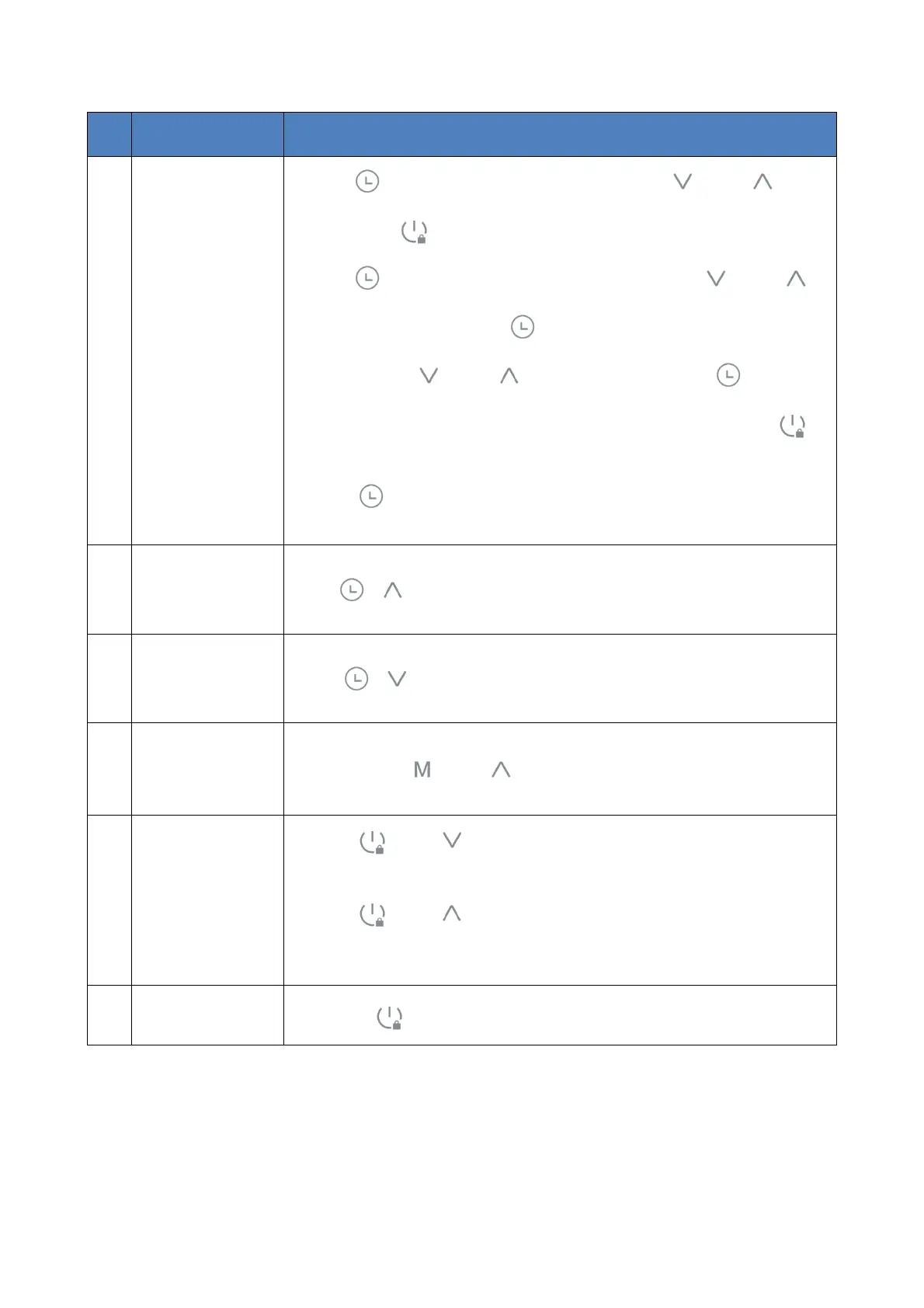
7 Timer
Press" " to enter the timer query interface. With " " and " " to
query. Press" "or no operation in 15s, it will return to main interface .
Press" " to enter the timer on/off set interface. Press " " and " "
to set hour part. Then press " " to confirm and enter the minute part
setting. Press " " and " " to set minute part. Press " " or no
operation in 5s, it will save setting and return to last interface. Press" ",
it will quit the setting and return to main interface .
Press " " for 2s to cancel the timer on/off setting.
8
Recover Factory
Setting
Press" + " for 3s to enter recover factory setting interface.
9 Manual Defrost Press " + " for 3s to enter the manual defrost function.
10
Fahrenheit/ Celsius
Switch
Press and hold " " and " " at the same time to switch °F / °C.
11 WI-FI
Press " " and " " for 2s to enter “EZ Mode” and the WI-FI icon flash
quickly.
Press " " and " " for 2s to enter “AP Mode” and the WI-FI icon flash
slowly.
12 Lock/Unlock Press " " for 3s to lock or unlock.


 To Next Page