Parts Identification
Operator’s Manual, Morbark Integrated Control System—Model 20 Chipper
8
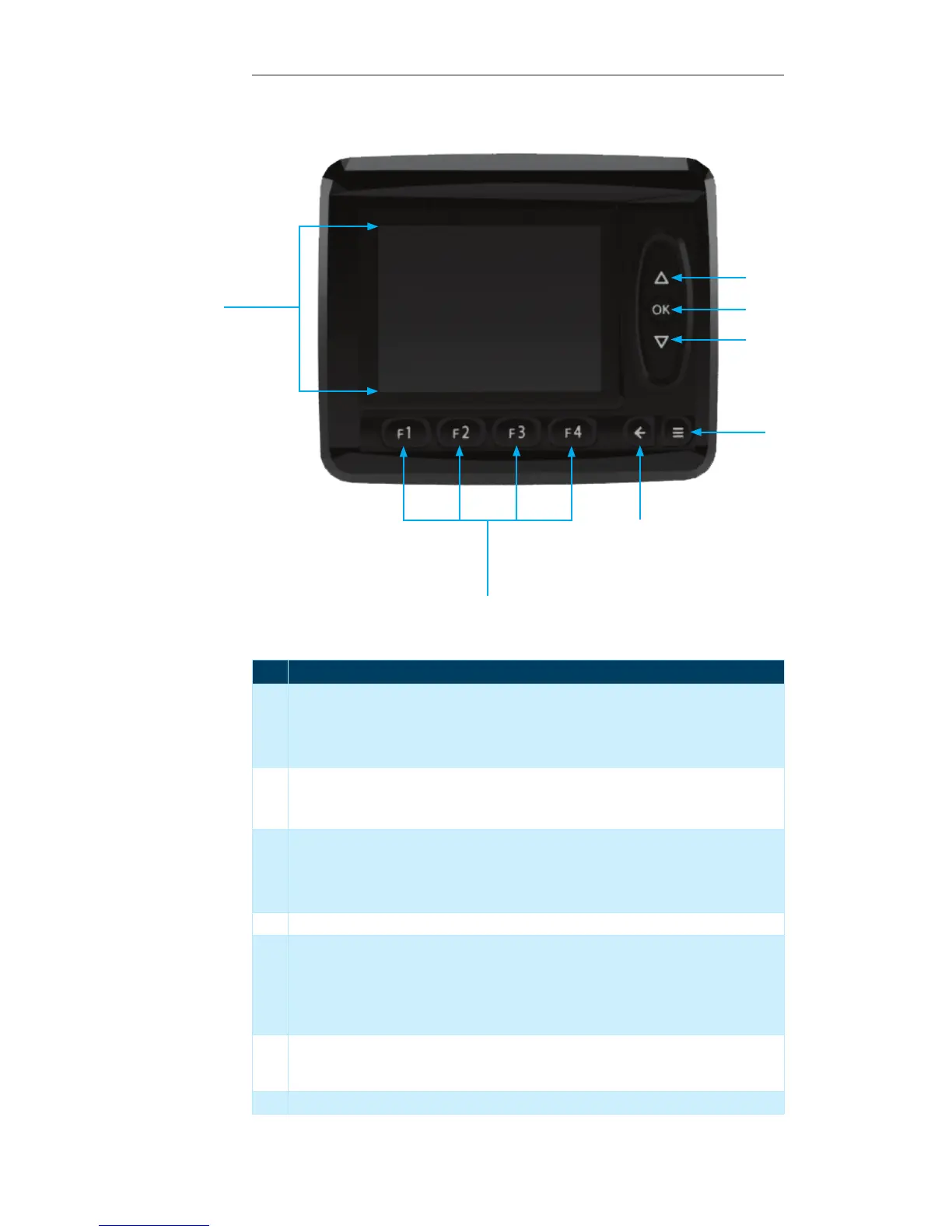
Display Module Parts Identication
No. Description
1 “Up” button — This button is used to navigate through the following:
Display Pages•
Menus•
Lists (i.e. selecting “Grinding Mode” or other adjustable parameters)•
2 “OK” button — This button is used as follows:
To navigate to the “Main Page” from any “Display Page”•
To confirm a selection within an adjustable screen (i.e. to set the “Grinding Mode”)•
3 “Down” button — This button is used to navigate through the following:
Display Pages•
Menus•
Lists (i.e. selecting “Grinding Mode” or other adjustable parameters)•
4 “Menu” button — This button is used to access the “System Menu”. It can be used at any time.
5 “Escape button — This button can be used as follows:
To cancel a selection•
Navigate to the “Main Page” from within any “Display Page” •
Escape from the “System Menu” to the “Display Page” that was being viewed prior to enter-•
ing the “System Menu”
6 “Function” buttons — These buttons can be used from within any page in the system. Their
functionality is dependant on the page that is currently displayed. A more in-depth descrip-
tion will be given on a per-page basis.
7 Display Screen
1
2
3
4
5
7
6


 To Next Page