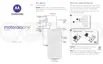
Delete one contact
1.
Open the Contacts app.
2. Touch the person's name.
3.
Touch > Delete and confirm the deletion.
Delete multiple contacts
1.
Open the Contacts app.
2. In your contact list, touch & hold the first contact.
3. Touch the other contacts to delete.
4.
Touch .
Contacts, calls, voicemail : Contacts 125














 To Next Page