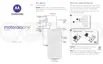
3. Tap App shortcuts.
You'll see a list of supported apps installed on your phone.
4. Select the apps to add.
To use the apps:
1. During a game, open the toolkit and tap the app's icon.
2. Drag the app window where you want it.
3. Use available app features as you normally do. Certain app features may not be available in freeform
mode.
Record or take screenshot during game
1. During a game, open the toolkit.
2.
To record your screen, tap . Learn more.
To take a screenshot, tap .
To adjust viewfinder size, resolution, or to record/disable screen touches, tap Screen record settings.
Use apps 82














 To Next Page