Operation Section
52
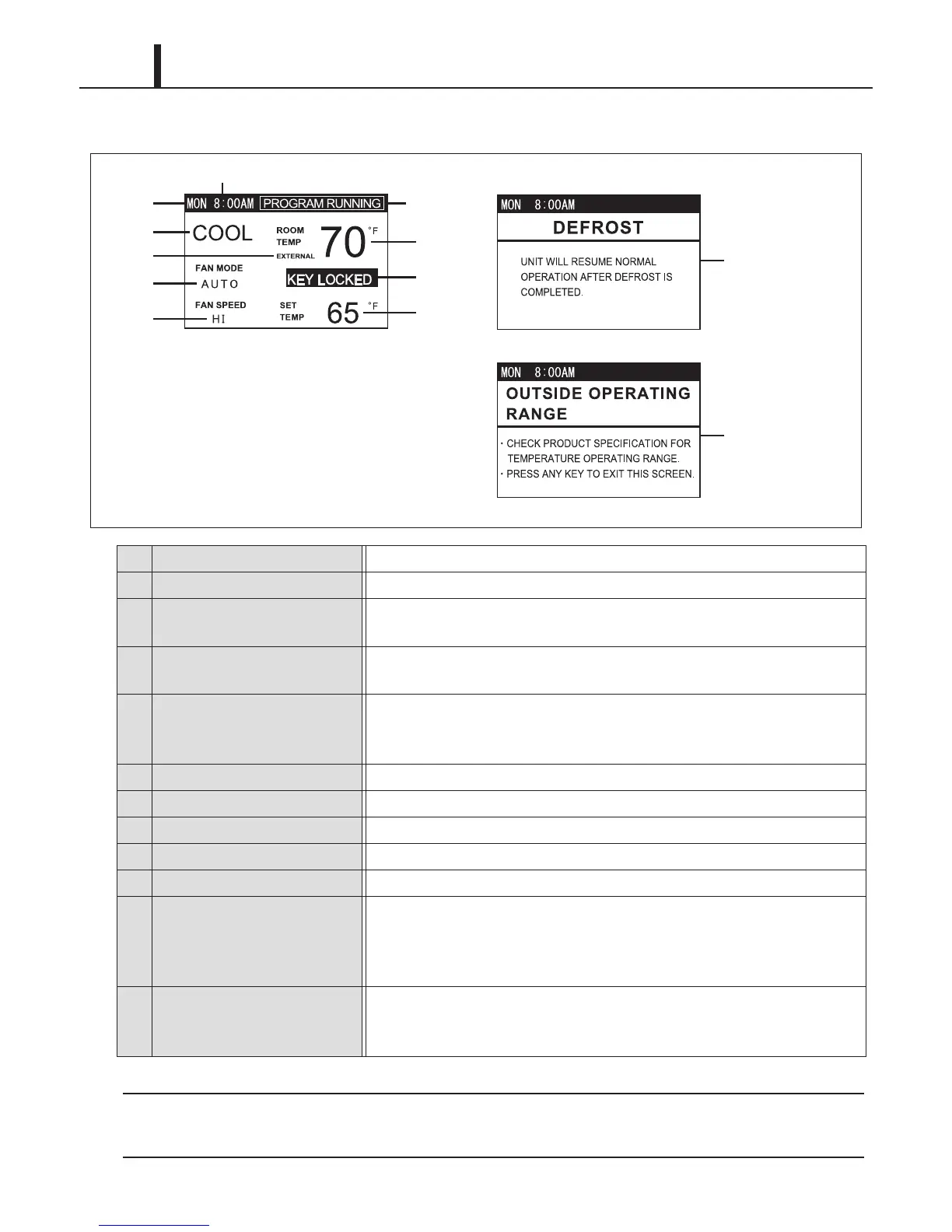
(2) LCD indicators
The unit has been preset at the factory to display the temperature in °F. The temperature scale
can be changed from °F to °C on the control panel under Menu.
1 Day of the week Indicate day of the week.
2 Time of the day Indicate time of the day.
3 Room Temp
Indicate room temperature.
Temperature range: 0 °F ~ 99 °F (0 °C ~ 99 °C)
4 Key Locked
Indicate keypad is locked.
Disable all buttons on the control panel except MENU/ESC button.
5 Set Temp
Indicate set point temperature. "MIN" or "MAX" indicates minimum or maximum value.
Temperature range for COOL mode operation: 65 °F ~ 90 °F (18 °C ~ 32 °C)
Temperature range for HEAT mode operation: 55 °F ~ 80 °F (13 °C ~ 27 °C)
6 Fan Only/Cool/Heat Indicate operating mode.
7 Fan Mode Indicate AUTO or ON.
8 Fan Speed Indicate HI, MID or LO.
9 External Indicate external millivolt or 24VAC thermostat is connected.
10 Program Running Indicate Program is running.
11 Defrost
Indicate defrost operation during heating.
When the ambient temperature is low, the unit automatically stops and starts
defrosting operation for maximum 15 minutes ("DEFROST" is displayed).
The unit returns to heating operation after defrosting operation is completed.
12 Outside Operating Range
Indicate the unit is used outside of the operating condition range.
When the ambient temperature falls outside the operating condition range,
the unit automatically stops and displays this notification.
ILL00781-00
12
lLL00779-00
1
6
9
7
8
10
3
4
5
2
lLL00780-00
11










 To Next Page