Operation Section
53
7.2 Operational Status Display
• The operational status of each functional part can be displayed on the LCD while the unit is
running.
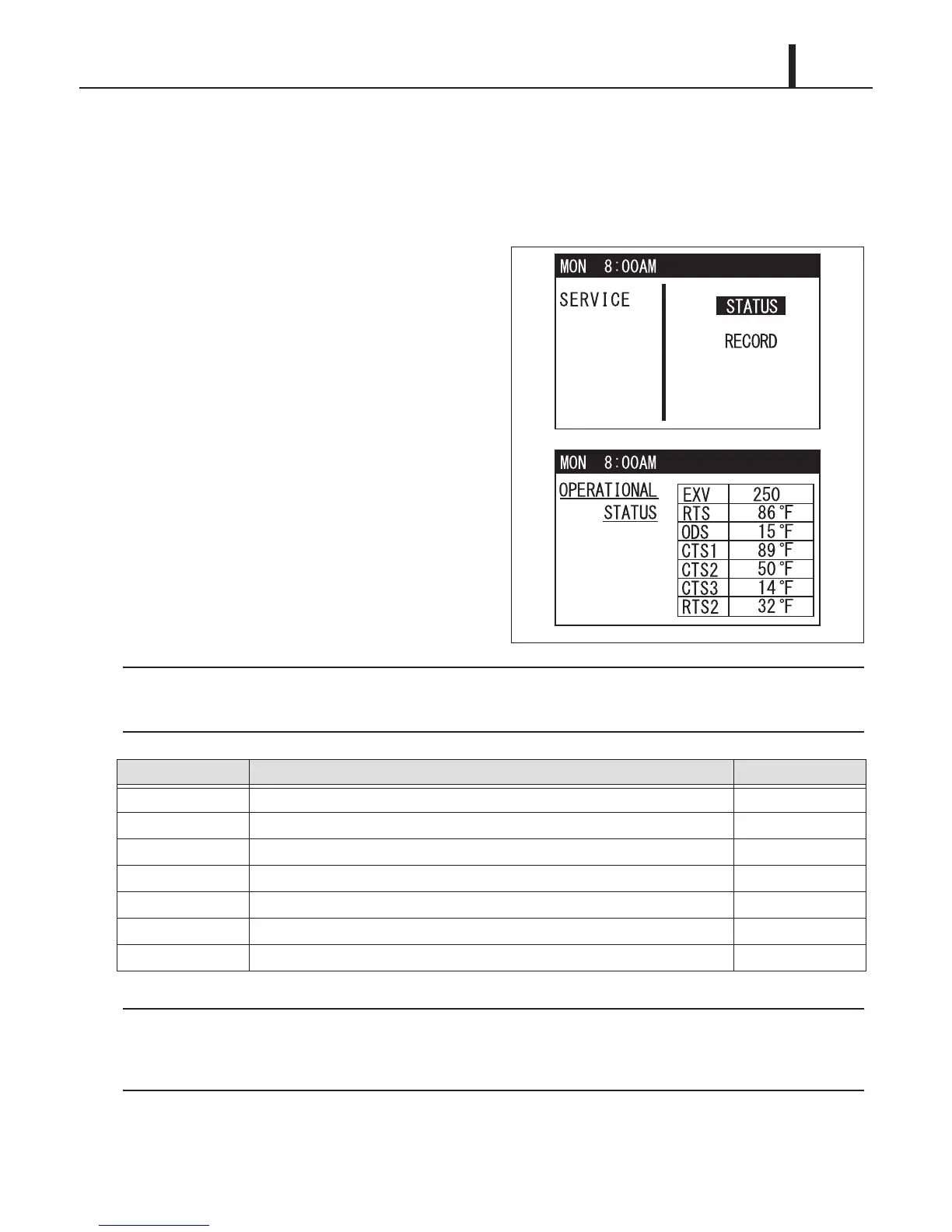
(1) Display method
• Press and hold MENU/ESC and ENTER
buttons for 5 seconds.
• Use FAN+ or -FAN button to select "STATUS",
and press ENTER button to confirm. The
operational status content is displayed.
• If no button is pressed for 1 minute, the LCD automatically displays the previous mode.
• Press Menu/ESC button again to return to the previous screen.
Display unit °F or °C can be changed on the control panel. Press MENU/ESC button, select TEMP.
SCALE by TEMP+ or -TEMP button, and press ENTER button. Select °F or °C, and press ENTER
button to confirm.
(2) Exiting operational status display
• To exit the operational status display, press MENU/ESC button.
Display Code Display Item Display Unit
EXV Electronic expansion valve opening rps
RTS Indoor air inlet thermistor temperature °F/°C
ODS Outdoor air inlet thermistor temperature °F/°C
CTS1 Indoor pipe thermistor temperature °F/°C
CTS2 Compressor pipe thermistor temperature °F/°C
CTS3 Outdoor pipe thermistor temperature °F/°C
RTS2 Not in use. -
ILL00874-00
ILL00875-00










 To Next Page