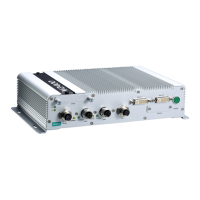
UC-8410A HW UM Appearance and Dimensions
LED Name Status Function
strength as follows:
3 Green: Excellent
2 Green: Good
1 Green: Poor
Note: The wireless LEDs are disabled on the –NW model.
Off No wireless signal or wireless signal failure
Diagnostic Green/Yellow/
Red
Various combinations of the on/off/blinking statuses of the
Green/Yellow/Red LEDs indicate different hardware
statuses. Refer to the Diagnostic LEDs section for details.
Diagnostic LEDs
The descriptions of the statuses indicated by the diagnostic LEDs are listed in the table below:
Priority
Green Yellow Red Status Description
1 On Off Blinking Self-diagnosis in progress
LAN1 Ethernet controller error
3 Blinking Off On LAN2 Ethernet controller error
4 On Off On LAN3 Ethernet controller error
5 Off On On UART interface error—i
ndicates an error in any one of the UART
interfaces
7 Off Blinking On Button device issue
8 On Blinking Blinking Ready for reset to factory default
9 Off On Blinking CPU usage (over 90%)
10 Off On Off RAM usage (over 90%)
11 Blinking On Off Disk usage (over 90%)
12 Blinking On Blinking File system corrupted
Reset Button
The Reset button returns the UC-8410A to its factory default configuration and also performs the system
diagnostic function. Please check the table below for details:
Self-diagnosis The Red LED will start blinking once you press the Reset button. Keep the
button pressed until the Green LED lights up
for the first time and then release
the button to enter the diagnostic mode. Refer to the Diagnostic LEDs section for
details.
Resetting the computer to
the factory default
configuration
The Red LED will start blinking once you press the Reset button. Keep the
button pressed until the green LED lights up for the second time and then
release the button to enter the process
of resetting the computer to the factory
default.
We recommend that you only use this function if the software is not working properly and you want to load the
factory default settings. To reset an embedded system, always use the software reboot command />reboot
to protect the integrity of data being transmitted or processed.


 To Next Page