Need help?
Do you have a question about the Moza NANO SE and is the answer not in the manual?
Legal statement regarding product use responsibility and terms acceptance.
Crucial safety instructions covering liquid exposure, fire, temperature limits, and product handling.
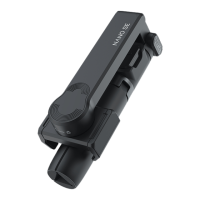
Visual guide identifying key external components of the Mini MX gimbal.
Guide to downloading and installing the MOZA Genie App, including system requirements.
Accessing video tutorials and contact information for technical support.
Essential notes on initial charging, phone installation, battery maintenance, and protection from damage.
Important points regarding phone installation, axis rotation limits, and device status before operation.
Detailed explanation of the power button's operations for power and sleep modes.
Functions of the remote control buttons for app or native camera interaction.
Explains indicator lights for remote controller, Bluetooth status, and battery level.
Information on firmware upgrade mode and the USB-C charging port.
Guidance on adjusting the gimbal's tilt axis angle and tightening the knob.
How to enter and exit the NANO SE's sleep mode.
Explanation and switching between Lock and Follow modes for gimbal behavior.
Steps to pair the NANO SE with the MOZA Genie App via Bluetooth.
Pairing the NANO SE with a phone to control the native camera.
Procedure to reset the NANO SE's Bluetooth connection for troubleshooting.
Detailed overview of icons and features within the MOZA Genie App interface.
Step-by-step guide to update the NANO SE firmware through the MOZA Genie App.
Important considerations and troubleshooting for the firmware update process.
Instructions on how to properly fold and store the NANO SE after use.
Steps to re-pair the remote controller if it loses connection with the NANO SE.
Guidance on addressing issues indicated by battery light flashes, like weak motor performance.
Instructions for registering the NANO SE via the MOZA Genie App.
Troubleshooting steps for problems receiving or verifying the product registration code.
A comprehensive list of technical specifications for the NANO SE gimbal.
Details on warranty coverage and specific conditions that may void the warranty.
Identification of importer and compliance statements with relevant EU directives.
Guidelines for the correct disposal of the NANO SE as electronic waste.
 General
| Bluetooth | Yes |
|---|---|
| Weight | 250 g |
| Battery Life | 10 hours |
| Charging Time | 2.5 hours |
| Stabilization | 3-Axis |
| Foldable Design | Yes |
| Material | Aluminum Alloy |
| Battery Type | Lithium-ion |
| Compatibility | Smartphones |
| Control Range | 10m |
| Payload Capacity | 280g |
| App Control | Yes (via Moza Genie App) |
| Extended Length | 69 cm |

 To Next Page