17
Operation
GB
(4) The charger must be disconnected for the device to operate.
(5) During periods of non-use, the charger may remain connected to the
device.
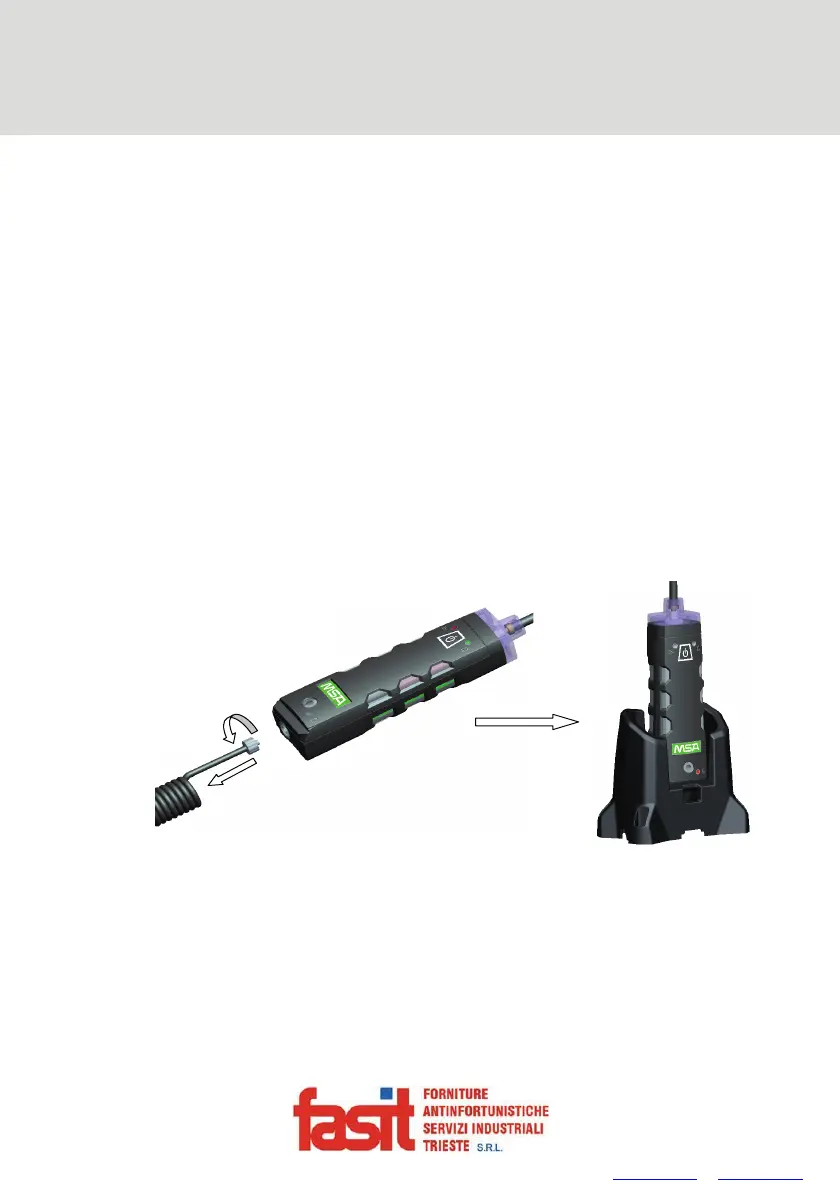
To Charge Device using Charging Cradle Accessory
(1) Rotate the coiled tubing connector counter-clockwise and pull.
(2) Firmly insert the device into the ALTAIR Pump Probe 4/4X charging cradle.
(3) The Charge LED is used to indicate the charge status.
Red = Charging
Green = Charged
Orange = Fault
(4) If a problem is detected during charging [Charge LED turns Orange]:
Remove the device from the charger cradle momentarilty to reset the
charge cycle.
(5) The charger must be disconnected for the device to operate.
(6) During periods of non-use, the charger may remain connected to the
device.
Fig. 2 Charging Device in Charing Cradle
FASIT Srl - Via Orsera 13/b - 34145 TRIESTE - ITALY - Tel +39 040 825604 - www.fasit.it - info@fasit.it



 To Next Page