The top 3 pin port will always be R1, unless it’s a LonWorks ProtoNode in which case the port designation is LonWorks (and
the port is 2 pins). The bottom 6 pin port will be R2.
NOTE:The 6 pin port can be RS-232, RS-485, M-Bus or KNX (and we use the left 3 pins for this as currently
shown).
4.2 Device Connections to ProtoNode
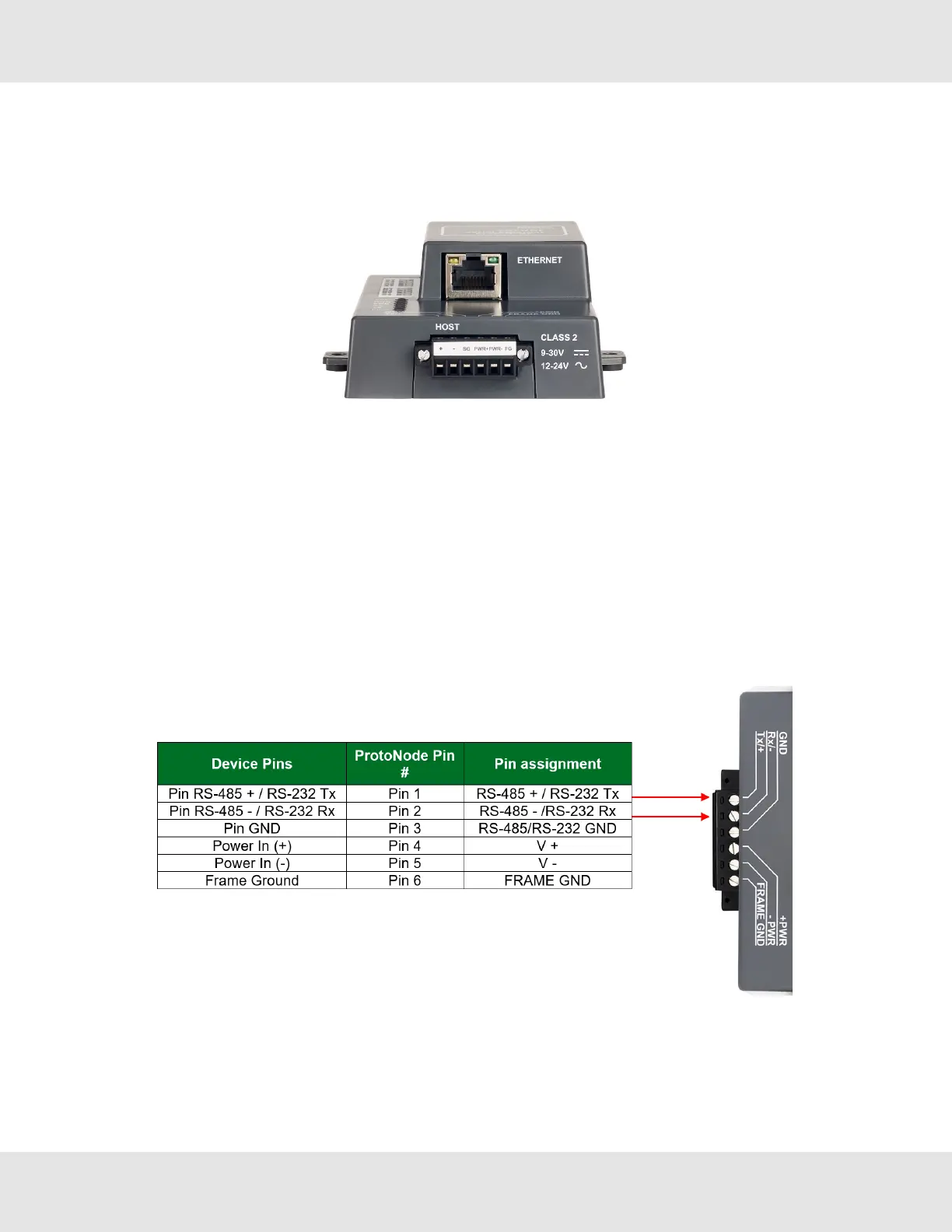
ProtoNode 6 Pin Phoenix connector for Devices
• The 6 pin Phoenix connector type is the same for each pair of ProtoNode units.
◦ For example the FPC-N34 (BACnet) and FPC-N35 (LonWorks) both use RS-485 for the 6 Pin Phoenix connector
• Pins 1 through 3 are for the model specific device connections (FPC-N34 example shown below; for other units check
the Interface Connections Table in Section 11.7 Specifications).
◦ The GND (Pin 3) is not typically connected
• Pins 4 through 6 are for power. Do not connect power until Section 5 Power up the ProtoNode.
4.2.1 RS-485 / RS-232
13 ProtoNode Start-up Guide



 To Next Page