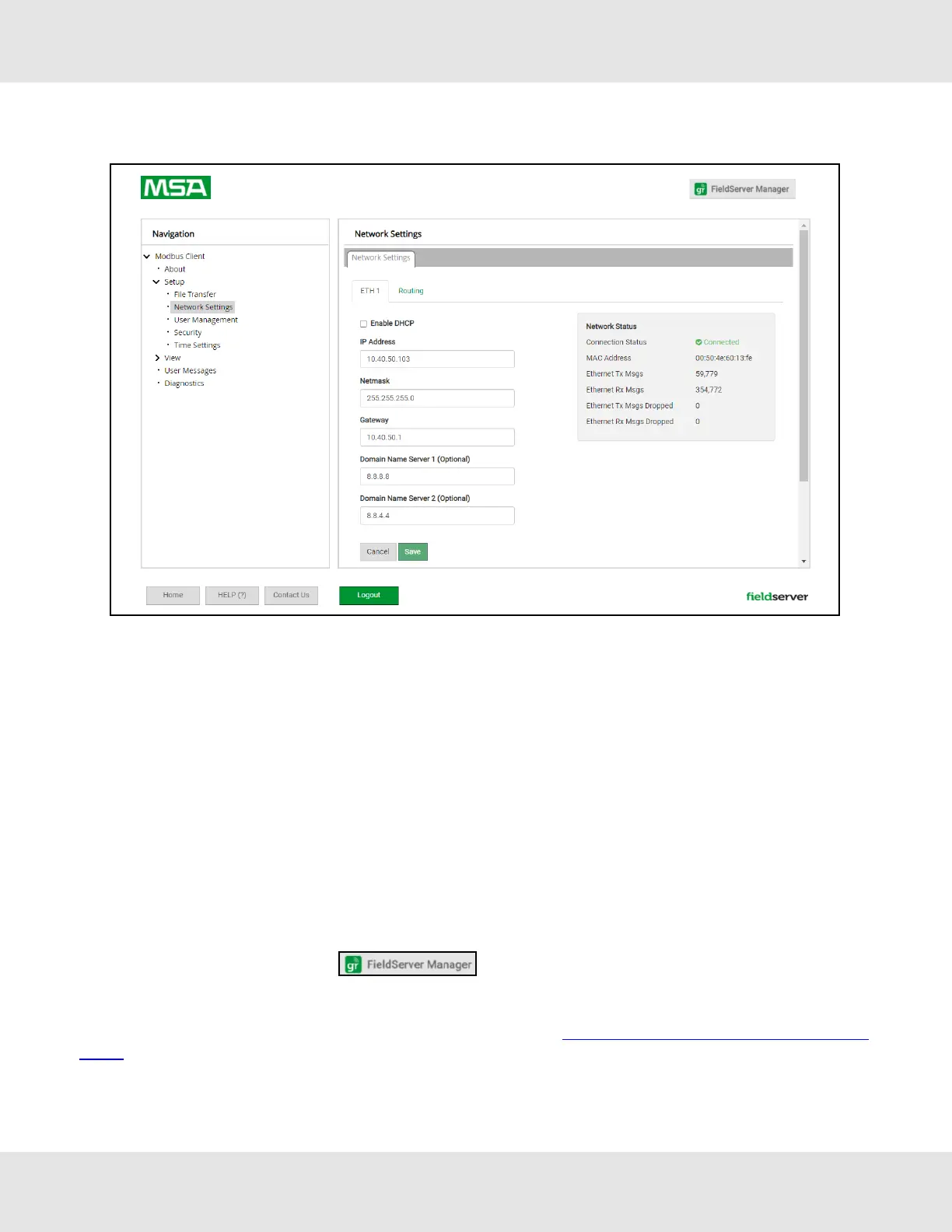
• From the Web GUI’s landing page, click on “Setup” to expand the navigation tree and then select “Network Settings”
to access the IP Settings menu.
• Enable DHCP to automatically assign IP Settings or modify the IP Settings manually as needed, via these fields: IP
Address, Netmask, Gateway, and Domain Name Server1/2.
NOTE:If connected to a router, set the Gateway to the same IP Address as the router.
• Click Save to record and activate the new IP Address.
• Connect the FieldServer to the local network or router.
NOTE:If the webpage was open in a browser, the browser will need to be pointed to the new IP Address of the
FieldServer before the webpage will be accessible again.
• Unplug Ethernet cable from PC and connect it to the network switch or router.
• Record the IP Address assigned to the ProtoNode for future reference.
NOTE:For Router settings go to Section 11.6 Routing Settings.
8.1.1 Accessing the FieldServer Manager
NOTE:The FieldServer Manager tab (see image above) allows users to connect to the Grid,
MSA Safety’s device cloud solution for IIoT. The FieldServer Manager enables secure remote connection to
field devices through a FieldServer and its local applications for configuration, management, maintenance.
For more information about the FieldServer Manager, refer to the MSA Grid - FieldServer Manager Start-up
Guide.
25 ProtoNode Start-up Guide


 To Next Page