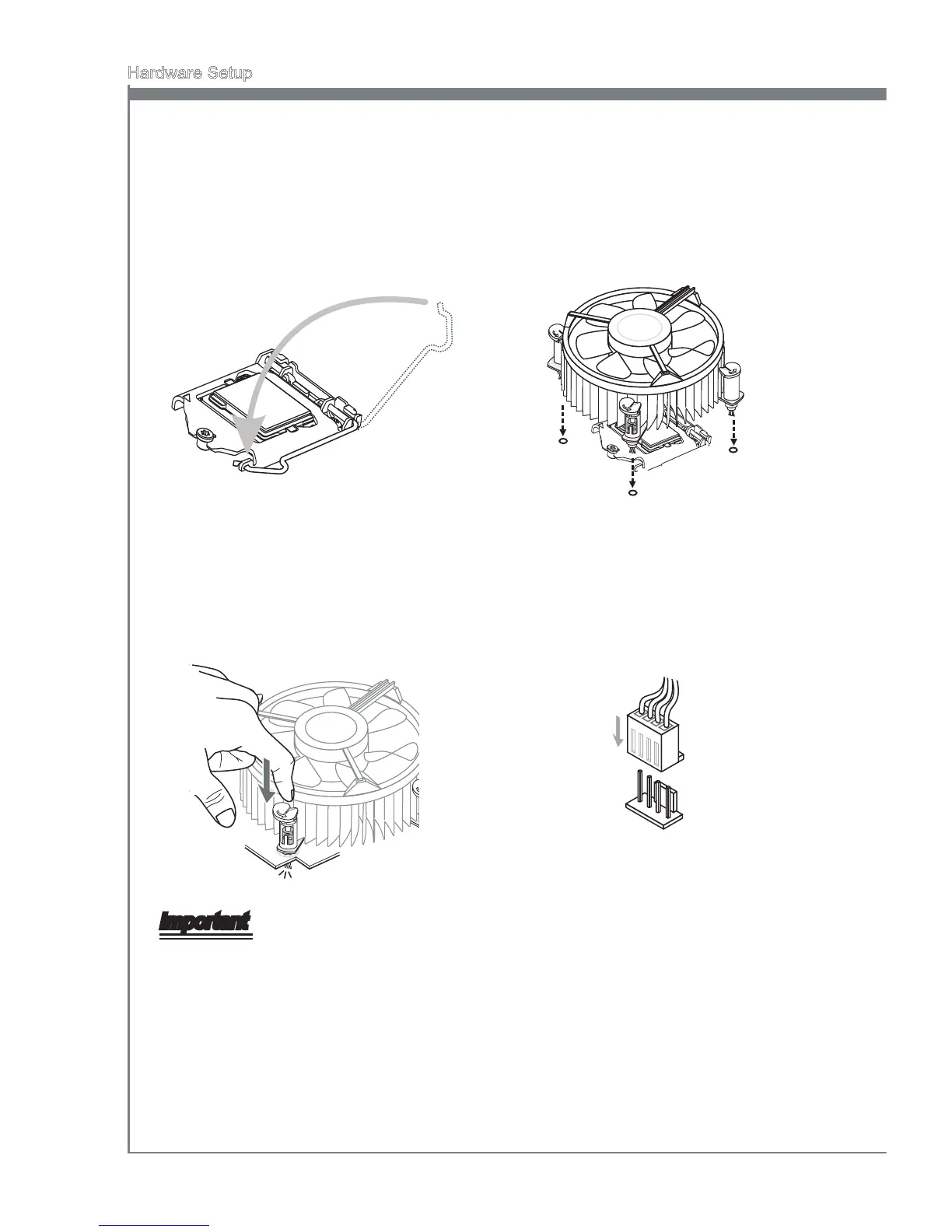
Secure the lever near the hook end
under the retenton tab.
5. Make sure the four hooks are n proper
poston before you nstall the cooler.
Algn the holes on the manboard
wth the cooler. Push down the cooler
untl ts four clps get wedged nto the
holes of the manboard.
6.
Press the four hooks down to fasten
the cooler. Turn over the manboard
to conrm that the clp-ends are
correctly nserted.
7. Fnally, attach the CPU Fan cable
to the CPU fan connector on the
manboard.
8.
Important
Conrm f your CPU cooler s rmly nstalled before turnng on your system.
Do not touch the CPU socket pns to avod damagng.
Whenever CPU s not nstalled, always protect your CPU socket pn wth the plastc
cap covered to avod damagng.
Please refer to the documentaton n the CPU cooler package for more detals about
the CPU cooler nstallaton.
Read the CPU status n BIOS.
•
•
•
•
•



 To Next Page