Then the followng screen appears to ndcate that the creaton s nshed.7.
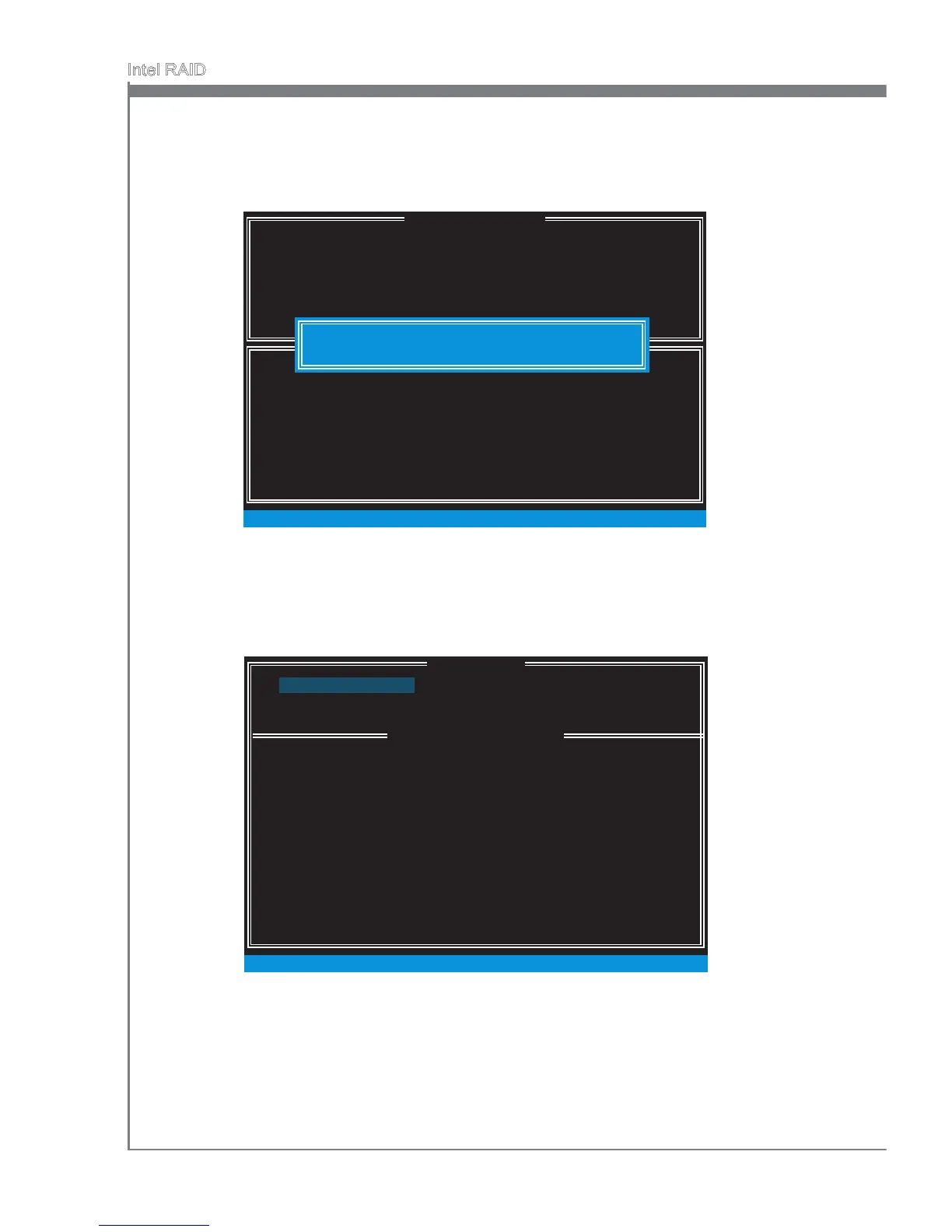
Go to the Create Volume eld and press <Enter>, the followng screen appears for
you to conrm f you are sure to create the RAID volume. Press <Y> to contnue.
6.
[ ]
CREATE VOLUME MENU
[ ]
HELP
Name :
Press ENTER to create the speced volume.
[ ↑↓] - Change [TAB] - Next [ESC] - Prevous Menu [ENTER] - Select
RAID Level :
Dsks :
Strp Sze :
Capacty :
Sync :
Volume0
RAID1(Mrror)
Select Dsks
N / A
XXX.X GB
N / A
Create Volume
WARNING : ALL DATA ON SELECTED DISKS WILL BE LOST.
Are you sure you want to create ths volume? (Y / N) :
DISK / VOLUME INFORMATION
[ ]
3. Reset Dsks to Non-RAID
4. Recovery Volume Optons
5. Ext
RAID Volumes :
ID Name Level Strp Sze Status Bootable
0 Volume0 RAID1(Mrror) N / A XXX.XGB
Normal Yes
Physcal Devces :
Port Devce Model Seral # Sze Type/Status (Vol ID)
1 XXXX-XXXXXXXX XXXXXXXXXXXXXX XXX.XGB Member Dsk(0)
2 XXXX-XXXXXXXX XXXXXXXXXXXXXX XXX.XGB Member Dsk(0)
[ ↑↓] - Select [ESC] - Ext [ENTER] - Select Menu
1. Create RAID Volume
2. Delete RAID Volume
MAIN MENU
[ ]
[ ]
MAIN MENU




 To Next Page