11
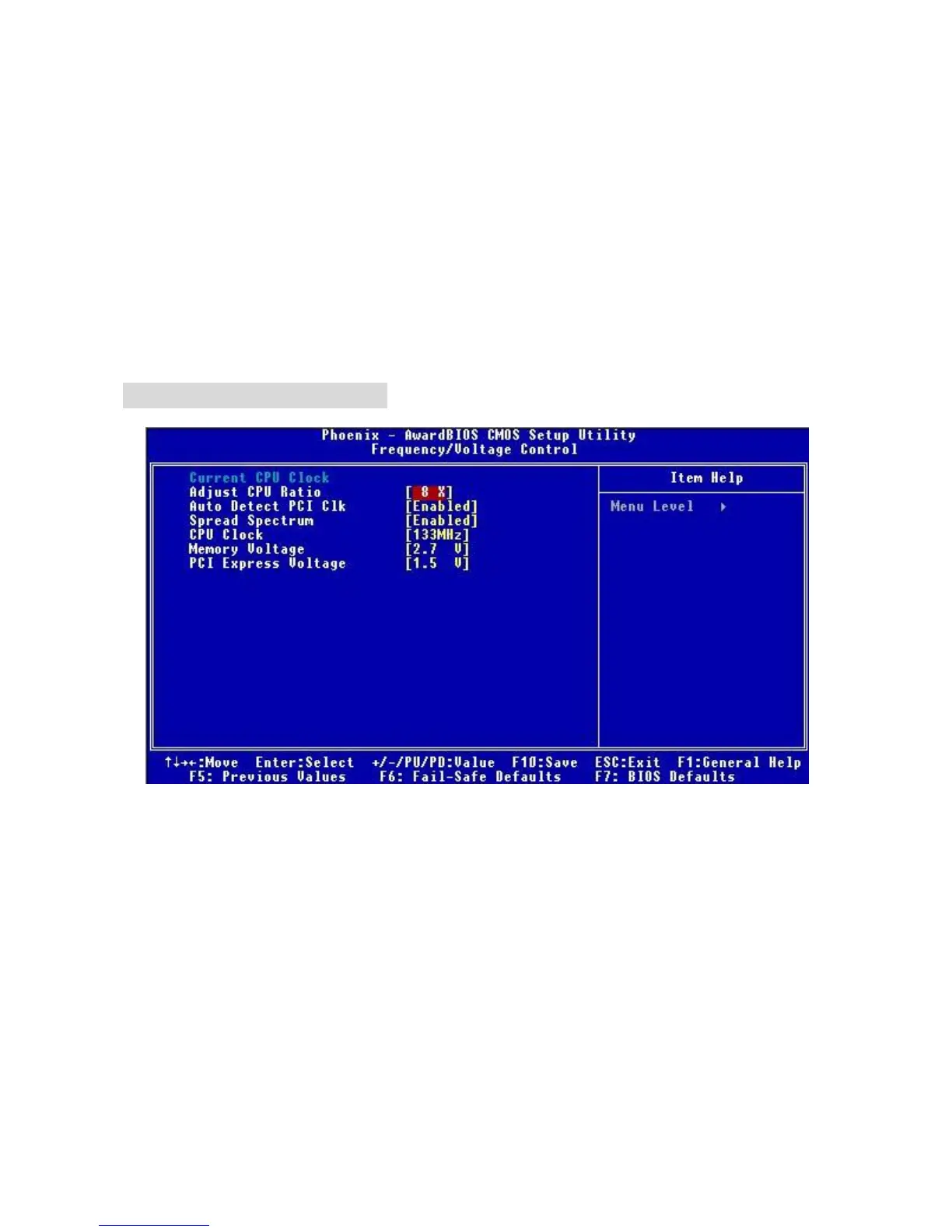
Frequency/Voltage Control
Use this menu to specify your settings for frequency/voltage control.
Load BIOS Defaults
Use this menu to load the optimized default settings into the BIOS for the best system
performance operations.
Set Password
Use this menu to set the password.
Save & Exit Setup
Save changes to CMOS and exit setup.
Exit Without Saving
Abandon all changes and exit setup.
Frequency/Voltage Control
Adjust CPU Ratio
This item allows you to adjust the CPU ratio. If the CPU is locked, you will not be able to adjust
the CPU Ration.
Auto Detect PCI Clk
This item is used to auto detect the PCI slots. When set to [Enabled], the system will remove
(turn off) clocks from empty PCI slots to minimize the electromagnetic interference (EMI).
Settings: [Enabled], [Disabled].
Spread Spectrum
When the motherboard’s clock generator pulses, the extreme values (spikes) of the pulses
creates EMI (Electromagnetic Interference). The Spread Spectrum function reduces the EMI
generated by modulating the pulses so that the spikes of the pulses are reduced to flatter curves.
If you do not have any EMI problem, leave the setting at [Disabled] for optimal system stability


 To Next Page