18
Storage
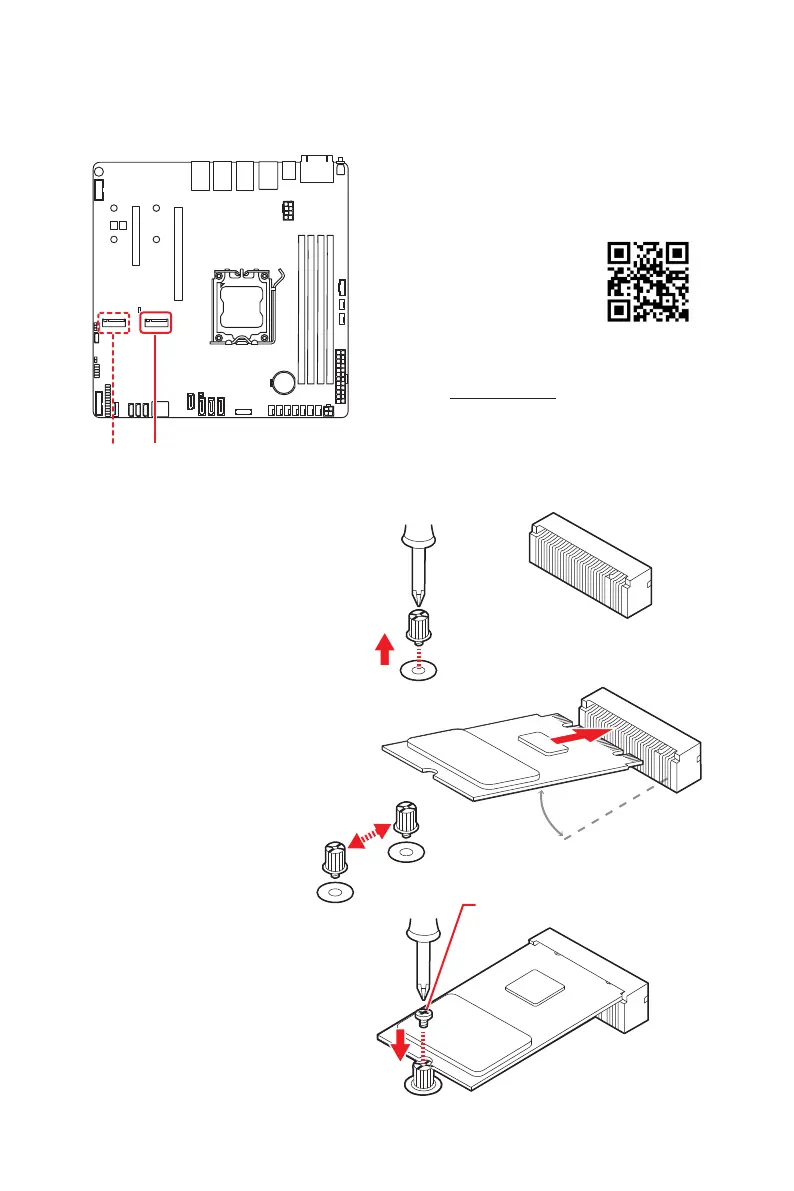
M2_1~2: M.2 Slots (M Key, PCIe 4.0, 22110/ 2280)
Please install the M.2 solid-state drive (SSD) into the M.2 slot as shown below.
M2_1* M2_2
Installing M.2 SSD
2. Set the M.2 riser screw at
the appropriate location
based on the length of
your M.2 SSD.
3. Insert your M.2 SSD
into the M.2 slot at a
30-degree angle.
4. Secure the M.2 SSD in
place with the supplied
M.2 screw.
1. Loosen the M.2
riser screw from the
motherboard.
30°
Supplied M.2 screw
⚽
Video Demonstration
Watch the video to learn how to
Install M.2 SSD.
*M2_1: The M2_1 and PCIE_2 slots
cannot operate simultaneously. You
can use the JSEL_M1 jumper to
select which one to enable.



 To Next Page