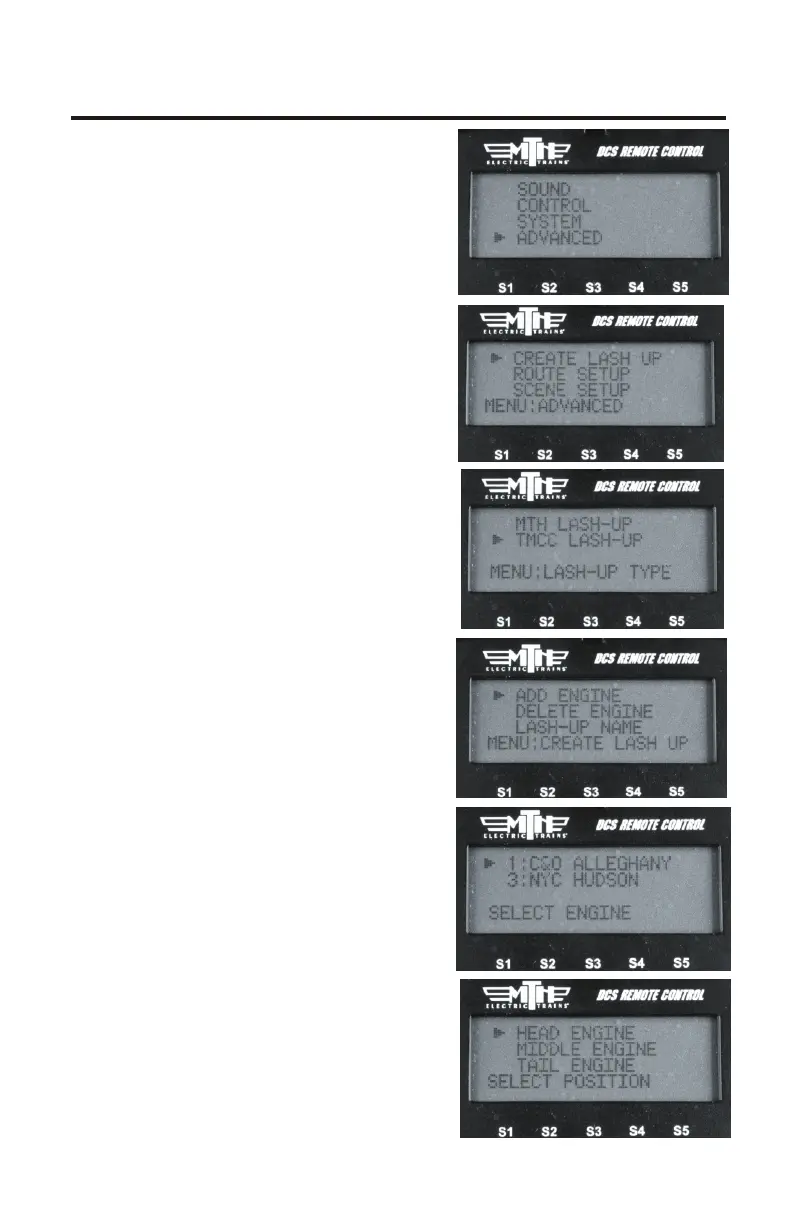
Create TMCC Lash-up
Select an individual engine in a lash-
up, change its settings (lighting,
sounds, or smoke, for example), and
those changes will be retained when
you go back to controlling the lash-
up.
1. Ensure the engines you wish to
add to the Lash-up are in the
ACTIVE LIST on the Remote
2. Ensure the TMCC Command Base
is powered on, connected to the TIU
you use to talk to TMCC engines,
and connected to the outer rail of
your track from the “U” post on the
Command Base
3. Apply track power
4. Press MENU
5. Select ADVANCED
6. Select CREATE LASH-UP
7. Select TMCC LASH-UP
8. Select ADD ENGINE
9.Scroll through your engine list to
grab the engine you want to place
into the lash-up
10. Select HEAD, MIDDLE, or
TAIL depending upon which engine
you want to add first. It's easiest to
start with the Head engine and then
work your way to the Tail engine
10
Improved TMCC® Control



 To Next Page