Page 29 MTI Part Number 7001-0040
Revision 3.1 August 7, 2014
TOOLS Menu – Calibration Wizard Continued
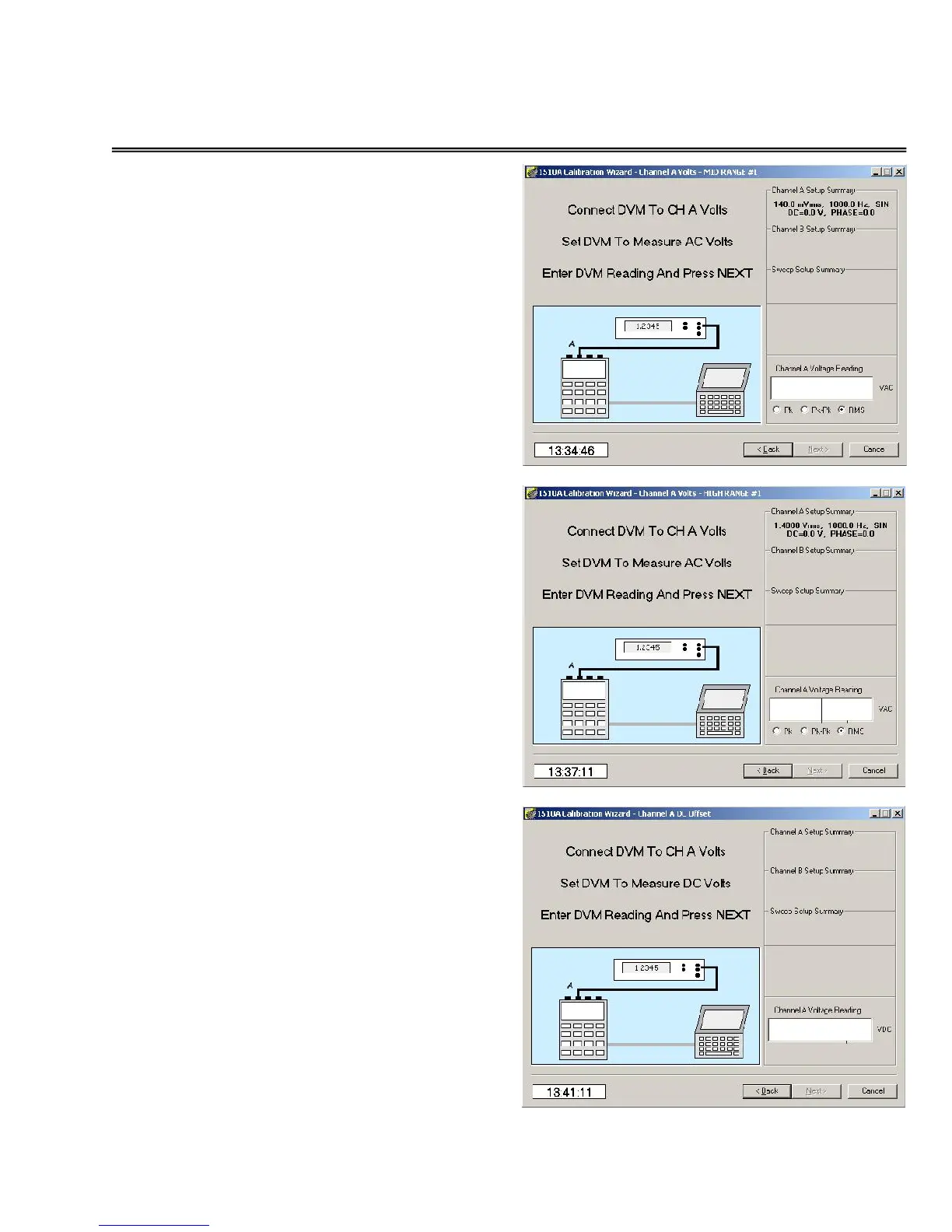
Channel A mid range AC calibration
Next, click in the Voltage Reading
window and enter the reading of the
voltmeter. Verify that the correct
units (Pk, Pk-Pk, or RMS) are selected
for the type of voltmeter you are
using.
This screen is repeated for the three
low range voltages (140 mv, 350 mv,
and 560 mv) used.
Channel A high range AC calibration
Next, click in the Voltage Reading
window and enter the reading of the
voltmeter. Verify that the correct
units (Pk, Pk-Pk, or RMS) are
selected for the type of voltmeter
you are using.
This screen is repeated for the three
low range voltages (1.4 v, 3.5 v, and
5.6 mv) used.
Channel A DC offset calibration
Next, click in the
Voltage Reading
window and enter the
reading of the
voltmeter.
Set the voltmeter for DC volts
readings.


 To Next Page