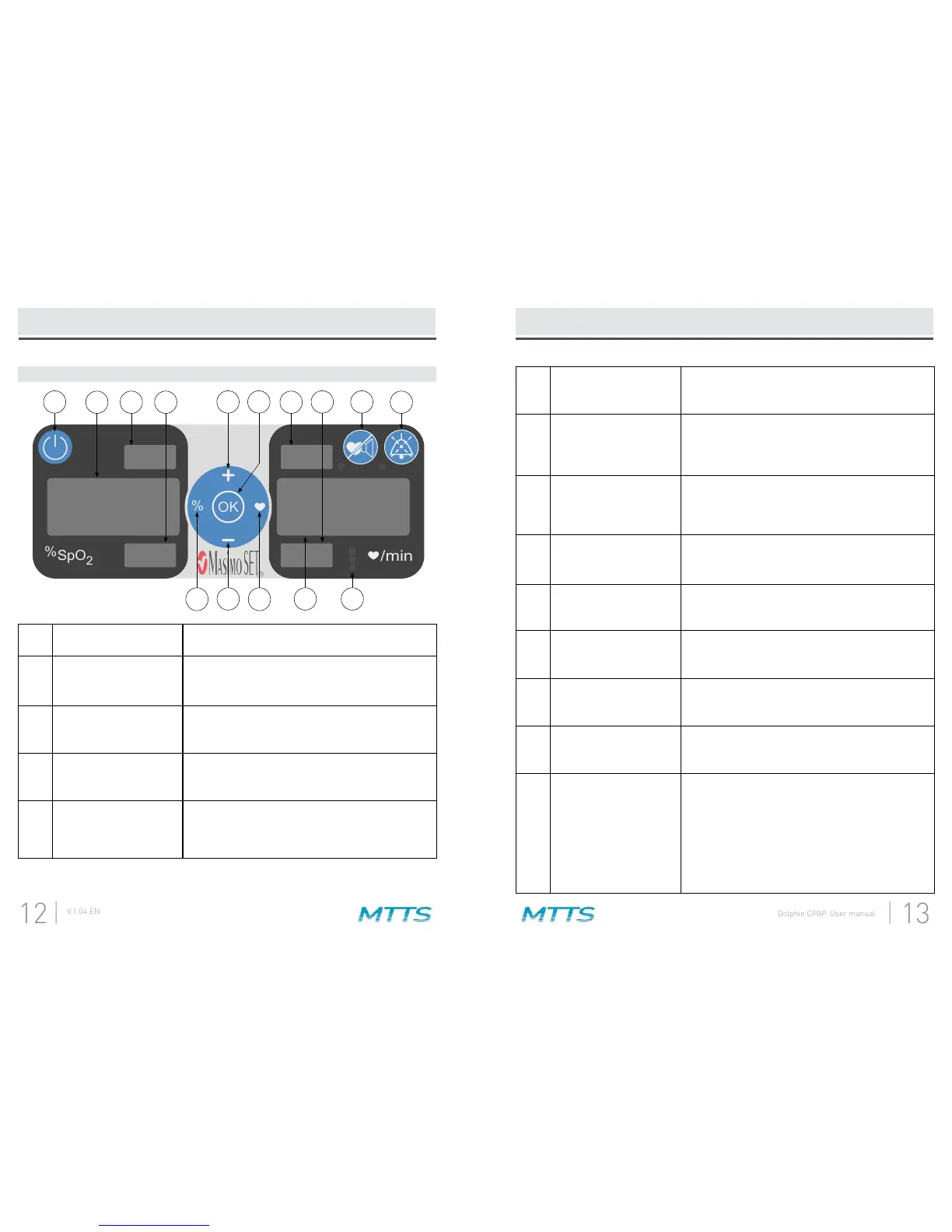
Pulse Oximeter Display
2
1 On / Off Button
Hold this button for 2 seconds to turn the Pulse
Oximeter display and functions on and off.
2 Saturation Display
Shows the functional oxygen saturation of arterial
hemoglobin in units of SpO
2
. When searching for a
3
Saturation Upper
Alarm Limit
Shows the upper alarm limit for saturation. When
the Increase / Decrease Buttons.
4
Saturation Lower
Alarm Limit
Shows the lower alarm limit for saturation. When
the Increase / Decrease Buttons.
5
Saturation Alarm
Limit Adjustment
Button
Press this button once and the Saturation Upper
alarm limit can be adjusted using the Increase /
Decrease Buttons.
3
4 107
6
1 11 12
13
5 8
9 14
6
Increase / Decrease
Buttons
Use these buttons to adjust the alarm limits when
faster adjustment.
7 OK / Select Button
Press this button after adjusting an alarm limit to
save the new alarm limit. If you press this button
8
Pulse Rate Alarm
Limit Adjustment
Button
Press this button once and the Pulse Rate Upper
the alarm limit can be adjusted using the
Increase / Decrease Buttons.
9 Pulse Rate Display
Shows pulse rate in beats per minute (bpm).
dashed lines.
10
Pulse Rate Upper
Alarm Limit
Shows the upper alarm limit for pulse rate. When
the Increase / Decrease Buttons.
11
Pulse Rate
Lower Alarm Limit
Shows the lower alarm limit for pulse rate. When
the Increase / Decrease Buttons.
12
Pulse Sound
Silence Button
Press this button to silence the pulse sound
playing the pulse sound.
13 Alarm Silence Button
Press this button to temporarily silence Pulse
Oximeter alarm sounds for 110 seconds. Press it
again to restore alarm sounds.
14
Perfusion
Indicator
Displays perfusion index (the ratio of the pulsatile
peripheral tissue). If perfusion index is high, all of
the green lights will rise and fall in correspond-
ence with the pulse. If the perfusion index is lower,
two green lights will rise and fall with the pulse.
If the perfusion index is very low, a red light will
6


 To Next Page