34
www.multilaser.com.br
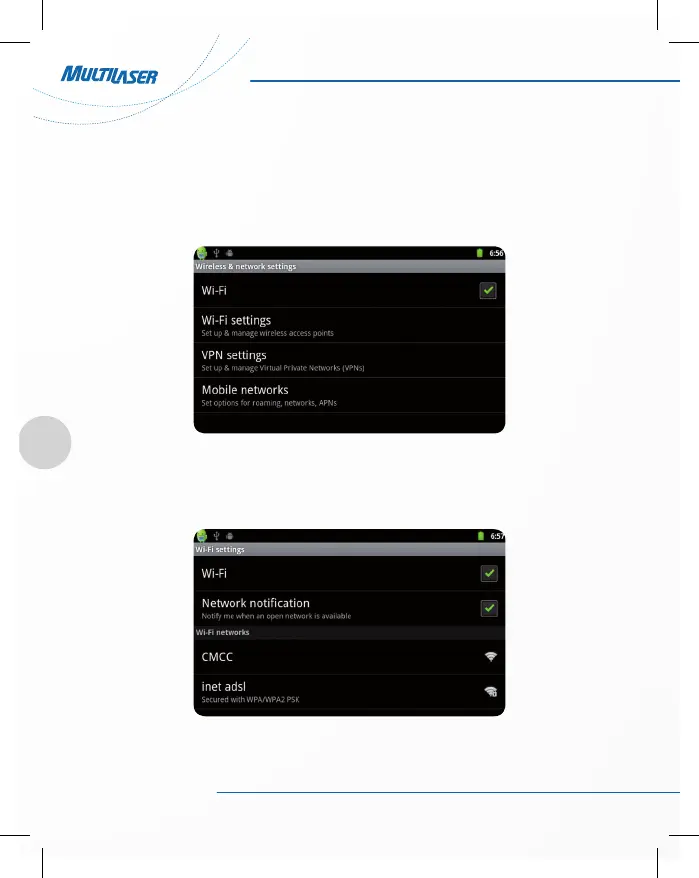
4.3 WIFI Wireless Connection
Click the main menu “Settings” icon, go to “Settings” screen, click on “Wireless and networks” into the “Wi-
reless and networks settings” interface. Click the “WIFI” section to quickly open the WIFI feature, click on “WIFI
settings” column enter “WIFI settings” interface, as shown below:
In the “WIFI settings” interface (above), click on the WIFI column also can open and close the WIFI feature, click
on the “Network Notice” to list the searched wireless routers, click the search name will pop up settings dialog,
please follow the prompts to complete the WIFI network links. Some encrypted network, need to enter a valid
key. As shown below:



 To Next Page