MD-1000I / MD-2000I / MD-3000I Explanation of USB Function
3. Explanation of USB Function
This manual will provide you with fundamental information about single-phase
online UPS systems, specifically how they function, use of the various func-
tions and what you are to do in the event of malfunction. In addition, this man-
ual contains information about transport, storage, handling and installation of
UPS systems.
Guidelines presented in this document solely concern UPS requirements. The
installation and personnel performing the installation are subject to applicable
national and local electrical codes and regulations. Modification to the contents
of this manual may be necessary from time to time to accommodate technical
changes. We have gone to great lengths to ensure the contents' accuracy and
ease of comprehension. However, we would be grateful if you notify us of any
errors or inaccuracies you find.
We accept no liability for errors in this user manual or consequential damages
resulting from those errors.
The UPS system (uninterruptible power supply) has been designed and built to
protect sensitive electrical equipment, such as computers, workstations, elec-
tronic money handling machines, important business devices, telecommunica-
tion systems, process controls, etc., against failure caused by poor power qual-
ity or power failure. Such sensitive systems require comprehensive protection
against electrical failure. Often, the failure may be caused by events outside
the system (e.g. thunderstorm, breakdown of operations) or interference
caused by nearby equipment (such as motors, air conditioners, machinery,
welding, etc.).
Power supply malfunctions are typically:
– Quick and slow line voltage peaks, fluctuation
– Power failures
– Fast or slow frequency peaks and fluctuations
– Power line interference or transients
The UPS s
ystem monitors the abovementioned power supply parameters and
protects the connected devices via suitable actions (e.g. switch over in the
event of power surges, over voltage or drops).
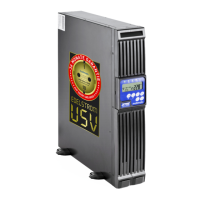
The UPS' mode of installation modifies easily from upright, using the provided
legs, to horizontal in a 19" rack and vice versa.
You'll find instructions for changing the installation mode in the chapter dedi-
cated to this subject ( 3.3 Changing Installation Mode).
MD Series 22



 To Next Page