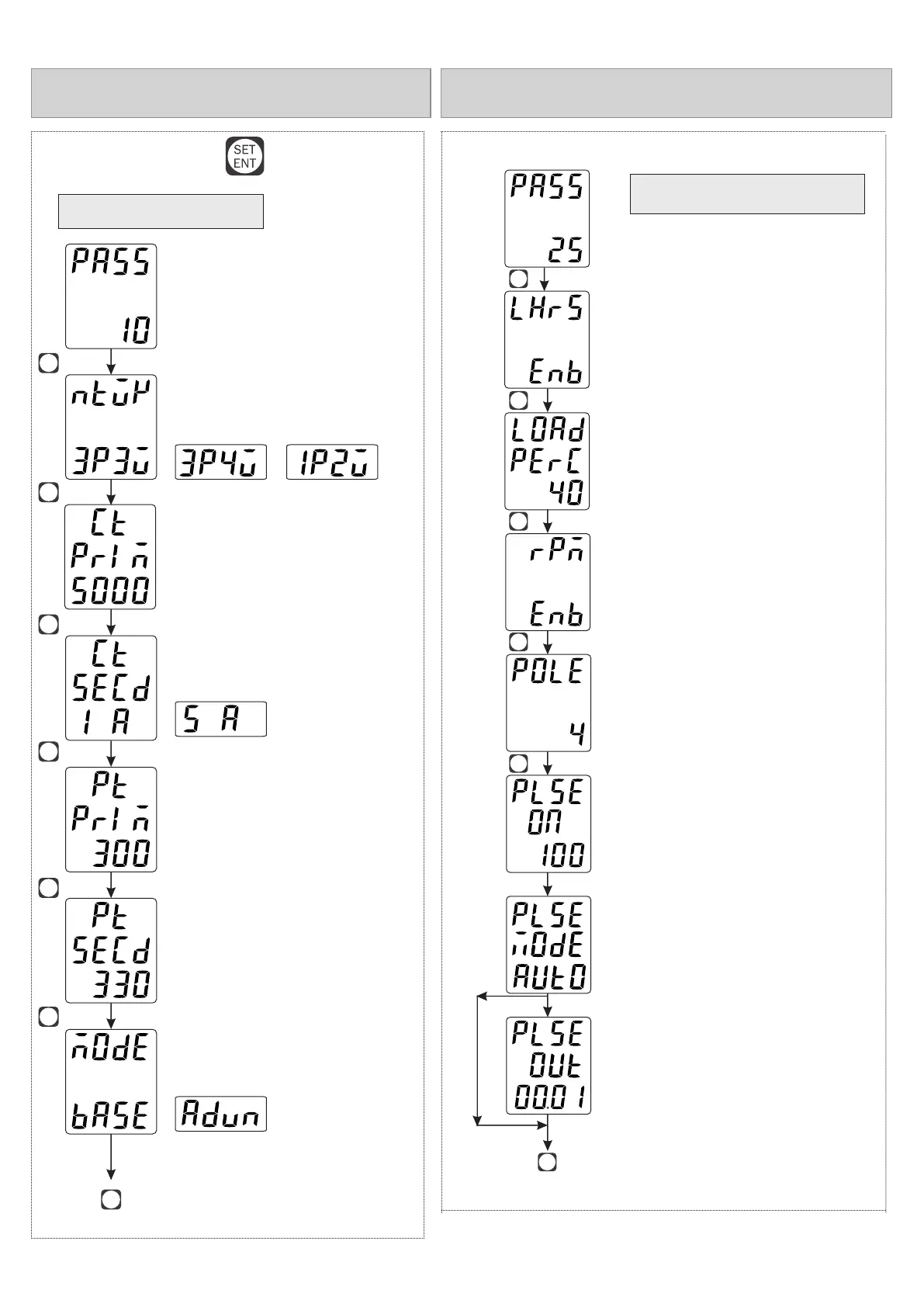
PARAMETER SETTING
Long Press key
/ /
/
/
Network Selection
Press key to save & exit from
parameter setting
CT Primary
PT Primary
PT Secondary
Mode selection
CT Secondary
(5 Amp to 6000 Amp selectable)
(100V to 520kV selectable)
(100V to 520V selectable)
(Basic / Advance)
(5 Amp/1 Amp selectable)
PRG
PRG
PRG
PRG
PRG
PRG
PRG
Enter Password 10
LOAD HOUR & RPM
(5 to 50%)
(1 to 128)
Enter Password 25
Press key to save & exit from parameter setting
Load Hour
Percentage
Load Hour
RPM
Enable / Disable
Enable / Disable
Pole
SET
ENT
SET
ENT
SET
ENT
SET
ENT
SET
ENT
(10 to 500ms)
Pulse ON Time
SET
ENT
Auto / Manual
Pulse Mode
0.01, 0.1, 1, 10, 100, 1000
Pulse Out
IF Auto





 To Next Page