EasyManua.ls Logo

MULTISPAN TC-19 - User Manual

MULTISPAN TC-19
2 pages
Print Icon
To Next Page IconTo Next Page
Loading...
Technical Specification
1) MODEL : TC - 19 (Temperature Controller).
2)
3) Input : J ,K (factory set)
4)
Display : 4 digit, single display, 7 segment LED.
Range : J type : 0 - 400 C / 0 - 600 C (factory set).
k type : 0 - 1200 C.
°°
°
OPERATING MANUAL
TEMPERATURE CONTROLLER
TC-19
Model : TC - 19 - J,K
(96 X 96 mm)
5) Relay status : LED indication for relay
status.
6) Controlling action : TP/ON-OFF
7) Output : 1 relay, 230V AC, 5A
8) Power Supply : 110V TO 250V AC,
50/60Hz (SMPS).
CONNECTION DIAGRAM
POWER ON
display for 2 sec
Process Value
display for 2 sec, according
display for 2 sec
to the input sensor programmed.
8888...
t C j
T P
5 0
Note :
1) Press key continuously along with or key to set the SETPOINT.
2) The
3)
5) On normal powering instrument, below given display appears,
set value is saved by releasing the key during setting procedure.
To show the SETPOINT, press key momentarily.
4) Auto out time is 15 SEC. without saving.
SET POINT SETTING
process value
process value
on releasing SET key will store
the latest set value
5 0
2 0 0
5 0
press + key to set SET point
www.multispanindia.com
Page - 1
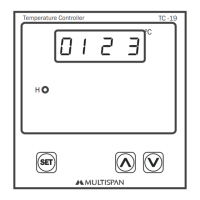
H
TC -19
Temperature Controller
SET
ºC
01 2 3
NCCNO
NL
-
+
Supply:
230 V AC
T/C
Question and Answer IconNeed help?

Do you have a question about the MULTISPAN TC-19 and is the answer not in the manual?

Summary

Technical Specifications

Model, Display, Input, and Range

Details the instrument's model, display type, input options, and temperature ranges.

Operation Modes

Power On Sequence

Describes the initial display sequence when the instrument powers on.

Set Point Setting Procedure

Explains how to set and save the desired temperature setpoint.

Control Parameter Configuration

Parameter Settings

Configures parameters like Proportional Band, Cycle Time, Manual Reset, Hysteresis.

User Configuration Options

Settings for password, input type selection, and control action.

Offset Setting

Adjusts the zero offset for temperature readings.

Sensor Status and Error Messages

Sensor Break or Open Message

Explains the 'Open' message indicating sensor connection or breakdown issues.

Summary

Technical Specifications

Model, Display, Input, and Range

Details the instrument's model, display type, input options, and temperature ranges.

Operation Modes

Power On Sequence

Describes the initial display sequence when the instrument powers on.

Set Point Setting Procedure

Explains how to set and save the desired temperature setpoint.

Control Parameter Configuration

Parameter Settings

Configures parameters like Proportional Band, Cycle Time, Manual Reset, Hysteresis.

User Configuration Options

Settings for password, input type selection, and control action.

Offset Setting

Adjusts the zero offset for temperature readings.

Sensor Status and Error Messages

Sensor Break or Open Message

Explains the 'Open' message indicating sensor connection or breakdown issues.

MULTISPAN TC-19 Specifications

General IconGeneral
BrandMULTISPAN
ModelTC-19
CategoryTemperature Controller
LanguageEnglish

Related product manuals