EasyManua.ls Logo

MULTISPAN TC-443 - User Manual

MULTISPAN TC-443
8 pages
Print Icon
To Next Page IconTo Next Page
Loading...
Page 1
TC - 443
OUTPUT SPECIFICATION:
POWER SUPPLY:
TEMPERATURE CONTROLLER
Supply voltage
Power consumption
(VA RATING)
Approx 4VA @ 230V AC MAX
ENVIRONMENT CONDITION:
Relative Humidity
Operating Temp.
0°C to 55°C
UP to 95% RH
(non-condensing)
100 to 270V AC, 50-60Hz
Input Type
Resolution
Indication
Input
Range
0 to 400°C
J
J = 1°C
±1% of FSD ± 1°C
Display
Heating
Size
Keys
Cooling
Alarm
Panel Cutout
Upper: 3 digit, 7 segment, 0.63”
1) PID control with Auto-Tuning
1) BL.TP (Blower Time Proportional)
Lower: 3 digit, 7 segment, 0.30”
2) ON-OFF control
Low, High, Absolute Low,
Inband, Outband, Absolute Outband
48 (H) x 48 (W) x 95 (D) mm
SET, INC, DEC, ENT
45 (H) x 45 (W) mm
TECHNICAL SPECIFICATION
INPUT SPECIFICATION:
DISPLAY AND KEYS:
DIMENSION:
CONTROL METHOD:
48
95
45
45
3
MECHANICAL INSTALLATION
TERMINAL CONNECTION
48
Outline Dimension (mm)
Panel Cutout
Dimension (mm)
STATUS LED DESCRIPTION
PV = Process value
SV = Set Value
Accuracy
2) ON-OFF control
(FSD:- Full Scale Deflection)
Relay
Relay Type
Rating
3 Nos
1 relay 1C/O (NO-C-NC)
2 relay (NO-C)
1 relay 10A, 230V AC / 28V DC
2 relay 5A, 230V AC
Relay Output
st
nd
st
nd
3 relay (NO-C)
td
3 relay 5A, 230V AC
td
TC
+
-
NC
C
R1
NO
C
NO
R2
!
100
270V AC
50/60 HZ
4VA
1
2
3
4
5
L
N
R3
C
NO
7
6
8
9
10
11
12
~
Display Color:
Upper : RED/WHITE
Lower: Green
Protection Level
IP-65 (Front side) As per IS/IEC
60529 : 2001
TUNE
OUT
OUT
1
2
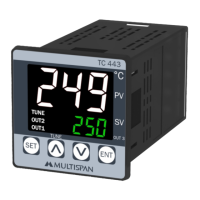
A - Control output 1 indication
B - Control output 2 indication
C - Control output 3 indication
B
D
A
E
D - Auto tuning “ON” indication
E - Blinking DP Will Indicate Delay time Count
.
C
SV
PV
SET ENT
°
TC 443
OUT 3
249
250
Question and Answer IconNeed help?

Do you have a question about the MULTISPAN TC-443 and is the answer not in the manual?

Summary

Power Supply Specifications

Supply Voltage

Specifies the voltage range for the controller.

Power Consumption

Details the power drawn by the controller.

Environmental Conditions

Operating Temperature

Defines the acceptable operating temperature range.

Relative Humidity

Specifies the non-condensing humidity limit.

Protection Level

Indicates the front side protection rating (IP-65).

Mechanical Installation and Dimensions

Outline Dimensions

Provides external dimensions of the controller unit.

Panel Cutout Dimensions

Specifies the required dimensions for panel mounting.

Technical Specifications

Input Specifications

Details input type, range, resolution, and accuracy.

Display and Keys

Describes the display characteristics and available keys.

Controller Dimensions

Provides unit size and panel cutout dimensions.

Control Methods

Heating Control Method

Details PID control with Auto-Tuning and ON-OFF control.

Cooling Control Method

Describes BL.TP (Blower Time Proportional) and ON-OFF control.

Alarm Control Method

Specifies alarm types: Low, High, Absolute Low/Outband.

Output Specifications

Relay Output Specifications

Details the number, type, and rating of relay outputs.

Status LED Description

Control Output 1 LED

Indicates the status of control output 1.

Control Output 2 LED

Indicates the status of control output 2.

Control Output 3 LED

Indicates the status of control output 3.

Auto Tuning LED

Indicates when the auto-tuning function is active.

Delay Time Count LED

Shows delay time count status via blinking display point.

Key Operation Modes

Operator Mode Functions

Describes how to enter parameter setting and auto-tuning.

Parameter Setting Mode Functions

Details actions like setting parameters and saving changes.

Safety Precautions

General Safety Instructions

Emphasizes following manual and equipment safety instructions.

Electric Shock Warning

Highlights critical risk of electric shock during operation.

Maintenance Guidelines

Regular Cleaning

Advises on regular cleaning to avoid blockages.

Cleaning Agents

Specifies using a soft cloth and avoiding certain cleaning agents.

Component Replacement

States that fusible resistors should not be replaced by the operator.

Wiring and Electrical Safety Guidelines

Wiring Precautions

Details precautions for wiring to prevent electric shock.

EMI Reduction

Provides guidance on using twisted wires for EMI reduction.

Power Cable Specifications

Specifies minimum cross-section and insulation for power cables.

Thermocouple;RTD Wiring

Advises on using specific wires for thermocouple/RTD extensions.

Anti-Noise Wiring

Suggests using standard power supply cable for anti-noise effect.

Installation Guidelines

Built-in Installation

Explains that terminals are inaccessible after installation.

Installation Debris Prevention

Warns against metal debris entering the product during installation.

Circuit Breaker;Mains Switch

Mandates installing a circuit breaker for power ON/OFF.

Environmental Storage

Advises using and storing within specified environmental ranges.

Mechanical Installation Details

Panel Cutout Preparation

Instructs to prepare the panel cutout with correct dimensions.

Unit Mounting

Describes fitting the unit into the panel using the clamp.

Proximity to Heat;Vapors

Warns against installing near heating sources or caustic vapors.

Terminal Block Wiring

Specifies terminal size and tightening torque for wiring.

Unused Terminals

Advises not to connect anything to unused terminals.

Error Display and Meaning

Error Codes

Lists error codes like 'OPn' and 'SrE' with their meanings.

Corrective Actions for Errors

Provides steps to resolve sensor connection and other errors.

Factory Setting Mode

Applying Factory Settings

Explains how to apply factory set values using the ENT key.

Exiting Factory Settings

Describes how to exit factory setting mode without applying changes.

Parameter Setting Flow

Set Point Setting

Details the process of setting SP1, SP2, and SP3 values.

Control Parameter Ranges

Parameter List and Ranges

Lists control parameters like PB, IT, DT with their acceptable ranges.

Basic Configuration Settings

Basic Configuration Password

Indicates the password required for basic configuration.

Configuration Case 1: Heat + Cool

Defines settings for Heat + Cool mode.

Configuration Case 2: Heat + Alarm

Defines settings for Heat + Alarm mode.

Configuration Case 3: Cool + Cool

Defines settings for Cool + Cool mode.

Configuration Case 4: Cool + Alarm

Defines settings for Cool + Alarm mode.

Control Parameter Settings

Control Parameter Password

Indicates the password required for control parameter settings.

Control Action 1 (PID)

Details parameters for PID control action 1.

Control Action 2 (Blower TP)

Details parameters for Blower TP control action 2.

Case 1: Heat + Cool Configuration

Heat+Cool: ON-OFF Control

Configuration steps when ON-OFF control is selected.

Heat+Cool: PID Control

Configuration steps when PID control is selected.

Heat+Cool: Relative Settings

Settings for relative input mode.

Heat+Cool: Individual Settings

Settings for individual input mode.

Case 2: Heat + Alarm Configuration

Heat+Alarm: ON-OFF Control

Configuration steps when ON-OFF control is selected.

Heat+Alarm: PID Control

Configuration steps when PID control is selected.

Heat+Alarm: Relative Settings

Settings for relative input mode.

Heat+Alarm: Individual Settings

Settings for individual input mode.

Heat+Alarm: ALM2 Settings

Configuration for ALM2 based on High/AB-L/LOW selection.

Case 3: Cool + Cool Configuration

Cool+Cool: Relative Settings

Settings for relative input mode.

Cool+Cool: Individual Settings

Settings for individual input mode.

Case 4: Cool + Alarm Configuration

Cool+Alarm: Relative Settings

Settings for relative input mode.

Cool+Alarm: Individual Settings

Settings for individual input mode.

Cool+Alarm: ALM2 Settings

Configuration for ALM2 based on High/AB-L/LOW selection.

Parameter Message Descriptions

Set Point 1 (SP1)

Defines Set Point 1 for Output 1.

Set Point 2 (SP2)

Defines Set Point 2 for Output 2.

Proportional Band (Pb)

Describes the Proportional Band parameter for PID action.

Integral Time Constant (IT)

Explains the Integral Time Constant parameter.

Derivative Time Constant (dt)

Explains the Derivative Time Constant parameter.

Control Function Descriptions

ON-OFF Control (Heating)

Illustrates the ON-OFF control operation for heating.

ON-OFF Control (Cooling)

Illustrates the ON-OFF control operation for cooling.

Auto Tuning Function

Explains the auto-tuning process and its benefits.

Starting;Stopping PID Auto-Tuning

Details how to initiate or halt the PID auto-tuning process.

Alarm Operation Modes

Low Alarm Operation

Illustrates the behavior of the low alarm function.

High Alarm Operation

Illustrates the behavior of the high alarm function.

Inband Alarm Operation

Illustrates the behavior of the inband alarm function.

Outband Alarm Operation

Illustrates the behavior of the outband alarm function.

Absolute Low Alarm Operation

Illustrates the behavior of the absolute low alarm function.

Absolute Outband Alarm Operation

Illustrates the behavior of the absolute outband alarm function.

Summary

Power Supply Specifications

Supply Voltage

Specifies the voltage range for the controller.

Power Consumption

Details the power drawn by the controller.

Environmental Conditions

Operating Temperature

Defines the acceptable operating temperature range.

Relative Humidity

Specifies the non-condensing humidity limit.

Protection Level

Indicates the front side protection rating (IP-65).

Mechanical Installation and Dimensions

Outline Dimensions

Provides external dimensions of the controller unit.

Panel Cutout Dimensions

Specifies the required dimensions for panel mounting.

Technical Specifications

Input Specifications

Details input type, range, resolution, and accuracy.

Display and Keys

Describes the display characteristics and available keys.

Controller Dimensions

Provides unit size and panel cutout dimensions.

Control Methods

Heating Control Method

Details PID control with Auto-Tuning and ON-OFF control.

Cooling Control Method

Describes BL.TP (Blower Time Proportional) and ON-OFF control.

Alarm Control Method

Specifies alarm types: Low, High, Absolute Low/Outband.

Output Specifications

Relay Output Specifications

Details the number, type, and rating of relay outputs.

Status LED Description

Control Output 1 LED

Indicates the status of control output 1.

Control Output 2 LED

Indicates the status of control output 2.

Control Output 3 LED

Indicates the status of control output 3.

Auto Tuning LED

Indicates when the auto-tuning function is active.

Delay Time Count LED

Shows delay time count status via blinking display point.

Key Operation Modes

Operator Mode Functions

Describes how to enter parameter setting and auto-tuning.

Parameter Setting Mode Functions

Details actions like setting parameters and saving changes.

Safety Precautions

General Safety Instructions

Emphasizes following manual and equipment safety instructions.

Electric Shock Warning

Highlights critical risk of electric shock during operation.

Maintenance Guidelines

Regular Cleaning

Advises on regular cleaning to avoid blockages.

Cleaning Agents

Specifies using a soft cloth and avoiding certain cleaning agents.

Component Replacement

States that fusible resistors should not be replaced by the operator.

Wiring and Electrical Safety Guidelines

Wiring Precautions

Details precautions for wiring to prevent electric shock.

EMI Reduction

Provides guidance on using twisted wires for EMI reduction.

Power Cable Specifications

Specifies minimum cross-section and insulation for power cables.

Thermocouple;RTD Wiring

Advises on using specific wires for thermocouple/RTD extensions.

Anti-Noise Wiring

Suggests using standard power supply cable for anti-noise effect.

Installation Guidelines

Built-in Installation

Explains that terminals are inaccessible after installation.

Installation Debris Prevention

Warns against metal debris entering the product during installation.

Circuit Breaker;Mains Switch

Mandates installing a circuit breaker for power ON/OFF.

Environmental Storage

Advises using and storing within specified environmental ranges.

Mechanical Installation Details

Panel Cutout Preparation

Instructs to prepare the panel cutout with correct dimensions.

Unit Mounting

Describes fitting the unit into the panel using the clamp.

Proximity to Heat;Vapors

Warns against installing near heating sources or caustic vapors.

Terminal Block Wiring

Specifies terminal size and tightening torque for wiring.

Unused Terminals

Advises not to connect anything to unused terminals.

Error Display and Meaning

Error Codes

Lists error codes like 'OPn' and 'SrE' with their meanings.

Corrective Actions for Errors

Provides steps to resolve sensor connection and other errors.

Factory Setting Mode

Applying Factory Settings

Explains how to apply factory set values using the ENT key.

Exiting Factory Settings

Describes how to exit factory setting mode without applying changes.

Parameter Setting Flow

Set Point Setting

Details the process of setting SP1, SP2, and SP3 values.

Control Parameter Ranges

Parameter List and Ranges

Lists control parameters like PB, IT, DT with their acceptable ranges.

Basic Configuration Settings

Basic Configuration Password

Indicates the password required for basic configuration.

Configuration Case 1: Heat + Cool

Defines settings for Heat + Cool mode.

Configuration Case 2: Heat + Alarm

Defines settings for Heat + Alarm mode.

Configuration Case 3: Cool + Cool

Defines settings for Cool + Cool mode.

Configuration Case 4: Cool + Alarm

Defines settings for Cool + Alarm mode.

Control Parameter Settings

Control Parameter Password

Indicates the password required for control parameter settings.

Control Action 1 (PID)

Details parameters for PID control action 1.

Control Action 2 (Blower TP)

Details parameters for Blower TP control action 2.

Case 1: Heat + Cool Configuration

Heat+Cool: ON-OFF Control

Configuration steps when ON-OFF control is selected.

Heat+Cool: PID Control

Configuration steps when PID control is selected.

Heat+Cool: Relative Settings

Settings for relative input mode.

Heat+Cool: Individual Settings

Settings for individual input mode.

Case 2: Heat + Alarm Configuration

Heat+Alarm: ON-OFF Control

Configuration steps when ON-OFF control is selected.

Heat+Alarm: PID Control

Configuration steps when PID control is selected.

Heat+Alarm: Relative Settings

Settings for relative input mode.

Heat+Alarm: Individual Settings

Settings for individual input mode.

Heat+Alarm: ALM2 Settings

Configuration for ALM2 based on High/AB-L/LOW selection.

Case 3: Cool + Cool Configuration

Cool+Cool: Relative Settings

Settings for relative input mode.

Cool+Cool: Individual Settings

Settings for individual input mode.

Case 4: Cool + Alarm Configuration

Cool+Alarm: Relative Settings

Settings for relative input mode.

Cool+Alarm: Individual Settings

Settings for individual input mode.

Cool+Alarm: ALM2 Settings

Configuration for ALM2 based on High/AB-L/LOW selection.

Parameter Message Descriptions

Set Point 1 (SP1)

Defines Set Point 1 for Output 1.

Set Point 2 (SP2)

Defines Set Point 2 for Output 2.

Proportional Band (Pb)

Describes the Proportional Band parameter for PID action.

Integral Time Constant (IT)

Explains the Integral Time Constant parameter.

Derivative Time Constant (dt)

Explains the Derivative Time Constant parameter.

Control Function Descriptions

ON-OFF Control (Heating)

Illustrates the ON-OFF control operation for heating.

ON-OFF Control (Cooling)

Illustrates the ON-OFF control operation for cooling.

Auto Tuning Function

Explains the auto-tuning process and its benefits.

Starting;Stopping PID Auto-Tuning

Details how to initiate or halt the PID auto-tuning process.

Alarm Operation Modes

Low Alarm Operation

Illustrates the behavior of the low alarm function.

High Alarm Operation

Illustrates the behavior of the high alarm function.

Inband Alarm Operation

Illustrates the behavior of the inband alarm function.

Outband Alarm Operation

Illustrates the behavior of the outband alarm function.

Absolute Low Alarm Operation

Illustrates the behavior of the absolute low alarm function.

Absolute Outband Alarm Operation

Illustrates the behavior of the absolute outband alarm function.

Overview

This document describes the Multispan TC-443 Temperature Controller, a device designed for precise temperature management in various applications.

Function Description

The TC-443 is a temperature controller that offers both heating and cooling control, along with alarm functionalities. It supports PID control with auto-tuning, as well as ON-OFF control for both heating and cooling. The device can manage up to three output relays for control and alarm functions. Its primary function is to monitor and maintain a set process value (PV) relative to a desired set value (SV) using a J-type sensor.

Important Technical Specifications

Power Supply:

  • Supply Voltage: 100 to 270V AC, 50-60Hz
  • Power Consumption (VA Rating): Approximately 4VA @ 230V AC MAX

Environmental Conditions:

  • Operating Temperature: 0°C to 55°C
  • Relative Humidity: Up to 95% RH (non-condensing)
  • Protection Level: IP-65 (Front side) as per IS/IEC 60529:2001

Input Specification:

  • Input Type: J
  • Input Range: 0 to 400°C
  • Resolution: J = 1°C
  • Indication Accuracy: ±1% of FSD ± 1°C (FSD: Full Scale Deflection)

Display and Keys:

  • Display: Upper: 3 digit, 7 segment, 0.63" (RED/WHITE); Lower: 3 digit, 7 segment, 0.30" (Green)
  • Keys: SET, INC, DEC, ENT

Dimensions:

  • Size: 48 (H) x 48 (W) x 95 (D) mm
  • Panel Cutout: 45 (H) x 45 (W) mm

Control Method:

  • Heating: PID control with Auto-Tuning, ON-OFF control
  • Cooling: BL.TP (Blower Time Proportional), ON-OFF control
  • Alarm: Low, High, Absolute Low, Inband, Outband, Absolute Outband

Output Specification:

  • Relay: 3 Nos
  • Relay Type:
    • 1st relay: 1C/O (NO-C-NC)
    • 2nd relay: (NO-C)
    • 3rd relay: (NO-C)
  • Rating:
    • 1st relay: 10A, 230V AC / 28V DC
    • 2nd relay: 5A, 230V AC
    • 3rd relay: 5A, 230V AC

Usage Features

Key Operation:

  • Entering Parameter Setting: Press SET key.
  • Start/Stop PID Auto Tuning: Press SET + UP keys for 6 seconds.
  • Going to Factory Setting Mode: Press UP + DOWN keys for 3 seconds.
  • Setting Parameter Value and Moving to Next: Press SET key.
  • Incrementing Parameter Value: Press UP key.
  • Decrementing Parameter Value: Press DOWN key.
  • Saving and Exiting Parameters: Press ENT key.

Display Features:

  • The upper display shows the Process Value (PV) in RED/WHITE.
  • The lower display shows the Set Value (SV) in Green.
  • Status LEDs indicate:
    • A: Control output 1 indication
    • B: Control output 2 indication
    • C: Control output 3 indication
    • D: Auto tuning "ON" indication
    • E: Blinking DP will indicate delay time count

Error Display:

  • OPn: Sensor is not connected, over-range condition, or sensor break.
  • SrE: Sensor connection is reversed.
    • Corrective Action: Check sensor and input wiring; replace sensor if needed. Contact company if the problem persists.

Factory Setting:

  • To enter, press UP + DOWN keys for 3 seconds.
  • FCS YES/NO: Press ENT to apply factory set values or escape without applying.

Parameter Setting Modes:

  • Set Point Setting: Allows configuration of SP1, SP2, and SP3, along with associated low and high set points (L02, HI2, L03, HI3) and alarm modes (ALM2, ALM3).
  • Basic Configuration: Configures output modes (0E1, 0E2, 0E3), alarm types (AL3), and set modes (S2M, S3M). It also allows setting of low and high limits (SLL, SHL) and offset (OFS). Password protected (PAS 73).
  • Control Parameter Setting: Configures PID parameters (Pb, It, dt, Ct), manual reset (Mr), cooling parameters (CPb, C-ON, C-OFF), and relay delay times (r1d, r2d). Password protected (PAS 37).

Auto-Tuning Function:

  • Automatically computes and sets Proportional band (Pb), Integral time (It), Derivative time (dt), and cycle time (Ct) based on process characteristics.
  • The "TUNE" LED will turn ON during auto-tuning.
  • If power is lost during auto-tuning, it will restart on the next power ON.
  • To start/stop auto-tuning, press SET key for 6 seconds.

Control Functions:

  • ON-OFF Control (Heating): Output RLY-ON when PV is below SV-HYST, RLY-OFF when PV is above SV.
  • ON-OFF Control (Cooling): Output RLY-ON when PV is above SV+HYST, RLY-OFF when PV is below SV. Includes delay time.

Alarm Operation:

  • Low Alarm: RLY-ON when PV is below SET-HYST, RLY-OFF when PV is above SET.
  • High Alarm: RLY-ON when PV is above SET+HYST, RLY-OFF when PV is below SET.
  • Inband Alarm: RLY-ON when PV is within SET±HYST, RLY-OFF when PV is outside SET±HYST.
  • Outband Alarm: RLY-ON when PV is outside SET±HYST, RLY-OFF when PV is within SET±HYST.
  • Absolute Low Alarm: RLY-ON when PV is below SET, RLY-OFF when PV is above SET.
  • Absolute Outband Alarm: RLY-ON when PV is outside SET, RLY-OFF when PV is within SET.

Maintenance Features

Safety Precautions:

  • Always turn OFF power before wiring to prevent electric shock.
  • Do not touch terminals when power is supplied.
  • Use appropriate wiring (1mm² or greater cross-section for power, 1.5kV insulation capacity).
  • Use thermocouple compensation wires for lead extensions.
  • Install a circuit breaker or mains switch between the power source and supply terminal for easy ON/OFF.
  • Operate and store the instrument within specified ambient temperature and humidity ranges.

Mechanical Installation Guidelines:

  • Prepare the panel cutout with specified dimensions.
  • Fit the unit into the panel using the provided clamp.
  • Avoid proximity to heating sources, caustic vapors, oil steam, or other unwanted process byproducts.
  • Use specified crimp terminals (M3.5 screws) and tighten screws with a torque of 1.2 N.m.
  • Do not connect anything to unused terminals.

General Maintenance:

  • Regularly clean the equipment to prevent blockage of ventilating parts.
  • Clean with a soft, clean cloth; do not use isopropyl alcohol or other cleaning agents.
  • The fusible resistor must not be replaced by the operator.

MULTISPAN TC-443 Specifications

General IconGeneral
BrandMULTISPAN
ModelTC-443
CategoryTemperature Controller
LanguageEnglish

Related product manuals