MT5600ZDX Owner's Manual
46
Command: +MS Select Modulation
Values:
Default: n/a
Description: +MS= This extended-format command selects the modula-
tion, optionally enables or disables automode, and
optionally specifies the lowest and highest connection
rates using one to four subparameters (client modem)
or five subparameters (server modem). The
command format is:
+MS=<mod>[,[<automode>][,[<min_rate>][,[<max_rate][,[<x_law][,[<rb_signalling>]]]]]]<cr>
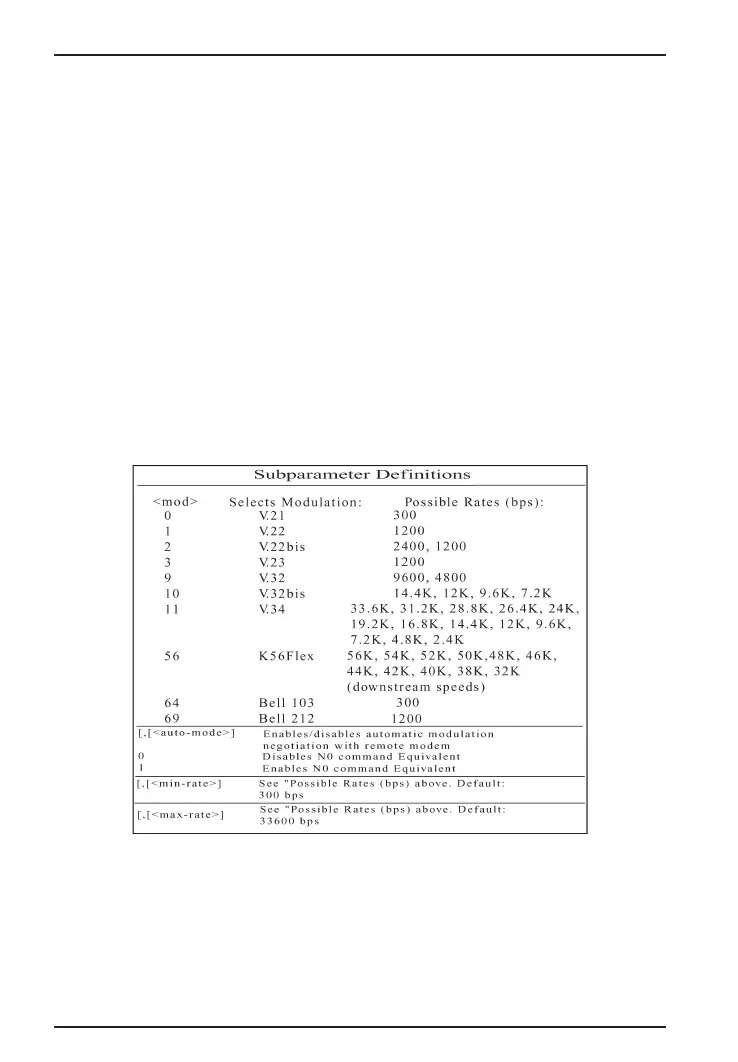
The modem can send a string of information to the DTE
consisting of selected options when AT+MS?<cr> is
entered. The following table is a display of subparam-
eter definitions:
Table 3-1. Subparameter Definitions
*: Use a comma (,) to separate optional parameters. For example: +MS=11,
1, 300, 28800 (+MS command with the default settings). Subparameters that
you do not enter remain at their current value. Type a comma only to skip a
subparameter or carriage return to skip the last subparameter. For example,
+MS=,0,<Enter> disables auto mode and keeps all other settings at their
current value.














 To Next Page