EasyManua.ls Logo

MyGate PQ81S - User Manual

MyGate PQ81S
20 pages
Print Icon
To Next Page IconTo Next Page
Loading...
ver.: 09_2021
Q81SQ81S
PROTECO S.r.l. Via Neive, 77 - 12050 Castagnito (CN) ITALY Tel. +39 0173 210111 - Fax +39 0173 210199 info@proteco.net - www.proteco.net
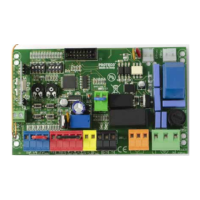
CONTROL PANEL FOR
SLIDING GATES
Control panel for 230V ac sliding gates operators
Automatic programming mode with obstacle detection
Sequential programming mode: adjustable force, slow down, working time per single motor
Immediate closing
Pedestrian opening
Multi-occupation feature
Second radio channel interface (optional)
Output for electrolock connection
Hammer action and lock pulse function
Built-in radio receiver 433,92 MHz (32 codes) suitable for fixed or rolling code transmitters
Input for 8K2 resistive safety edge
Self diagnosis of malfunctions by LED coding
230V ac
TECHNICAL FEATURES
Instructions Manual
Item code PQ81S
Pcb’s dimensions 137 x 84 x 37 mm
Pcb’s weight 160 g
Main power supply 230V, 50-60Hz
Power supply tolerance -10% +20%
Transformer 230/21Vac – 15VA
Main fuse 5 A
Rated power 600 W
Max. power draw 3,5 A
Power draw in stand-by 30 mA
Blinker 24Vac, max 20 W
Accessories 24Vdc , max 5 W
Accessories -20 +50 °C
Protection rating IP55
Question and Answer IconNeed help?

Do you have a question about the MyGate PQ81S and is the answer not in the manual?

Summary

SAFETY INSTRUCTIONS AND PRELIMINARY CHECKS

DESCRIPTION AND MAIN COMPONENTS

ELECTRICAL CONNECTIONS

MOTORS wiring

Wiring diagram for gate motors based on opening direction (left/right).

MAIN POWER

Connects the 230V main power supply via a circuit breaker.

START DEVICES

Wiring options for START commands: main, timer, or key switch.

TIMER

Wiring a timer for automatic gate operations.

KEY SWITCH

Wiring a key switch for gate control.

PEDESTRIAN OPENING

Wiring the pedestrian opening function.

EMERGENCY STOP BUTTON

Wiring the emergency stop button for safety.

PHOTOCELLS

Wiring photocell safety devices for closing and opening.

Photocells IN CLOSING

Photocell wiring for closing safety, stops/reverses gate.

Photocells in OPENING

Photocell wiring for opening safety, stops/reverses gate.

SAFETY EDGE

Wiring safety edges for closing and opening operations.

Mechanical safety edge in CLOSING

Mechanical safety edge wiring for closing safety.

Mechanical safety edge in OPENING

Mechanical safety edge wiring for opening safety.

8 K2 RESISTIVE SAFETY EDGE IN CLOSING

8K2 resistive safety edge wiring for closing.

8 K2 RESISTIVE SAFETY EDGE IN OPENING

8K2 resistive safety edge wiring for opening.

FLASHING LIGHT

Wiring the flashing light for gate status indication.

HOW TO PLUG THE 2 nd RADIO CHANNEL JACK

Connecting an optional second radio channel receiver.

Auxiliary radio channel AUX

Configuring the auxiliary radio channel for different functions.

Signalling LIGHT

Setting the second radio channel for signaling light function.

Courtesy LIGHT

Setting the second radio channel for courtesy light function.

DEFAULT SETTINGS

BROWSING THE MENU

FUNCTIONS MENU

Accessing and configuring specific gate functions.

AUTOMATIC CLOSING

Setting the automatic closing time for the gate.

8 K2 RESISTIVE SAFETY EDGE INPUT

Activating the 8K2 safety edge input.

OPERATION MODE

LOADING RADIO CODES

DELETING EXISTING RADIO CODES

Procedure to erase all previously stored radio codes.

LOADING A REMOTE CONTROL AS START COMMAND

Storing a remote control for the gate's start command.

LOADING A REMOTE CONTROL AS PEDESTRIAN COMMAND

Storing a remote control for the pedestrian opening function.

LOADING A REMOTE CONTROL AS 2 nd RADIO CHANNEL COMMAND

Storing a remote control for the second radio channel.

PROGRAMMING

AUTOMATIC mode

Configuring the gate for automatic operation with obstacle detection.

AUTOMATIC mode with OBSTACLE DETECTION

Detailed steps for programming automatic mode with obstacle sensing.

SEQUENTIAL MODE

Configuring the gate with sequential operation parameters.

SEQUENTIAL mode WITHOUT Obstacle Detection

Steps for programming sequential mode without obstacle detection.

TROUBLE SHOOTING - ERROR MESSAGES

MyGate PQ81S Specifications

General IconGeneral
BrandMyGate
ModelPQ81S
CategoryControl Panel
LanguageEnglish