myPOS Smart Technical Specicaon & Warranty (Updated March 2018) | page 9myPOS Smart User Manual | page 9
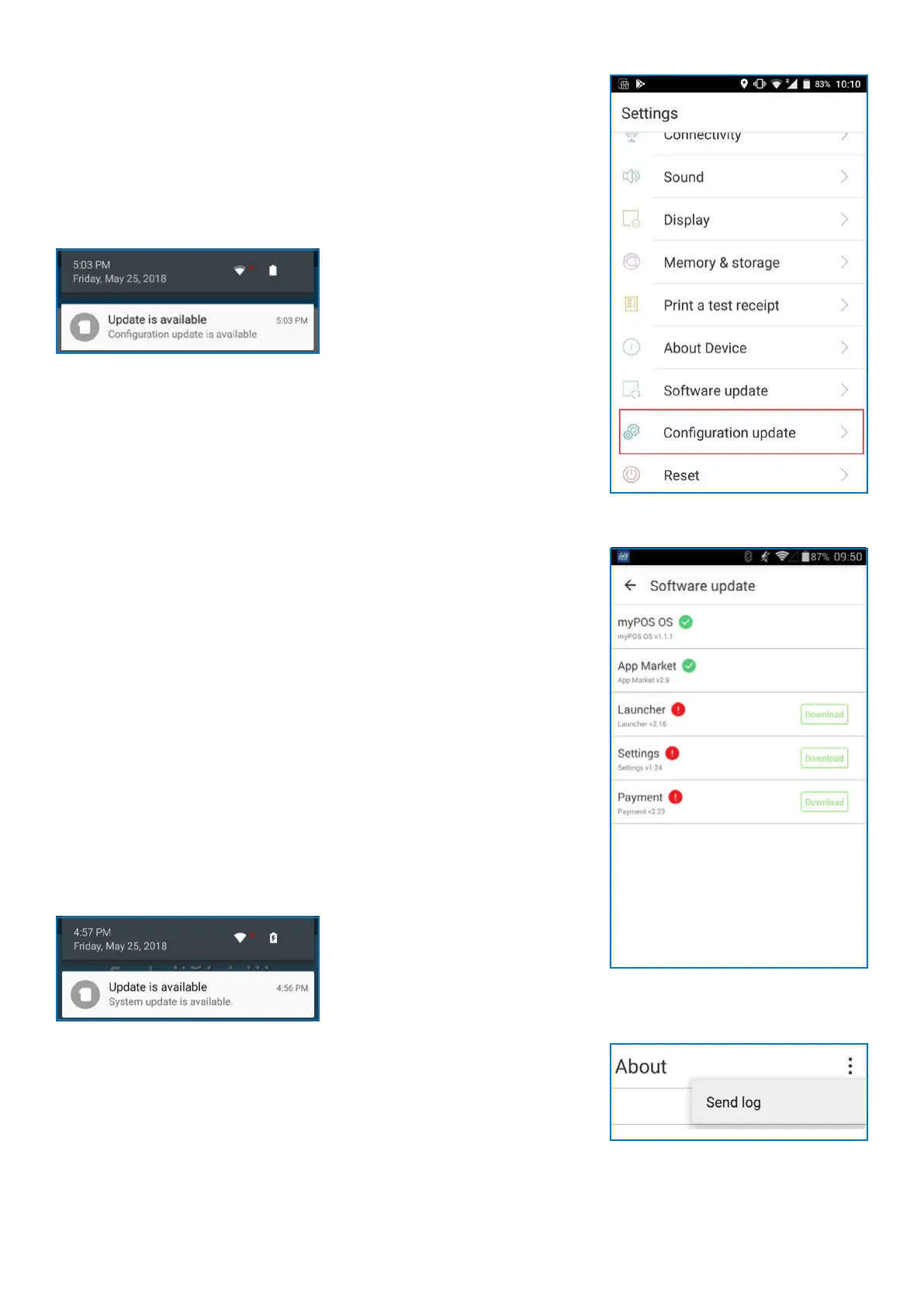
Conguration update
Some of the changes of your device, made through your
myPOS account, need addional update to take eect. In these
cases, you will receive a nocaon for Conguraon update.
All you have to do is tap on the nocaon - the Sengs app
will open. Tap on Conguraon update and wait unl the
update is downloaded and installed.
In some cases, conguraon updates will be sent from
myPOS Europe Ltd. in regard to newly released features and
funconalies. Keeping your soware up to date is important
to get the best from your device.
System update
myPOS Smart Devices come with 6 system apps:
• myPOS OS app
• AppMarket app
• Payment app
• Sengs app
• Launcher app
• myPOS Remote
You will receive a nocaon for System update.
All you have to do is to tap on the nocaon and the Sengs
app will open. Tap on Download and then tap Install to install
the update.
Send log from terminal
To send log from terminal, enter the Sengs app, select About
and press the 3 dots in the top right corner. Aer that, press
Send log.



 To Next Page