Home
Myray
Medical Equipment
hyperion X5
Page 13
Myray hyperion X5 - Page 13
54 pages
Manual
Save Page as PDF
To Next Page
To Next Page
To Previous Page
To Previous Page
Loading...
TECHNICAL MANUAL -
hyperion X5
EN
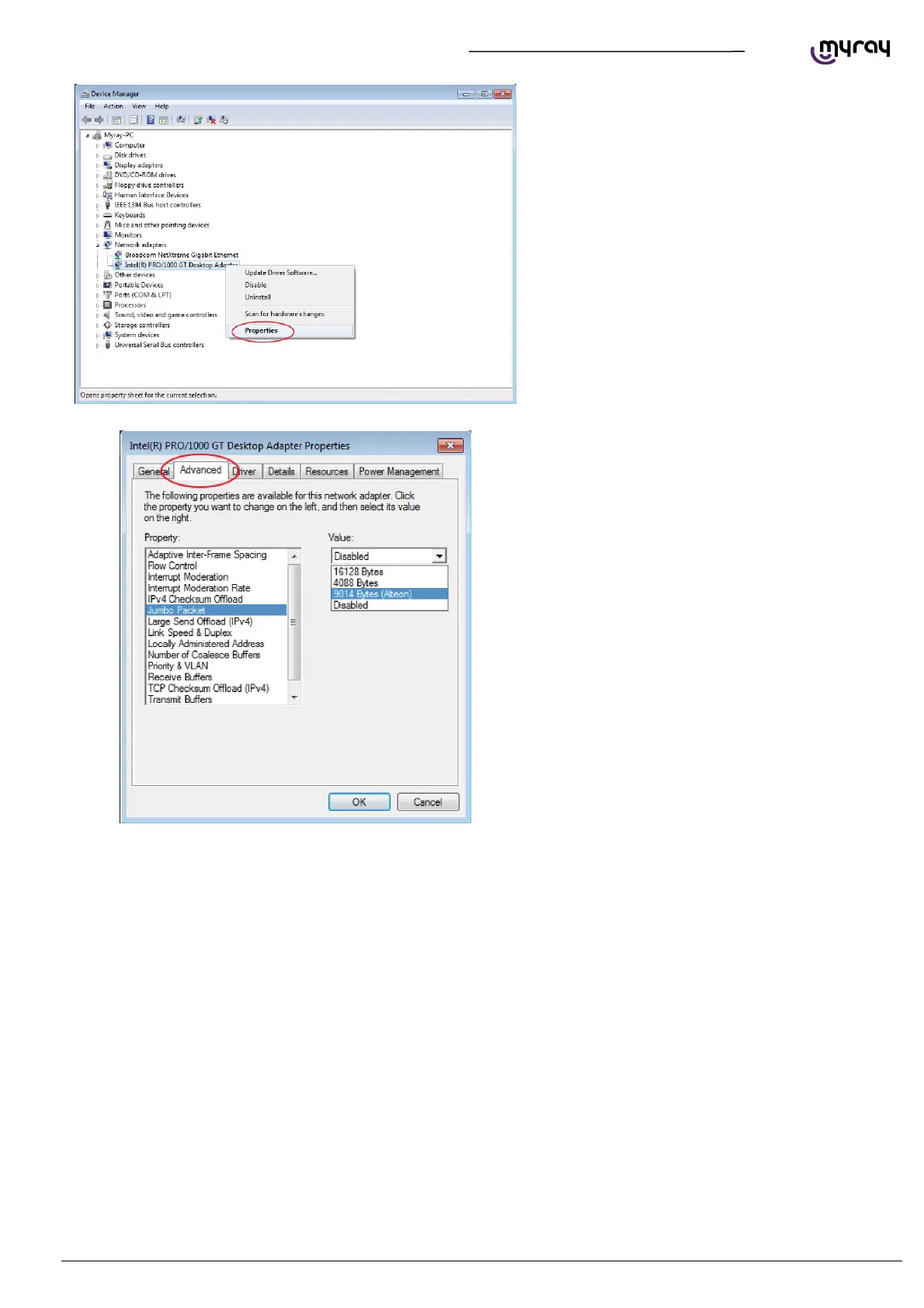
PC CONFIGURATION
11
Expand
the
“New
tork
Adapte
r”
group,
right
c
lick
on the “Intel pro 1000”, and sele
ct “Properties”.
Select
the
“Advanced”
tab,
highlight
the
“Jumbo
Packet”, and set it to “9014 byte
12
14
Table of Contents
Main Page
Default Chapter
5
Table of Contents
5
1 Pc Configuration
7
System Requirements
7
Setting up the Device
8
Preliminary Operations
8
Operating System Settings
8
Disabling Windows Firewall
11
Intel Pro 1000" Network Card Installation
12
Acquisition Server" Software Installation
14
Connection and Configuration
19
Software Acquisition Server
19
Irys Installation and Configuration
24
2 Calibration
30
Preliminary Operations
30
Device Configuration
31
Xray Alignment
32
Verifying the Sensor Calibration
36
Verifying the Mechanical Centering
37
Test Laser
39
Calibration Data Backup
42
3 Control Boards Description
43
Unit Block Diagram
43
Power Board 97661407
44
Connectors List
46
Fuses and Dip Switches List
46
Leds List
46
Logic Board 97661408
48
Connectors List
50
Dip Switches List
50
Leds List
50
Sensor Interface Board 97661485
52
Connectors List
54
Leds List
54
Keyboard Board 97661484
54
Logo Board 97661539
54
Related product manuals
Myray hyperion X9
169 pages
Myray Hyperion X5 2D
52 pages
Myray Hyperion X5 3D
52 pages
Myray hyperion X5 3D CEPH
214 pages
Myray hyperion
209 pages
Myray hyperion MRT
209 pages
Myray ZEN-X
34 pages



 To Next Page