TECHNICAL MANUAL - hyperion X5
EN
PC CONFIGURATION
17
1.3. CONNECTION AND CONFIGURATION
1.3.1. SOFTWARE ACQUISITION SERVER
hyperion X5 can be connected to a LAN or direclty to the Acquisistion server PC. Either way, the image detector must be
connected directly with a point-to- point connection to the Acquisition Server PC.
The direct connection between the image detector and the PC is managed automatically by the software, there is thus no
need to set the IP address on the detector for the connection to be estabilished. The Intel Pro 1000 always stays
configured as from system default (DHCP) and the connection is managed automatically.
It could be necessary to set up a static IP address for the network adapter used for the PC to hyperion X5 system
communication. If this network adapter is directly connected to the unit, the IP address for the PC should be set to one in
the same subnet as the hyperion X5's default (e.g.192.168.1.150)
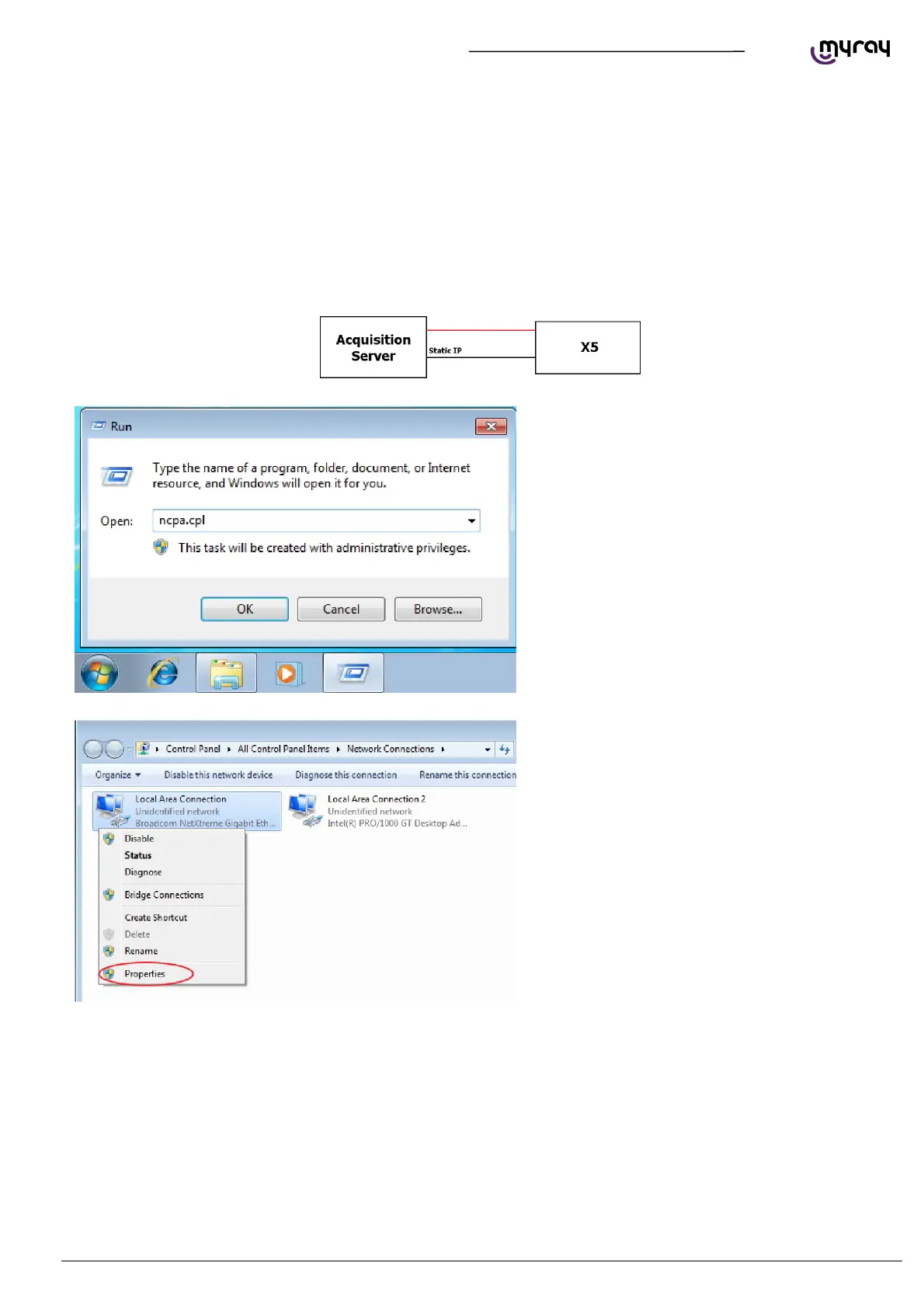
To set a static IP address on a network board it is
necessary to click on the Start button, type
“ncpa.cpl” and press Enter. The Network
connection window will open:
If it is necessary to give the communication
network board a fixed IP address , right-click with
the mouse on the relative connection (not the
INTEL pro 1000 one, the one supplied by the
other network board) and select “Proprieties”.



 To Next Page