EasyManua.ls Logo

NAD 300 - Main Amp & Dolby NR Alignment

NAD 300
45 pages
Print Icon
To Next Page IconTo Next Page
To Previous Page IconTo Previous Page
Loading...
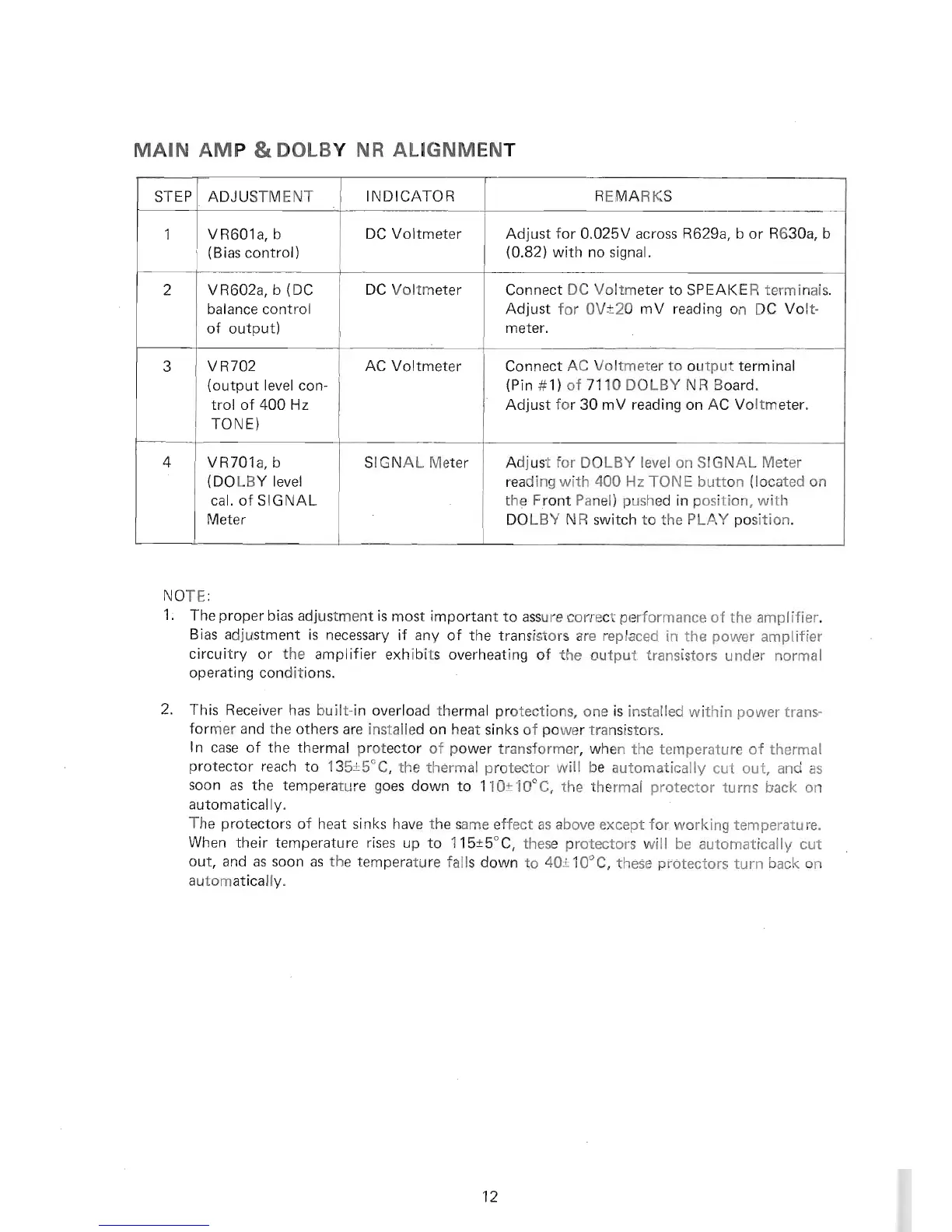
MAIN AMP
&
DOLBY NR
ALIGNMENT
NOTE:
1
.
The
proper
bias
adjustment is
most
important
to assu re
correct
performance
of the amplifier.
'
Bias
adjustment is
necessary if
any of the
transistors are replaced
in the
power
amplifier
circuitry or the amplifier
exhibits
overheating of the
output transistors
under normal
operating conditions.
2.
This Receiver
has built-in
overload thermal
protections,
one is installed
within
power
trans-
fornier
and the
others are
installed
on heat
sinks of
power
transistors.
ln
case
of
the
thermal
protector
of
power
transformer, when
the temperature
of
thermal
protector
reach
to 135t5'C,
the thermal
protector
will be
automatically
cut out, and
as
soon as the
temperature
goes
down
to 110t10'C, the thermal
protector
turns back on
automatically.
The
protectors
of heat
sinks
have the
same effect as above
except
for
working temperature.
When
their temperature
rises
up
to
115t5"C,
these
protectors
will be
automatically cut
out, and
as soon as the temperature
falls down
to
40t19'9,
these
protectors
turn back
on
automatically.
STEP ADJUSTMENT
INDICATOR REMARKS
1 VR601a,
b
(Bias
control)
DC
Voltmeter
Adjust
for 0.025V across R629a, b or
R630a, b
(0.82)
with no
signal.
2 VR602a, b
(DC
balance
control
of output)
DC Voltmeter
Connect
DC Voltmeter to
SPEAKE R terminals.
Adjust for 0Vt20 mV reading
on DC Volt-
meter.
3
vR702
(output
level
con-
trol of
400 Hz
TONE)
AC Voltmeter
Connect
AC Voltmeter to
output
terminal
(Pin
#11
of
7110
DOLBY
NR Board.
Adjust
for
30 mV reading on AC Voltmeter.
4 VR701a,
b
(DOLBY
level
cal. of SIGNAL
Meter
SIGNAL Meter
Adjust
for
DOLBY level on SIGNAL
Meter
reading
with
400 Hz TONE button
(located
on
the
Front
Panel)
pushed
in
position,
with
DOLBY
NR switch to the
PLAY
position.
12

Related product manuals