EasyManua.ls Logo

NAD 300 - Changing Power Line Voltages

NAD 300
45 pages
Print Icon
To Next Page IconTo Next Page
To Previous Page IconTo Previous Page
Loading...
1.
2.
A,
B.
Ci. CHANGING
POWER
LINE
VOLTAGES
The
NAD300
has
a multi-voltage
Power Transformer of 12OV,22OV
and
240V.
Remove the chassis
out of
cabinet and
open the bottom cover
of chassis.
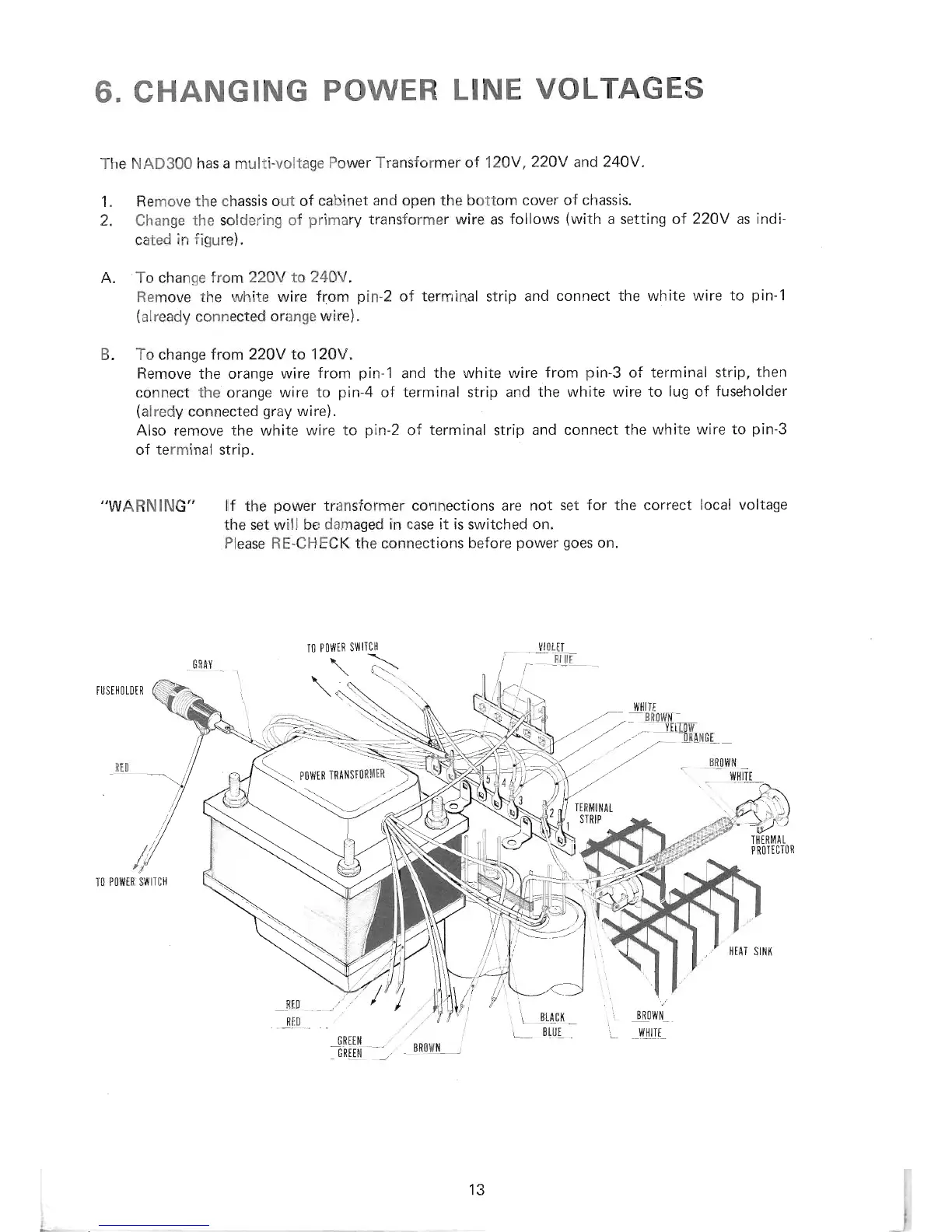
Change
the soldering
of
primary
transformer wire as
follows
(with
a setting of
22OV
as
indi-
cated
in figure).
To
change
from22OY
to24OV.
Remove the
white wire
from
pin-2
of
terminal
strip
and
connect the white
wire
to
pin-1
(already
connected
orange wire).
To
change trom 22OV
to 120V.
Remove
the orange wire
from
pin-1
and
the white wire
from
pin-3
of
terminal strip,
then
connect
the
orange
wire
to
pin-4
of
terminal
strip and
the
white
wire to
lug
of
fuseholder
(alredy
connected
gray
wire).
Also remove the white
wire
to
pin-2
of
terminal
strip
and connect
the white wire
to
pin-3
of
terminal
strip.
,,WARN
ING"
lf
the
power
transformer
connections are
not
set for the correct
local voltage
the set will
be damaged in case
it is
switched
on.
Please RE-CHECK
the
connections
before
power
goes
on.
I0
P0wiR
swllc}l
\.\
TUSIllOTDER
t{t{tTE
..7
BR0[4I
.-' _ T[Inr
,,'
ng4[0l
''"
///
//
'P
7
.
---:-
\
tow,*tRltsroRilrR
\
\---7
///
,
TO
POlllER SI{ITIH
\
\
1
-ILACK
L
Btljt
,.
tR0lltx_i
_l
_.G
REt N
GRILil
13

Related product manuals