ENGLISH
CONFIGURING C 700
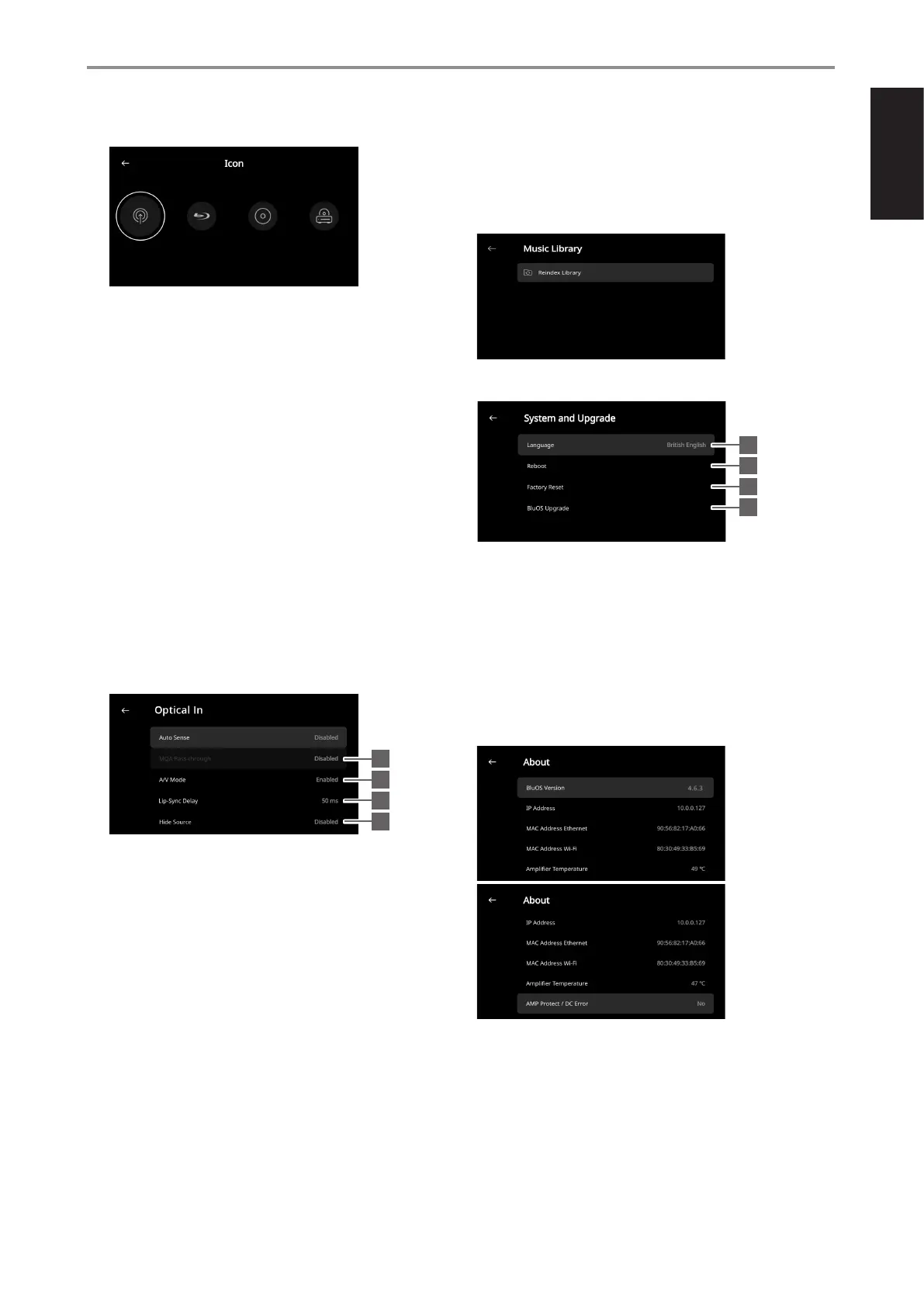
3 Icon: Select and assign icon for the selected Source 9 Hide Source: Activate or deactivate selected Source
4 Front View: Front panel display layout and contents can be configured
by selecting the following options
• Album Only, Album and Text, Album, Text and VU, Text Only
• Source (Simple), Source (Detailed)
MUSIC LIBRARY
Reindex Library: Music library will be scanned for any newly added,
deleted, or updated files, ensuring that these changes are incorporated
into the BluOS app.
• Analog VU meter, Digital VU
SYSTEM AND UPGRADE
A combination of above options is available depending upon the
Source selected.
Text Only
- Display album name, song title, artist name, broadcast/radio
station, name, title of the show, etc.
Album Only
- Display album/title art, station ID symbol or icon only
5 Auto Sense (applicable only for Optical Input, Coaxial Input and
HDMI Sources): Wake up from network standby mode when triggered
by an active Optical Input, Coaxial Input or HDMI Source
6 MQA Pass-through (applies only to Coaxial and Optical Sources):
Enable MQA Pass-through for the C 700 V2 to act as MQA decoder or
renderer when MQA certified CD player or other MQA certified devices
are connected to coaxial or optical input ports.
1
2
3
4
1 Language: Front panel display items will be shown in the language
selected.
2 Reboot: Cycle power by powering off and powering back the unit
3 Factory Reset: Restore to factory default settings
4 BluOS Upgrade: Select “BluOS Upgrade” to initiate BluOS upgrade
mode. When “BluOS Upgrade” prompt appears, select “Yes” to start
BluOS upgrade process. Follow the display screen prompt to complete
the upgrade procedure.
ABOUT
Display information about the following parameters
6
7
8
9
7 A/V Mode: By connecting your TV or other video sources to your
C 700 V2 through analog, coaxial, optical or HDMI input ports, you can
listen to the audio of your favorite shows or movies through your BluOS
system. Grouping multiple BluOS devices from one of these inputs can
require an abundance of network traffic. A/V mode creates a short and
unobtrusive buffer to your audio to ensure your BluOS system stays in
sync with your video even with slower or cluttered networks.
Enabled: With A/V Mode enabled on your input source, audio delay
will be automatically adjusted to keep your grouped BluOS devices
in sync with the video source connected. Use the Lip-sync delay
slider below the A/V Mode setting to manually adjust the lower end
of this delay to better suit the speed of your network. · Show current or detected information about BluOS rmware version,
Disabled: When your C 700 V2 is connected to an audio source IP Address, MAC Address Ethernet and MAC Address Wi-Fi
without video, such as a turntable or CD player, the A/V Mode · Amplier Temperature: If the internal temperature of the amplifier
setting should be disabled. channel reaches 91 degrees centigrade, C 700 V2 will turn off
automatically and a protect message will be shown in the display. Once
8 Lip-Sync Delay: With A/V Mode enabled, “Lip-sync delay” can be the temperature falls below 80 degrees centigrade, C 700 V2 will turn
adjusted to ensure your audio is staying in sync over your network on again and the protect message display will be cleared.
with the original video source. By varying “Lip-sync delay” from 50ms to · AMP Protect/DC Error: If an internal fault is detected, “Yes” is shown in
150ms, one can delay the audio output to synchronize it with the video the display along with a message prompt instructing the user to hard
image of the corresponding source. cycle the power of the C 700 V2 - this is required to clear the error. “No”
indicates the unit is operating as intended.
13


 To Next Page