2. Name, Function and Connection
2-1. Front Panel
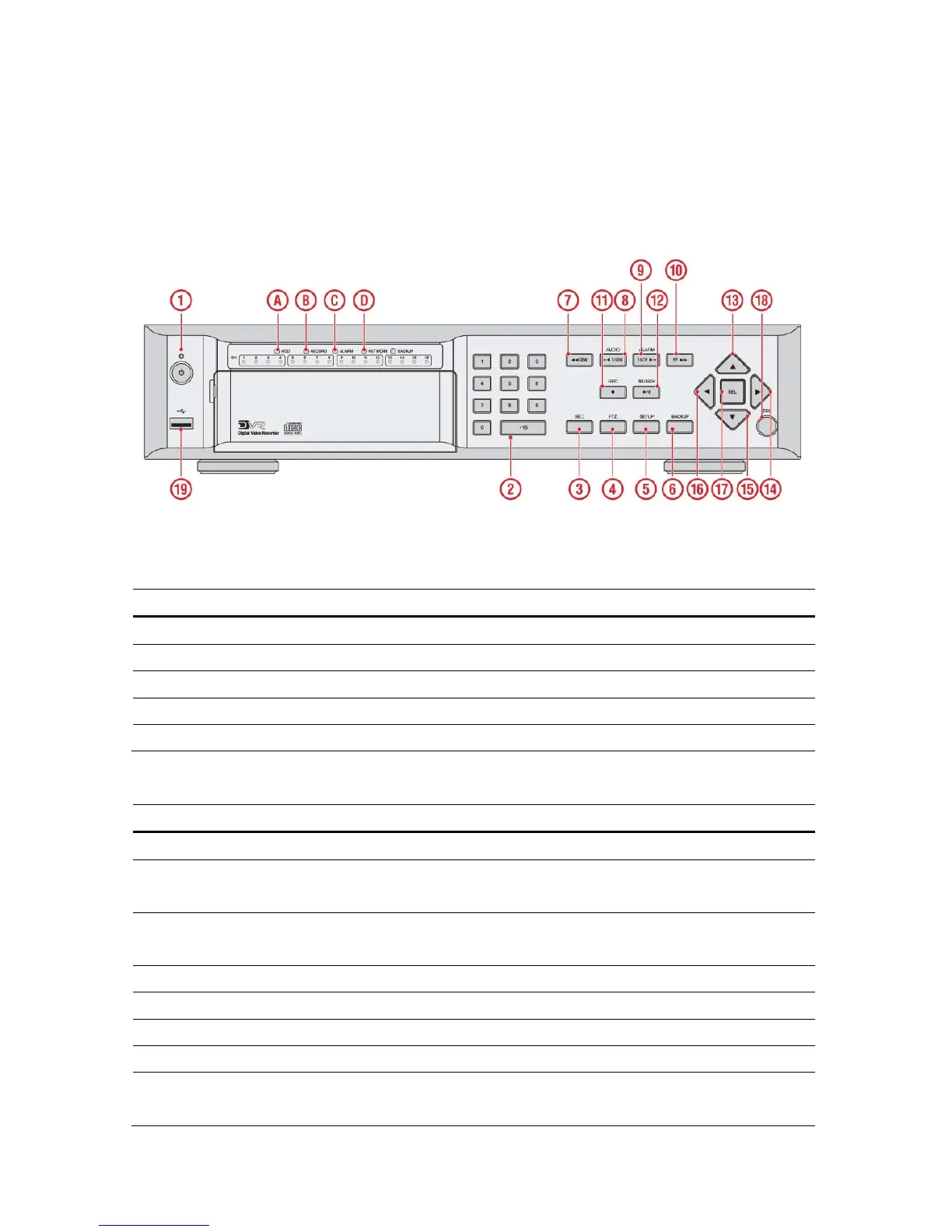
The following information will help you to operate the front panel controls.
Figure 2.1.1. Front panel
Table2.1.1. Indication lamps
NO. Name Description
A
HDD
Indicating that the system is accessing the hard disk.
B
RECORD
Indicating that the system is recording video data.
C
ALARM
Indicating that when sensor(s) is/are triggered or motion is detected.
D
NETWORK
Indicating that when Network client connects through the network.
E
BACKUP
Indicating that USB or CDRW storage device is stored images or video.
Table 2.1.2. Front panel buttons
NO Name Description
1
POWER
POWER ON/ OFF
2
NUMBER
Channel keys. For channel 10, press the 0 key. For channel 11, press
the +10 and 1 key. For channel 16, press the +10 and 6 key.
3
SEQ
Enable/disable the automatic sequence of display of channels in full
screen, quad, 9-split display mode.
4
PTZ
Press to control Pan/Tilt/Zoom operations.
5
SETUP
Press to enter SETUP menu.
6
BACKUP
Press to capture video in jpeg format in live or playback mode.
7
REW
Press to rewind the footage in playback mode.
8
AUDIO
Press to select audio mode such as SINGLE, MIX and MUTE.
MUTE- All of 4 channels.
16


 To Next Page