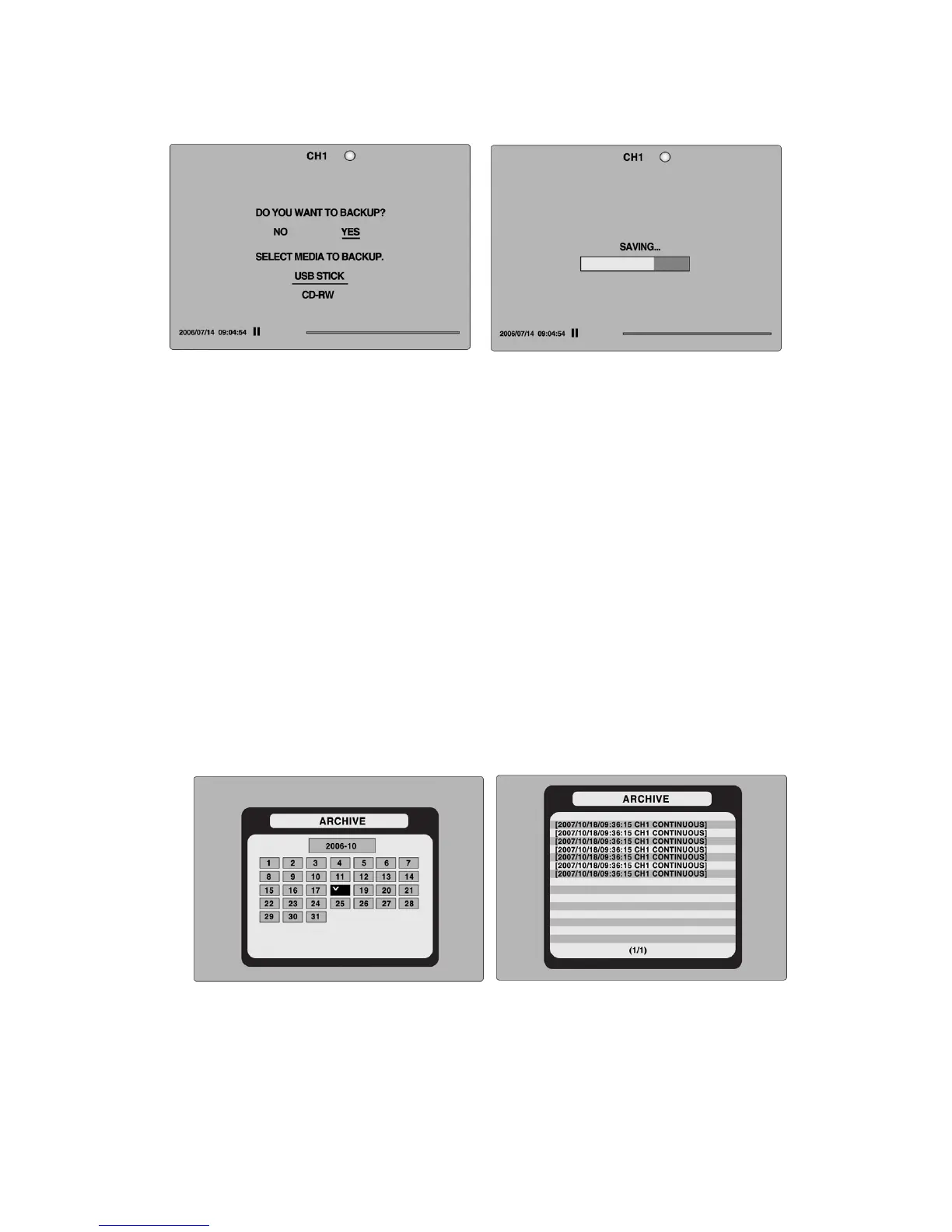
Figure 7.2.1. Video Archiving and Backup Screen
The DVR will convert the corresponding portion of the video into an AVI file.
7-3. Transferring still images or video from the ARCHIVE list
The stored data onto hard drive will be found in the ARCHIVE list in SEARCH menu.
User can back up still images or video into the storage device from the ARCHIVE list.
1. Select the date to begin searching by using the LEFT, RIGHT, UP and DOWN buttons to
navigate through the days.
2. Once you have selected the date, press SEL to open the list of stored data.
3. Use the UP and DOWN buttons to scroll through the on-screen listings.
4. Use the LEFT and RIGHT buttons to display a list of stored events that happened
previous to or after the current selection.
5. Once the desired event has been selected, press SEL to view the still image or the first
frame of the selected video.
6. Press the BACKUP button to launch the archiving function in playback mode.
Figure 7.3.1. Archive Search Screen
7-4. Playback of Backup Video
7-4-1. Playback of backup video in AVI format
53
If the proper codec is not installed on your PC, the AVI file may not be played correctly. If this
happens, install the ‘FFDSHOW’ codec that can download from open sites.


 To Next Page