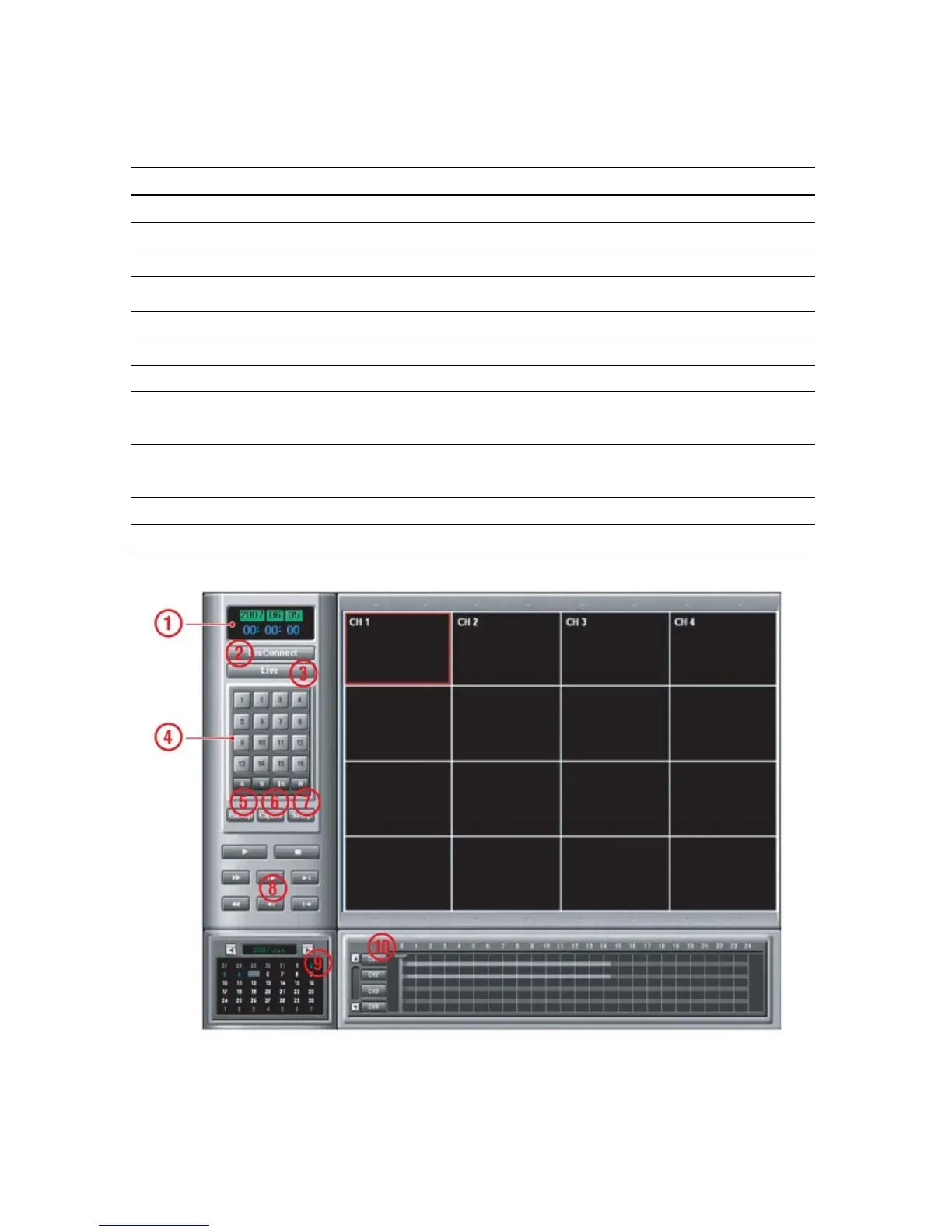
Table 10.2.1. Main controls in Live
No Name Description
1
DATE & TIME
Displays the current date and time.
2
CONNECT
Click this icon to connect to the DVR
3
SEARCH
Click this icon to search for recorded video.
4
LIVE DISPLAY MODE
Click these icons to select display mode.
5
PAUSE
Click this icon to pause the display screen.
6
CAPTURE
Click this icon to capture the image from live display.
7
SETUP
Click this icon to control remotely the setting of DVR.
8
PAN/TILT
Use these buttons to control the PAN/TILT features on the
remote camera.
9
ZOOM/FOCUS
Use these buttons to control the ZOOM/ FOCUS features on
the remote camera.
10
AUDIO
The audio can be turned on or off by clicking the audio icon.
11
CONNECTION STATUS
Shows the client connection information.
10-2-2. Search and Playback
Figure 10.2.2. Main user interface – Search & Playback
Table 10.2.2. Main controls – Search & Playback
68


 To Next Page