To exit from each menu.
5-2. SEARCH Screen
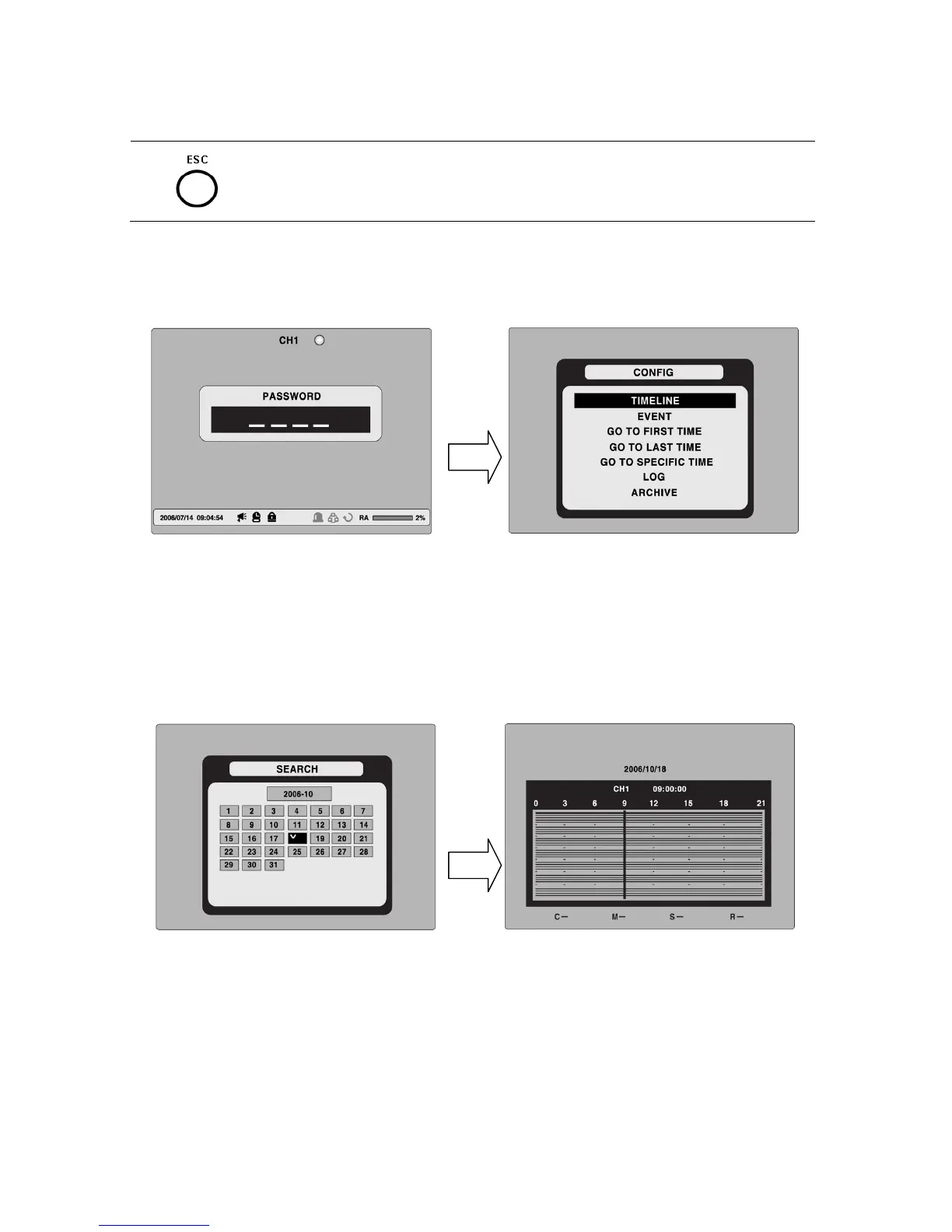
Press SEARCH in live mode to enter the Search screen.
When you press the Search button, DVR asks for a password as in Figure 5-2-1.
Figure 5.2.1. Search Screen
Enter the password using the arrow controls.
There are 7 ways of search menu such as TIMELINE, EVENT, GO TO FIRST TIME, GO TO
LAST TIME, GO TO SPECIFIC TIME, LOG, and ARCHIVE on the screen.
5-2-1. TIME-LINE Search
The TIME-LINE search window is used to find the stored video by using the time line bar.
Figure 5.2.2. Time-line Search
1. Select the date of the video to begin searching by using the LEFT, RIGHT, UP and DOWN
buttons to navigate through the days.
2. Once you have selected the date, press the SEL button to move to the time line search
window.
3. Use LEFT / F/ADV or RIGHT/ F/REW buttons to select a time zone on the 24 hours time
table.
46
Note
: The recording mode is indicated on the screen as below.


 To Next Page