ALARM OUT
Select alarm from 1 to 4.
SENSOR IN
Enable setting up to 4 sensors of 9/16 sensors for the each alarm.
MOTION ON
Enable setting up to 4 cameras of 9/16cameras for the each alarm.
VIDEO LOSS ON
Enable setting up to 4 cameras of 9/16 cameras for the alarm.
ALARM DURATION
Set the dwell time of alarm from1 to 60seconds.
3-4-2. SPOT – OUT
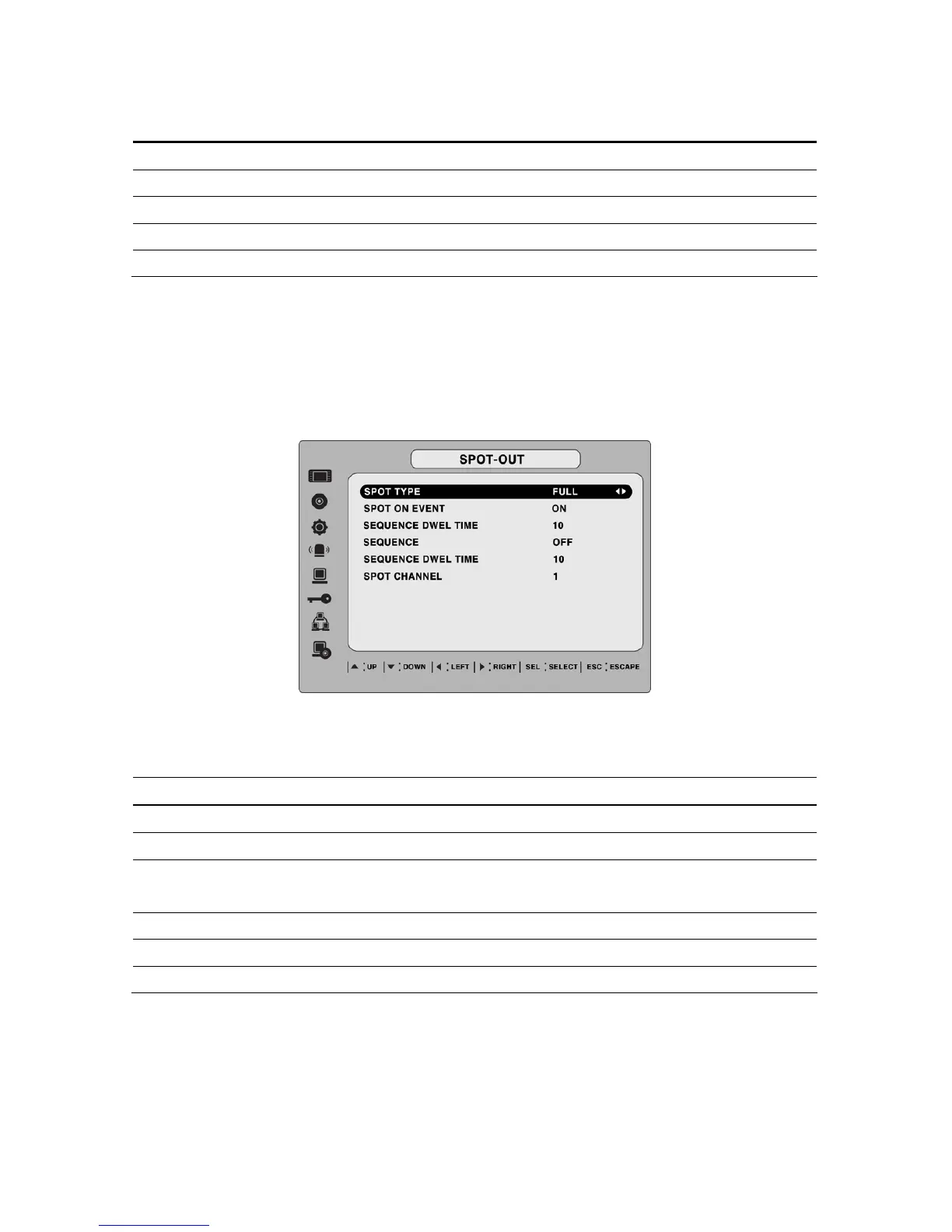
Figure 3.4.3. SPOT-OUT setup screen
Table 3.4.3. Menu item in SPOT-OUT Setup screen
Item Description
SPOT TYPE
Select either FULL or QUAD for spot channel display.
SPOT ON EVENT
Enable/disable spot channel display when event occurred.
SPOT EVENT DWELL
TIME
Set the dwell time for the display of the event activated channel.
SEQUENCE
Enable/disable sequential display of spot channel in full screen.
SEQ-DWEL TIME
Set the dwell time for spot channel display in sequential display.
SPOT CHANNEL
Set the channel for spot monitoring.
3-4-3 PTZ Setup
To control the PTZ functions of the camera, connect the controller to the RS-485 port.
28


 To Next Page