December 2008
Document #: 720002-0000R 17
6 Print Cleaning Instructions
Note: Under normal operating conditions, the minimum interval for cleaning the Nanoptix
PayCheck printer is 3 months or 5 km of paper printed, which ever comes first.
Note:
Pre saturated cleaning cards are also available for cleaning the thermal print head and
platen roller.
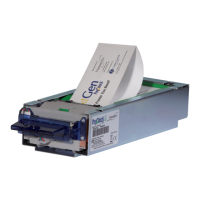
1. Open top cover and remove ticket tray.
Figure 18: Open cover
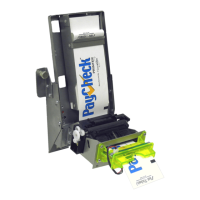
2. Remove excess dust using a cloth and/or portable vacuum cleaner
Figure 19: Remove dust


 To Next Page