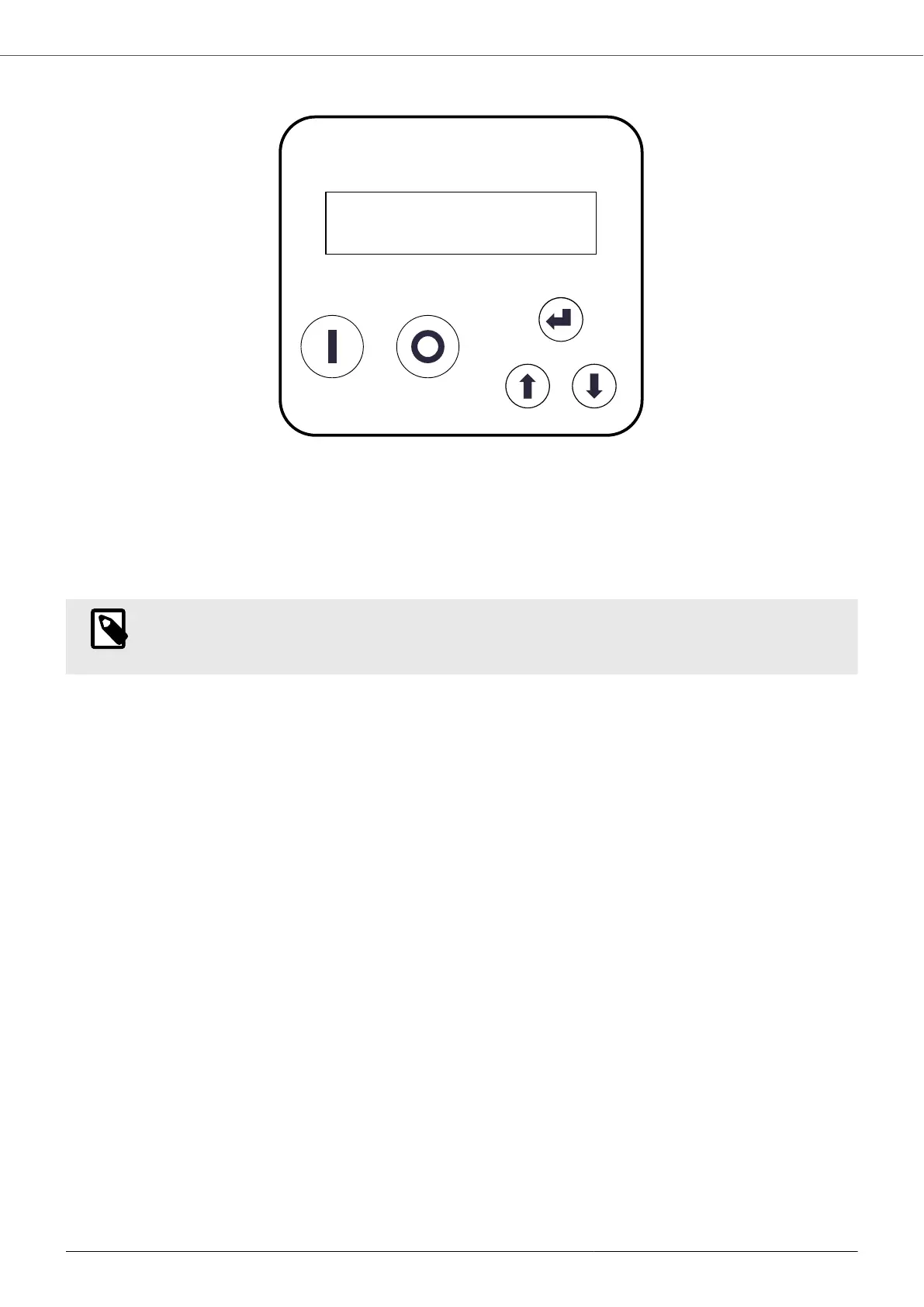
9.1. Keyboard and display
1. DISPLAY
2. START: motor start
3. STOP: motor stop / alarm reset / exit the menu
4. ENTER: access the menu / edit parameters / confirm parameters
5. +: parameter scrolling / parameter editing
6. -: parameter scrolling / parameter editing
NOTE
A confirmation acoustic signal helps the user to operate the device and provides a quick indication in
case of an alarm.
9.2. Control via App
The device can be controlled using a smartphone or tablet equipped with Bluetooth BTLE connectivity and with the
App Nastec NOW installed. The App is available for Android and iOS and may be downloaded, free of charge, from
the respective online stores.
Through the application it is possible to:
• Monitor multiple operating parameters simultaneously.
• Obtain energy consumption statistics and check alarm history.
• Run reports with the possibility of adding notes, images and send them by e-mail or store them in the digital
archive.
• Create schedules, save them in the archive, copy them to other devices, and share them among multiple users
• Control a device remotely, via Wi-Fi or GSM, using a smartphone placed nearby as a modem.
• Access manuals and additional technical documentation.
• Receive online help on parameters and alarms.
9.3. Initial set-up
The first time the device is switched on, the initial set-up is entered directly, through which it is possible to perform
a quick and complete programming of the device in relation to the pump and the system in which it is installed.
Failure to complete the initial set-up makes it impossible to use the device. In any case, it is possible to repeat the
initial set-up at any time, for example if you decide to install the device in a new system.
The device suggests default values for each parameter. If you wish to modify the basic setting, simply press the
ENTER key, wait for the parameter to start flashing and use the scroll keys. Press ENTER again to save the
selected value, which therefore stops flashing.
During the initial set-up, the device control mode is automatically set to Control mode = Constant value and Unit =
bar.
A detailed description of the different parameters encountered during the initial set-up is provided here below.
VASCO - VAriable Speed COntroller
33


 To Next Page