Chapter 3 Configuring Your SCXI Hardware and Software
Getting Started with SCXI 3-2 www.ni.com
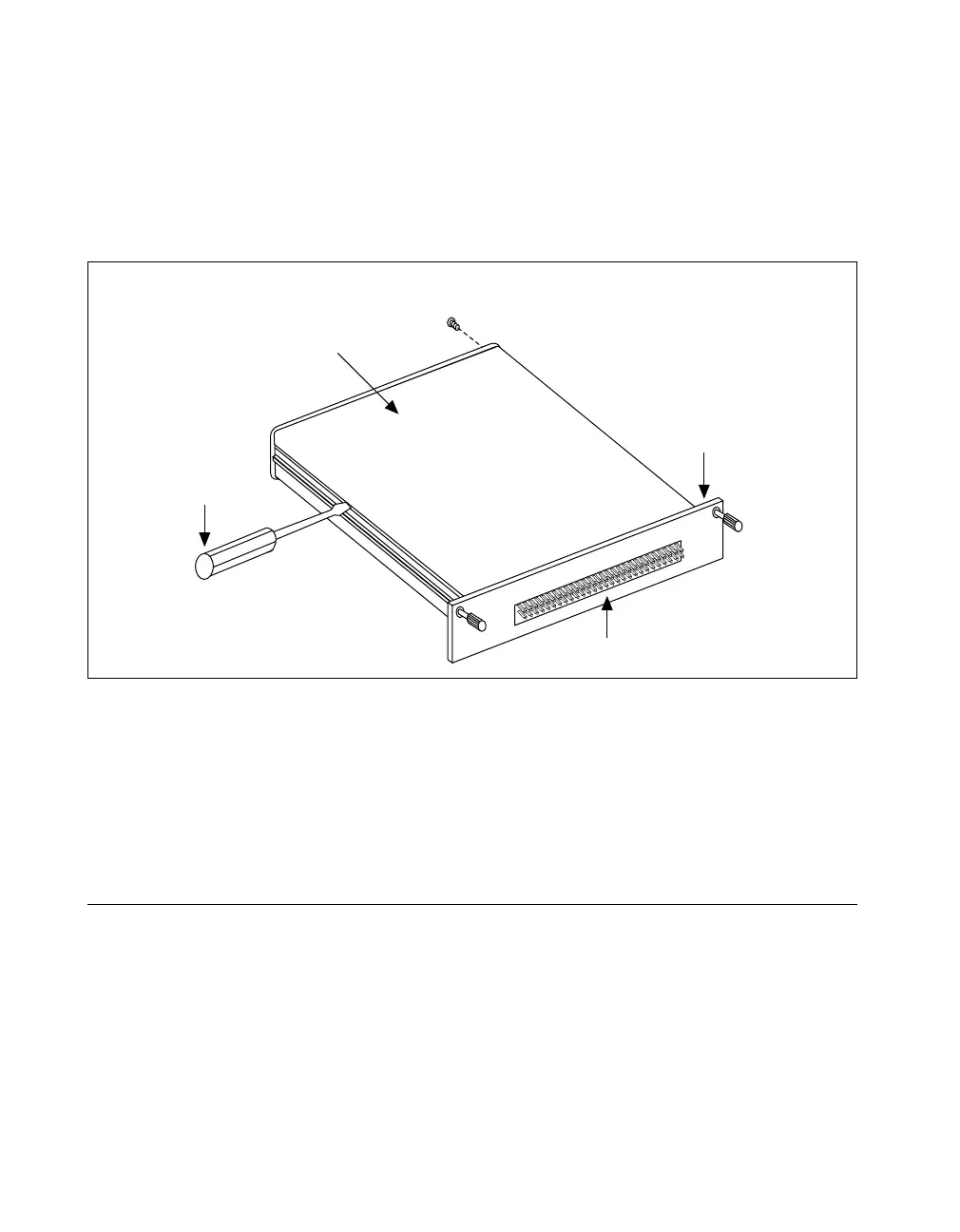
Use this procedure to access the user-configurable jumpers.
1. Remove the grounding screw shown in Figure 3-1.
2. Remove the cover by inserting a flathead screwdriver in the slot at the
bottom of the module and gently pushing the screwdriver down until
the cover pops off, as shown in Figure 3-2.
Figure 3-2. Removing the SCXI Module Cover
To replace the cover, follow these steps:
1. Align the cover with the slot at the top of the module and snap the
bottom of the cover into place.
2. Replace the grounding screw, taking care not to over-tighten it.
Analog Modules
The following sections describe each analog SCXI module and contain
step-by-step instructions for configuring the jumpers on each module.
Follow the steps in the procedure for your module, check the position of
each jumper, and read the jumper position description. Change the
appropriate jumpers to configure the module for your application.
Grounding
Screw
Top of Module
Front Connector
Removable Cover


 To Next Page
 Loading...