26
Console Features
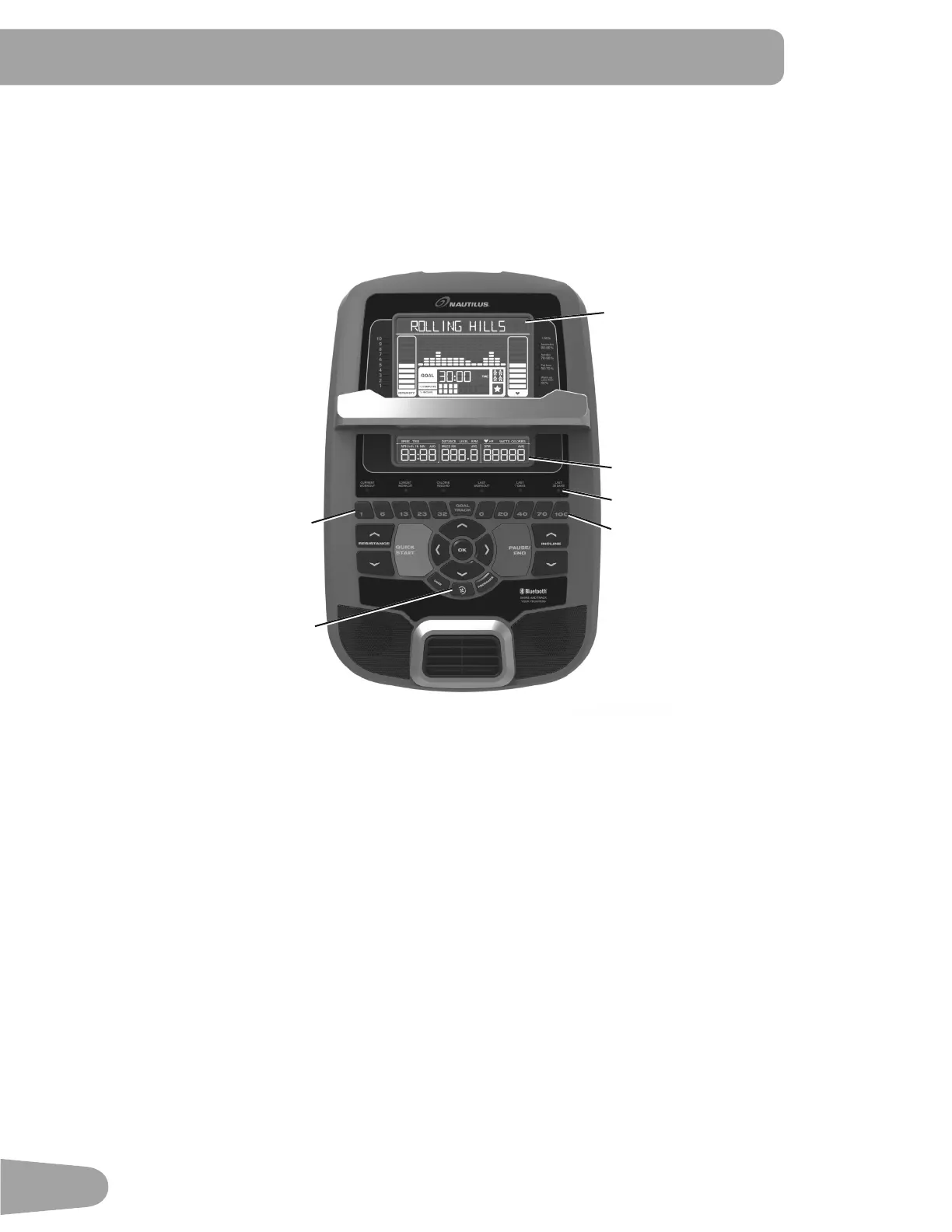
The Console provides important information about your workout and lets you control the resistance levels while you
H[HUFLVH7KH&RQVROHIHDWXUHVWKH1DXWLOXV'XDO7UDFN
™
display with touch control buttons to navigate you through the
H[HUFLVHSURJUDPV
Note: Though your machine is Bluetooth
®
enabled, it is unable to receive input (possibly from a Bluetooth
®
enabled
chest strap) or play audio across the Bluetooth
®
connection. The Console uses the Bluetooth
®
FRQQHFWLYLW\WRH[SRUW
\RXUZRUNRXWGDWDWR¿WQHVVDSSVRQO\
Keypad Functions
Resistance Increase (c) button- Increases the workout resistance level
Resistance Decrease (d) button- Decreases the workout resistance level
Incline Increase (c) button- Increases the Incline angle of the Rail Assembly
Incline Decrease (d) button- Decreases the Incline angle of the Rail Assembly
QUICK START button- Begins a Quick Start workout
86(5EXWWRQ6HOHFWVD8VHUSUR¿OH
PROGRAMS button- Selects a category and workout program
PAUSE / END button- Pauses an active workout, ends a paused workout, or goes back to the previous screen
*2$/75$&.EXWWRQ'LVSOD\VWKH:RUNRXW7RWDOVDQG$FKLHYHPHQWVIRUWKHVHOHFWHG8VHU3UR¿OH
Increase (c) button- Increases a value (age, time, distance, or calories) or moves through options
Left (eEXWWRQ'LVSOD\VGLႇHUHQWZRUNRXWYDOXHVGXULQJDZRUNRXWDQGPRYHVWKURXJKRSWLRQV
Upper Display
Lower Display
Incline Level Quick Buttons
Resistance Level Quick Buttons
Achievement Indicator Lights
Fan



 To Next Page