17
Console Features
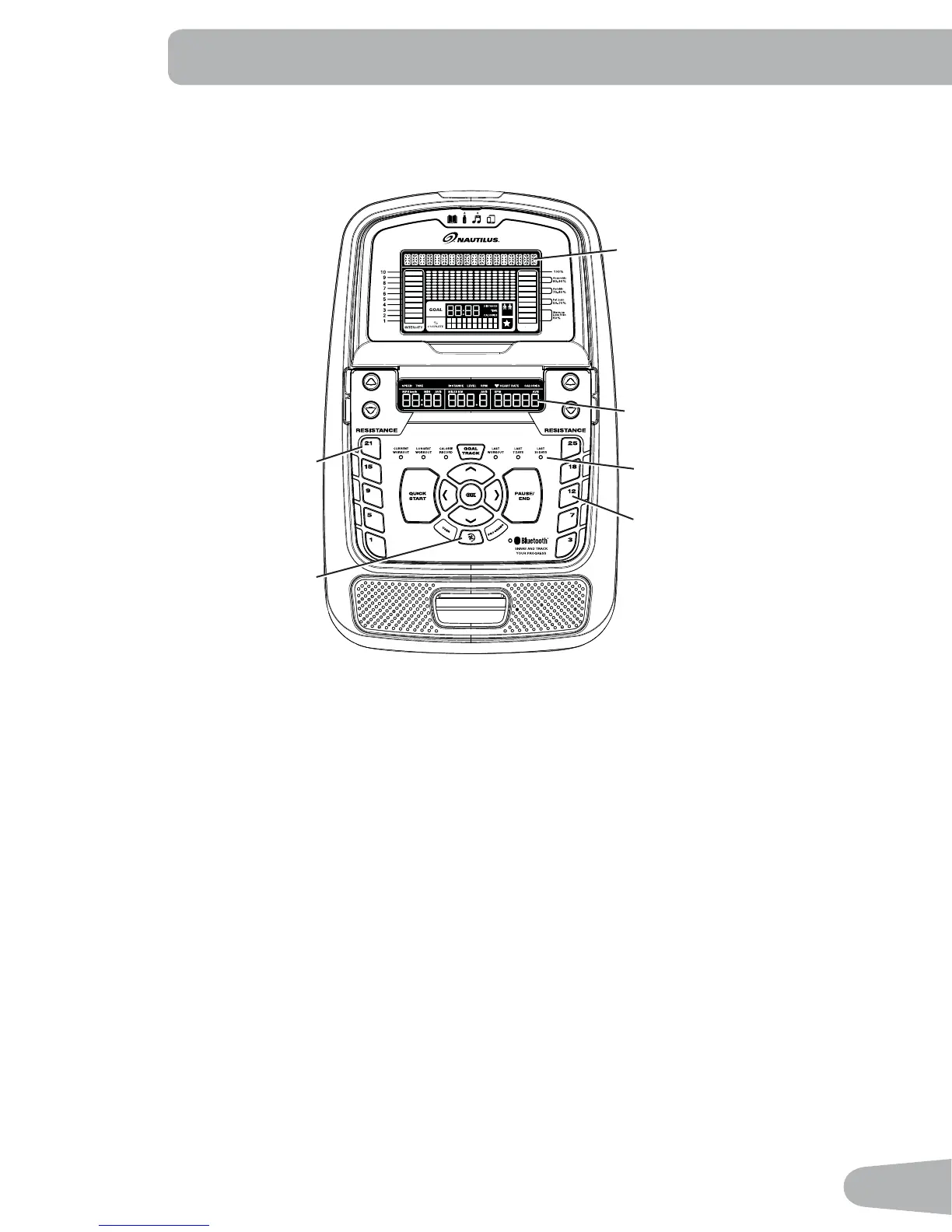
The Console provides important information about your workout and lets you control the resistance levels while you
e[ercise. The Console features the Nautilus Dual Track™ display with touch control buttons to navigate you through the
e[ercise programs.
Keypad Functions
Resistance Increase (c) button Increases the workout resistance level
Resistance Decrease (d) button Decreases the workout resistance level
QUICK START button Begins a Quick Start workout
USER button Selects a User pro¿le
PROGRAMS button Selects a category and workout program
PAUSE / END button Pauses an active workout, ends a paused workout, or goes back to the previous screen
GOAL TRACK button Displays the Workout Totals and Achievements for the selected User Pro¿le
Increase (c) button Increases a value (age, time, distance, or calories) or moves through options
Left (e) button Displays different workout values during a workout, and moves through options
OK button Starts a Program workout, con¿rms information, or resumes a paused workout
Right (f) button Displays different workout values during a workout, and moves through options
Decrease (d) button Decreases a value (age, time, distance, or calories) or moves through options
Hr
Upper Display
Lower Display
Resistance Level Quick Buttons
Achievement Indicator Lights
Fan
Resistance Level Quick Buttons


 To Next Page