English-11
English
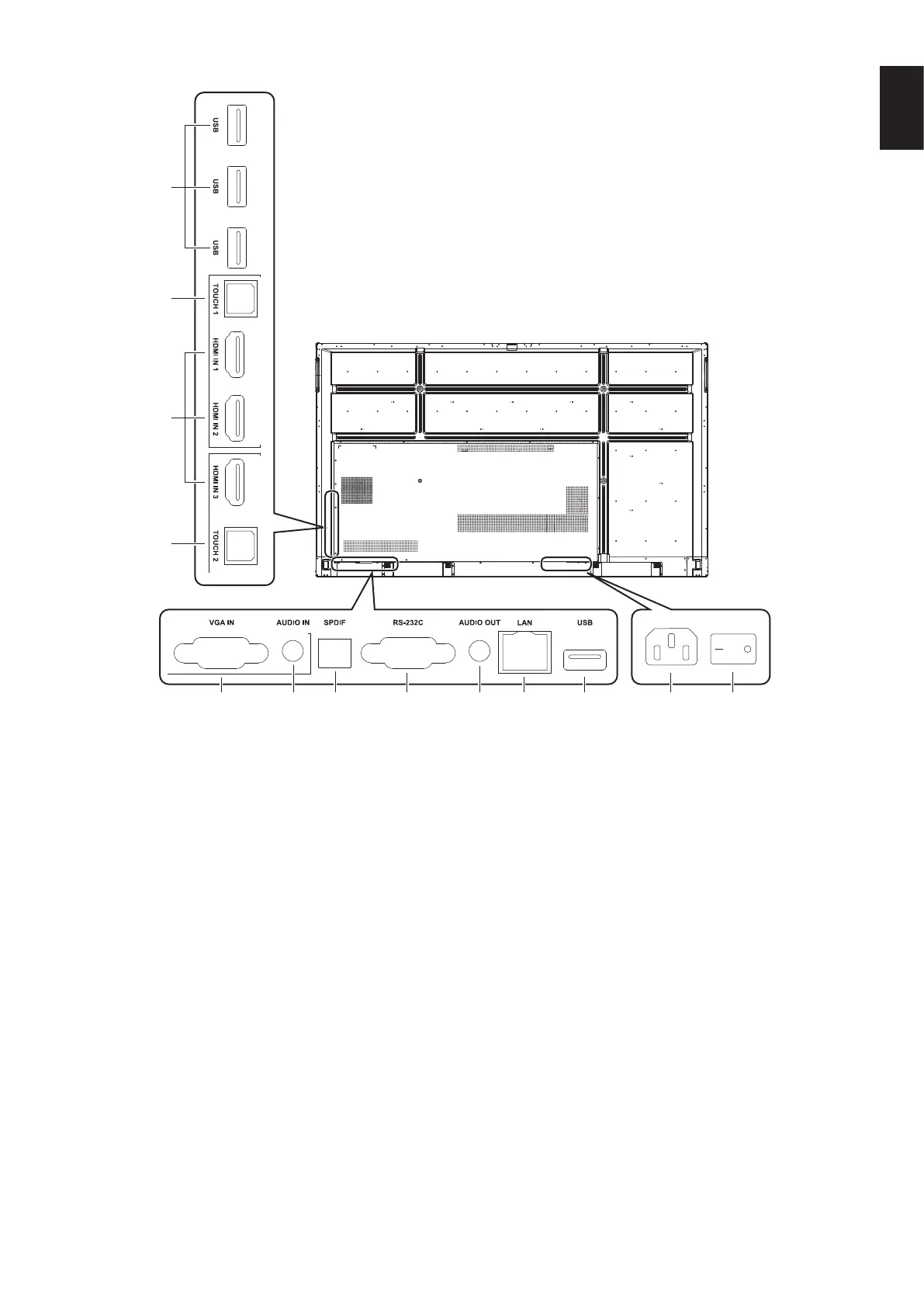
Terminal Interface
1 USB2.0 (Rear side)
Connect USB devices such as mobile hard disk, U disk, USB
Keyboard and mouse, USB drives, etc.
USB 2.0 (Rear bottom)
USB interface of system.
2 TOUCH
Touch signal output to the external computer.
3 HDMI IN
HDMI signal input, connect to devices with HDMI output
interface (personal computer with HDMI output, set-top box,
or another video device).
4 VGA IN
External computer image input.
5 AUDIO IN
External computer audio input.
6 SPDIF
Optical output.
7 RS-232C
Serial interface, used for mutual transfer of data between
devices.
8 AUDIO OUT
Audio output to the external speaker.
NOTE: This connector is not a Headphone terminal.
9 LAN
Connecting RJ-45 terminals.
0 AC Inlet
AC power input, connecting AC power supply.
! AC SWITCH
To open or shut down AC power supply. “I” means power on,
“O” means power off.










 To Next Page