EasyManua.ls Logo

NEC PC-8201A - Page 137

NEC PC-8201A
219 pages
Print Icon
To Next Page IconTo Next Page
To Previous Page IconTo Previous Page
Loading...
Chapter
7
The
cursor
will
be
flashing
under
the
"p"
of
the
word
"ports”.
Now
input
the
f.1
Function
Key
again
and
the
last
line
of
the
screen
will
display:
String
:ports
This
is
because
the
PC-8201
remembers
the
last
string,
making
consecutive
searches
easier.
Consecutive
searching
is
performed
by
the
use
of
the
NEXT
command
in
combination
with
the
FIND
command.
Press
the
Q
Key
and
the
last
line
of
your
screen
will
display
the
message:
"No
match"
This
is
because
the
search
starts
after
the
letter
"p"
of
the
word
"ports",
and
the
remainder
of
your
text
file
does
not
contain
that
word.
Now
move
the
cursor
one
position
to
the
left,
so
that
it
is
positioned
at
the
space
just
before
the
word
"ports".
Again
press
the
f.1
Function
Key.
The
cursor
will
move
to
the
position
of
the
"p"
in
the
word
"ports"
because
it
found
the
string
being
searched
for
in
the
FIND
command.
Now
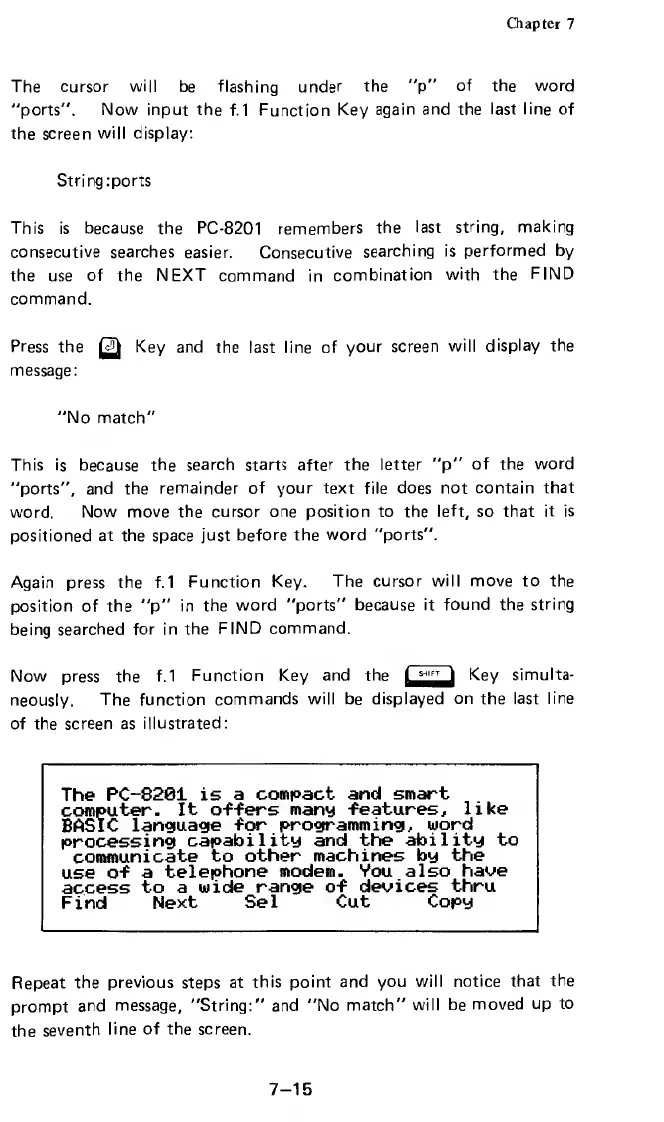
press
the
f.1
Function
Key
and
the
Key
simulta¬
neously.
The
function
commands
will
be
displayed
on
the
last
line
of
the
screen
as
illustrated:
The
PC-8281
is
a
compact
and
smart
computer.
It
offers
many
features,
like
BASIC
language
for
programming,
word
processing
capability
and
the
ability
to
communicate
to
other
machines
by
the
use
of
a
telephone
modem.
Vou
also
have
access
to
a
wide
range
of
devices
thru
Find
Next
Sel
Cut
Copy
Repeat
the
previous
steps
at
this
point
and
you
will
notice
that
the
prompt
and
message,
"String:"
and
"No
match"
will
be
moved
up
to
the
seventh
line
of
the
screen.
7-15

Related product manuals