EasyManua.ls Logo

NEC PC-8201A - Page 47

NEC PC-8201A
219 pages
Print Icon
To Next Page IconTo Next Page
To Previous Page IconTo Previous Page
Loading...
Chapter
4
Data
Recorder
The
Data
Recorder
is
used
for
the
purpose
of
saving
BASIC
programs
or
TEXT
data
files
on
cassette
tape.
The
(PC-6082),
(PC-8281),
or
any
other
cassette
recorder
may
be
used
with
the
PC-8201
comput¬
er.
The
information
to
be
saved
on
tape
is
sent
to
the
recorder
as
audio
signals.
This
stored
data
can
then
be
reused
at
a
later
time.
The
cassette
recorder
you
choose
to
use
with
the
PC-8201
should
have
the
following
basic
features:
EARPHONE
jack
REM
(REMOTE)
jack
MIC
(MICROPHONE)
jack
CAPSTAN
head
drive
The
PC-8201
power
switch
should
be
OFF
prior
to
connecting
the
recorder.
The
(PC-8293)
cable
is
used
to
connect
the
recorder
to
the
PC-8201.
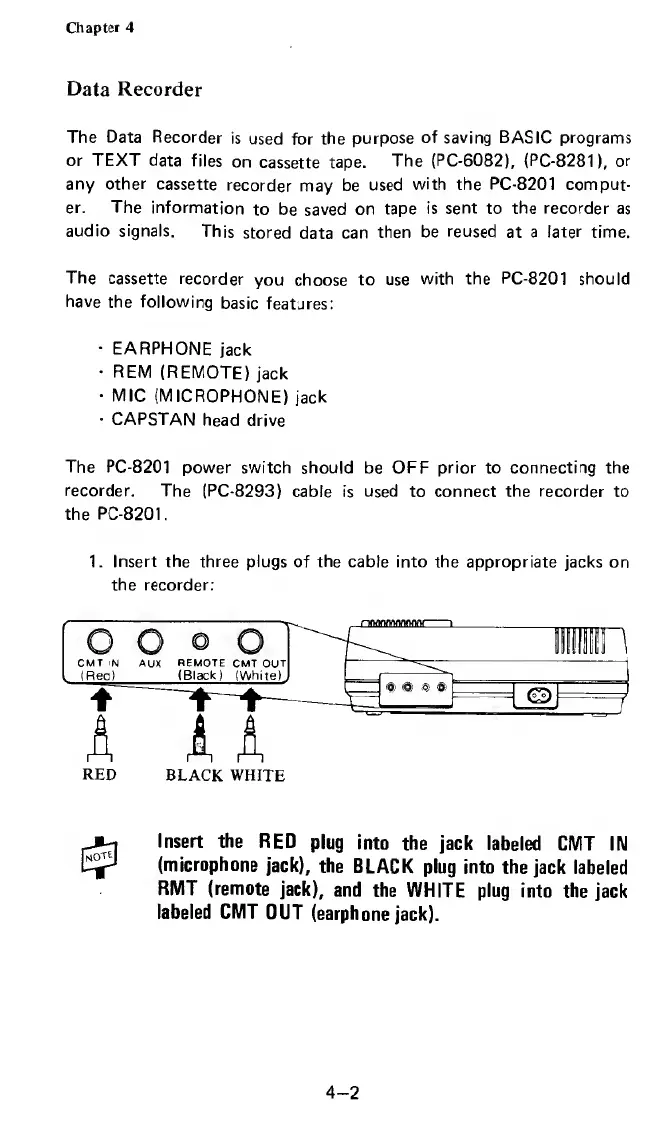
1.
Insert
the
three
plugs
of
the
cable
into
the
appropriate
jacks
on
the
recorder:
Insert
the
RED
plug
into
the
jack
labeled
CMT
IN
(microphone
jack),
the
BLACK
plug
into
the
jack
labeled
RMT
(remote
jack),
and
the
WHITE
plug
into
the
jack
labeled
CMT
OUT
(earphone
jack).
4-2

Related product manuals