Page 10 of 28
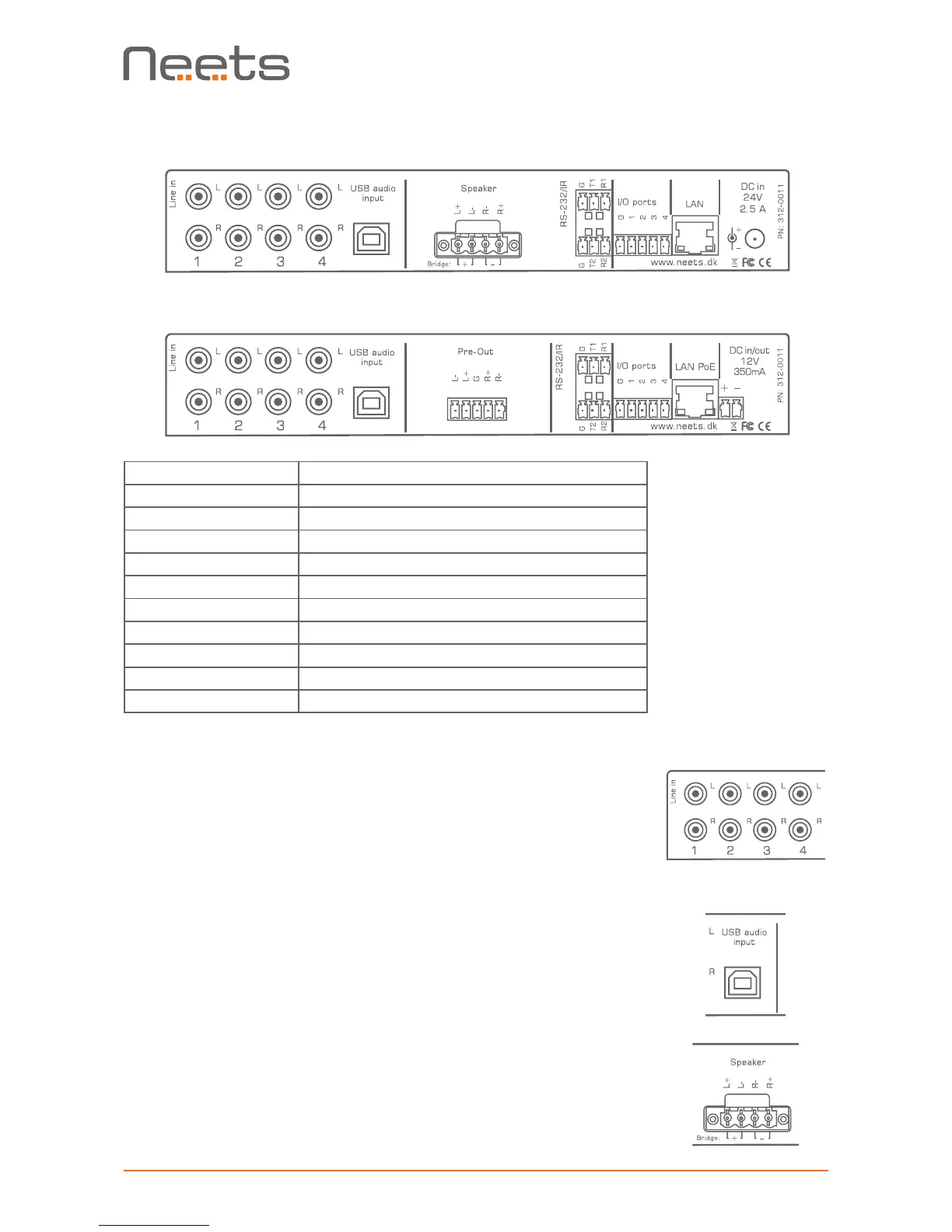
Rear
Neets Audio Amplifier 2:25
Neets Audio Preamplifier
Number: Description
1 4 x stereo line level audio input
2 1 x USB audio input
3 Amplier 2:25 1 x stereo speaker level output
3 Preamplier 1 x stereo balanced line level output
4 2 x bi-directional RS-232 or IR transmitter
5 4 x digital I/O
6 Amplier – 2:25 1 x RJ-45 Network (LAN) connector
6 Preamplier 1 x RJ-45 Network (LAN) connector w. PoE
7 Amplier – 2:25 24 V DC power input
7 Preamplier 12 V DC power input or output
1 3 4 52 6 7
1 3 4 52 6 7
Line audio input
The connectors marked “Line in” are line level audio inputs. Connect your
audio sources here with an RCA cable.
White inputs are left channel, red inputs are right channel.
USB audio input
The USB audio connector is used to connect the amplier to your PC
or MAC for use as a USB audio source.
Connect using a USB A male to USB B male cable. Remember not to
exceed the maximum USB cable length of 5 meters.
Speaker output (Amplier - 2:25 only)
The loudspeakers are connected to the Speaker output using the supplied
mating Euroblock connector. The loudspeaker cables can be securely fas-
tened to the amplier by tightening the two screws built into the connector;
this is important when connecting heavier speaker cables.


 To Next Page