Page 27 of 28
RS-232 settings
The RS-232 settings commands are used to congure the RS-232 interfaces on the amplier.
Please remember to store the settings with the Save command if you want the unit to remember
the settings after a reboot.
All commands start with: NEUNIT=<A>,SETTINGS=RS-232 , RS-232 =<B>,
Where <A> is the unit ID, default 1 and <B> is the RS-232 number to control. All commands
must end with a \CR.
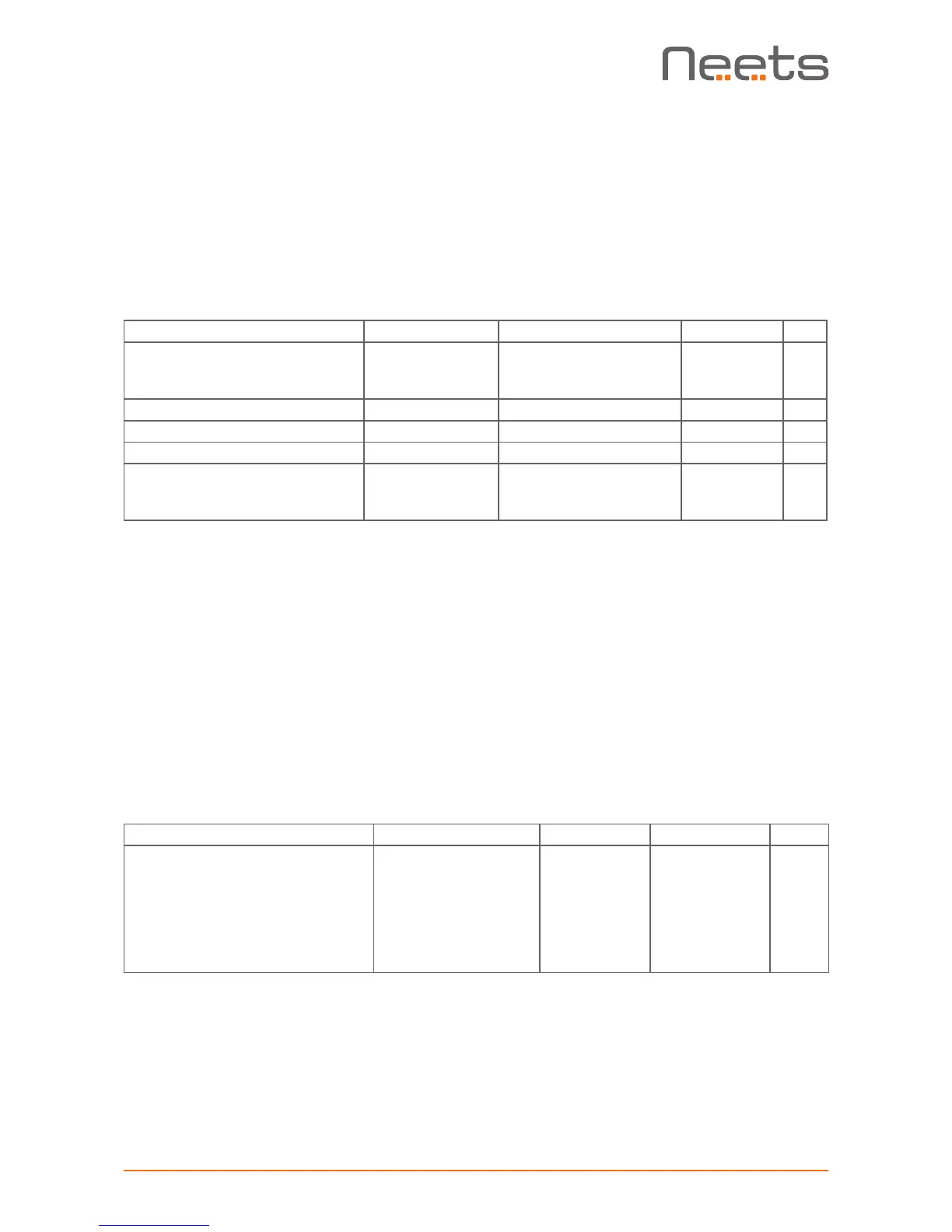
Description: Syntax <X> Default <X> R/W
Set the comport baud rate BAUDRATE=<X> 1200,2400,4800,
9600,14400,19200,
38400,57600,115200
0 R/W
Set the comport data bit DATABIT=<X> TRUE or FALSE FALSE R/W
Set the comport parity PARITY=<X> ON OR OFF OFF R/W
Set the comport stop bit STOPBIT=<X> -70 to -30 -50 R/W
Set the comport TCP Port
number (if used as LAN
gateway)
IPPORT=<X> -70 to -30 -50 R/W
Example of use:
- NEUNIT=1,SETTINGS=RS-232 ,RS-232 =1,BAUDRATE=19200,DATABIT=7\CR <- Sets
RS-232 port 1 to 19200 baud rate and 7 databit.
- NEUNIT=1,SETTINGS=RS-232 ,RS-232 =2,IPPORT=3570\CR <- Sets RS-232 port 2
IP port to 3570.
RS-232 control
The command below sends out a command on the RS-232 port.
For all commands the mandatory start sequence look like this: NEUNIT=<A>,RS-232 =<B>
Where <A> as default is 1, and <B> is the RS-232 port number to use. All commands must be
started with a “,” and all lines must end with a \CR
Description: Syntax <X> Default <X> R/W
Data container.
Each byte must be converted to
a 2 byte ASCII value.
Fx: “Neets” becomes
“4E65657473”
DATA=<X> Up to 500
bytes of date
R/W
Example of use: NEUNIT=1,RS-232 =2,DATA=4E65657473\CR - Sends “Neets” on RS-232
port 2


 To Next Page