Page 14 of 28
RS-232 connection
Controlling the amplier or preamplier from a control
system by RS-232
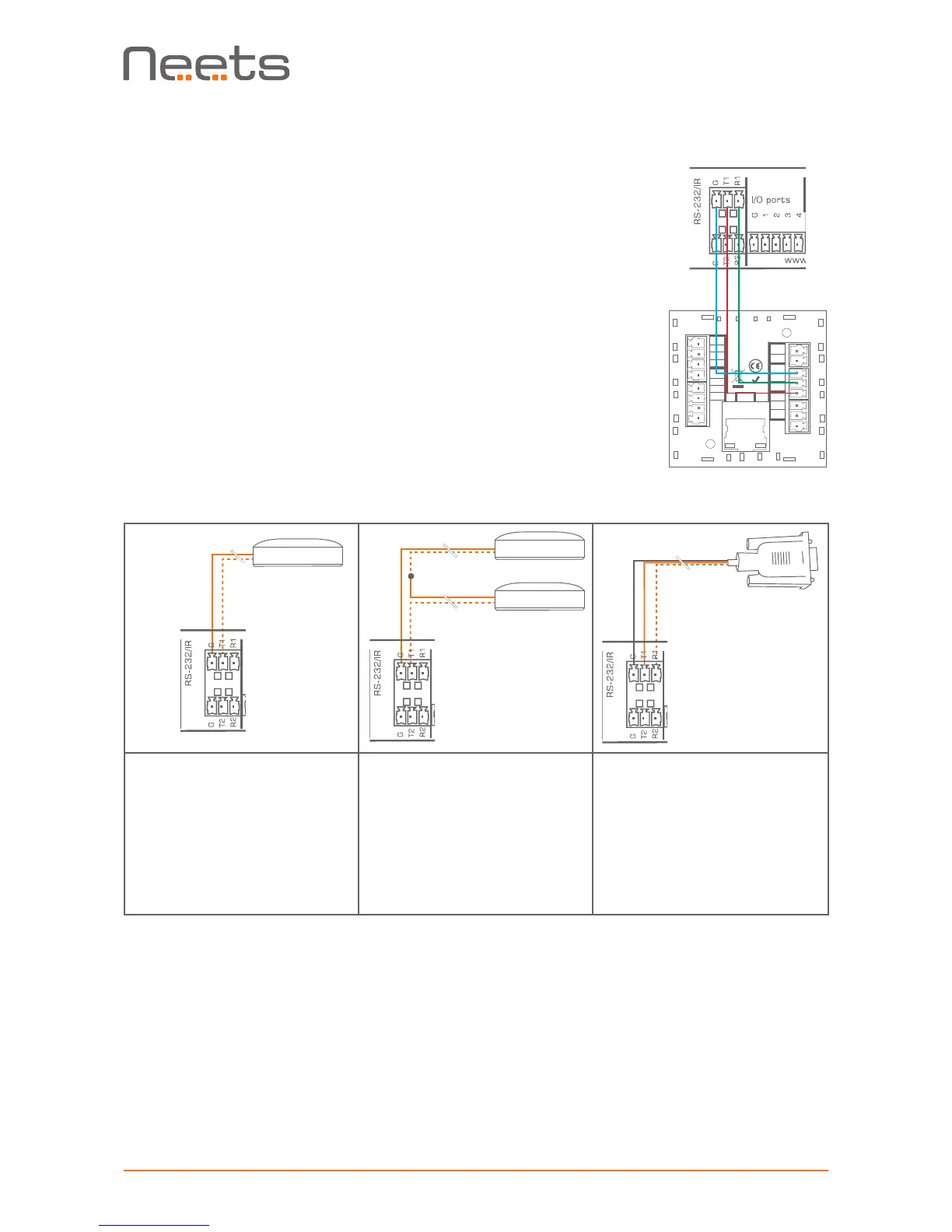
To control the amplier or preamplier unit by RS-232, connect the RS-232
port from the control system to the unit’s RS-232 port 1 (T1, R1 and G).
The required commands for RS-232 control can be found in section “LAN
and RS-232 protocol” on page 20.
Remember, it is not possible to control the amplier or preamplier by both
RS-232 and LAN at the same time.
Using the amplier or preamplier as a LAN to RS-232/
IR gateway
Both of the RS-232/IR ports can be used as either RS-232 or as IR
emitter gateways in conjunction with the LAN port.
P/N#:
310-0102
LAN
Neets Control
Sierra II, EU
RoHS
GND
I/O 1
I/O 2
I/O 3
PWR
NDA
NCL
GND
+12V
GND
GND
TX-1
RX-1
GND
TX-3
TX-2
When used as dual IR port:
Connect the first IR emitter
white striped wire to T1 or
T2 and first IR emitter black
wire to second IR emitter
white striped wire; connect
second IR emitter black wire
to G, as shown above.
When used as single IR port:
Connect the IR emitter
white striped wire to T1 or
T2 and the black wire to G
as shown above.
When used as RS-232 port:
Connect the device to T1/
T2, R1/R2 and G, as shown
above. Please check manual
of equipment to control for
the correct pin connection.
IR-Emitter
IR 1 Emitter
IR 2 Emitter
Using the amplier or preamplier with RS-232 loop-through
By default, one RS-232 line from the control system allows connection to only one receiver, in this
case the amplier or preamplier unit. However, by using the unit’s second RS-232 port as a loop-
through port, you can connect and control a second device such as a display or a projector.
So, how do we do this? The unit’s RS-232 port 1 analyzes and responds only to those commands
from the control system that it recognizes as applying to its own functions. The remaining com-
mands, not applicable to amplier or preamplier functions, are retransmitted on RS-232 port 2.
The benet of this operating mode is that you can set any communications parameter (like baud
rate) on RS-232 port 2.


 To Next Page