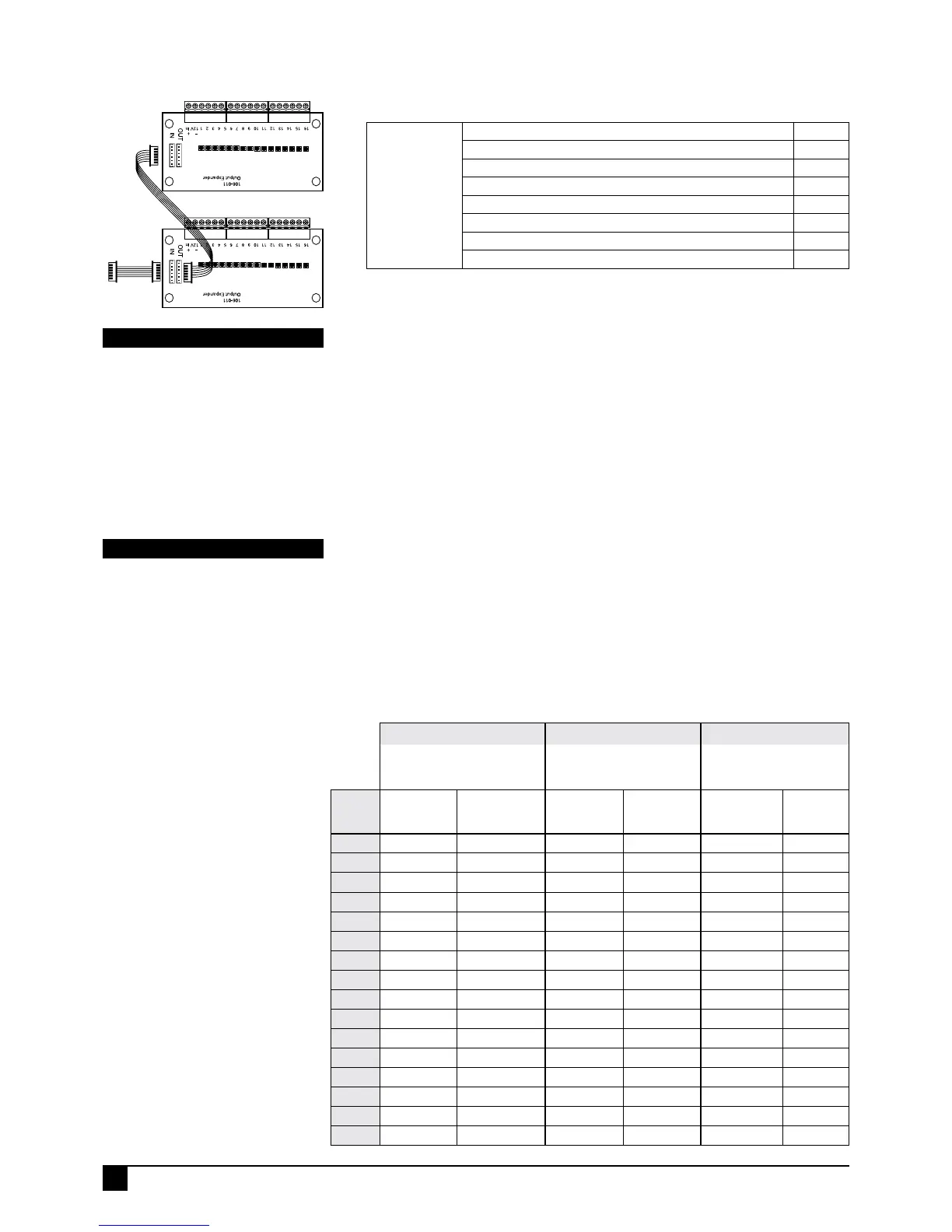
ENABLE OUTPUT EXPANDER
Selecting this option enables the optional 106-011 Output Expander.
When this option is enabled, the AUX connector on the main board will only drive the
Output Expander.
When this option is disabled, the AUX header is used for the 106-013 Four Relay
Board.
PROGRAMMING SEQUENCE:
P117E 1E toggles the option ON and OFF
OFF: No Output Expander
ON: Output Expander enabled
P117E 1E
PROGRAM MODE LEVEL
Installer mode or NessComms.
FACTORY DEFAULT
OFF: No Output Expander.
NOTES
boards.
EXPANDER OUTPUT FORMAT A, B, C
Use this option along with option P117E 5E to configure the output expander outputs
as per the output tables.
Three different combinations of outputs are available for either a single or dual output
expanders.
PROGRAMMING SEQUENCE:
P117E 2E toggles the option ON and OFF
P117E 2E
PROGRAM MODE LEVEL
Installer mode or NessComms.
FACTORY DEFAULT
OFF
NOTES
the second 6-way header on the first
expander. The expander closest to the
panel becomes Expander 1.
ON/OFF state of the User Codes 13 to 15.
These outputs can be made to change
via:
A) Radio key. Pressing the ON button
turns the output On, OFF turns it OFF.
A Radio key must be programmed to a
User Code 13~15 for this will operate.
B) Radio keypad auxiliary key. The
radio keypad auxiliary key (there are 2
auxiliary keys) must be programmed to
a User Code 13~15.
C) The D8x/D16x keypad using ARM
- DISARM with a User Code. Enter
Arm+User_Code_13~15 to turn the
output on. User_Code_13~15 + E will
turn the output off.
Note that the USER CODE does not
have to be assigned to an AREA for this
to work.
DISARM buttons on Radio Keys do not
change the Code13-15 outputs on the
output expander.
Only the AUX button works, pulsing ON
the Code13-15 output for the time set by
P145E.
Option No. Description Default
P117E
1E
Enable Output Expander
OFF
2E
Expander Output Format A & B
OFF
3E
Day Zone follower
OFF
4E
Output Exclude
OFF
5E
Expander Output Format C
OFF
6E
User Code Toggle or Pulse
OFF
7E
[not used]
OFF
8E
[not used]
OFF
To D8/D16
AUX header
54
NESS D8X / D16X DELUXE CONTROL PANEL – INSTALLATION MANUAL
PROGRAMMING
Output Format A Output Format B Output Format C
P117E 1E = ON
P117E 2E = OFF
P117E 5E = OFF
P117E 1E = ON
P117E 2E = ON
P117E 5E = OFF
P117E 1E = ON
P117E 2E = OFF
P117E 5E = ON
OUTPUT EXPANDER 1
(Or if using only
one expander)
EXPANDER 2 EXPANDER 1
(Or if using only
one expander)
EXPANDER 2 EXPANDER 1
(Or if using only
one expander)
EXPANDER
2
1 Zone 1 Aux 5 Zone 1 Aux 5 Aux 5 Zone 1
2 Zone 2 Aux 6 Zone 2 Aux 6 Aux 6 Zone 2
3 Zone 3 Aux 7 Zone 3 Aux 7 Aux 7 Zone 3
4 Zone 4 Aux 8 Zone 4 Aux 8 Aux 8 Zone 4
5 Zone 5 User Code 13 Zone 5 User Code 13 User Code 13 Zone 5
6 Zone 6 User Code 14 Zone 6 User Code 14 User Code 14 Zone 6
7 Zone 7 User Code 15 Zone 7 User Code 15 User Code 15 Zone 7
8 Zone 8 Tel. Line Fail Zone 8 Tel. Line Fail Tel. Line Fail Zone 8
9 Zone 9 Aux 1 Aux 1 Zone 9 Aux 1 Zone 9
10 Zone 10 Aux 2 Aux 2 Zone 10 Aux 2 Zone 10
11 Zone 11 Aux 3 Aux 3 Zone 11 Aux 3 Zone 11
12 Zone 12 Aux 4 Aux 4 Zone 12 Aux 4 Zone 12
13 Zone 13 Arm Home Arm Home Zone 13 Arm Home Zone 13
14 Zone 14 Mains Fail Mains Fail Zone 14 Mains Fail Zone 14
15 Zone 15 Battery Fail Battery Fail Zone 15 Battery Fail Zone 15
16 Zone 16 Ext. Tamper Ext. Tamper Zone 16 Ext. Tamper Zone 16



 To Next Page