Digital Video Recorder for Ness IQ-
NTP Server
Click (
) keyboard icon in
NTP Server frame and the virtual keyboard will appear. Input IP address of NTP server.
NOTE
“Use NTP” function connected to the
Currently used NTP is administered by pool.ntp.org and its IP address is 65.23.154.62. However, users are allowed to use IP a
NTP site.
Interval
Set clock-update-interval from NTP
Server. Normally, user can adjust 1 hour up to 24 hours.
System Clock
Display DVR clock.
Server Clock
Display NTP Server’s clock if Internet is connected to Server Clock. If not displaying, please click (
displayed, please click (
Choose ‘OK’ to confirm the clock synchronization.
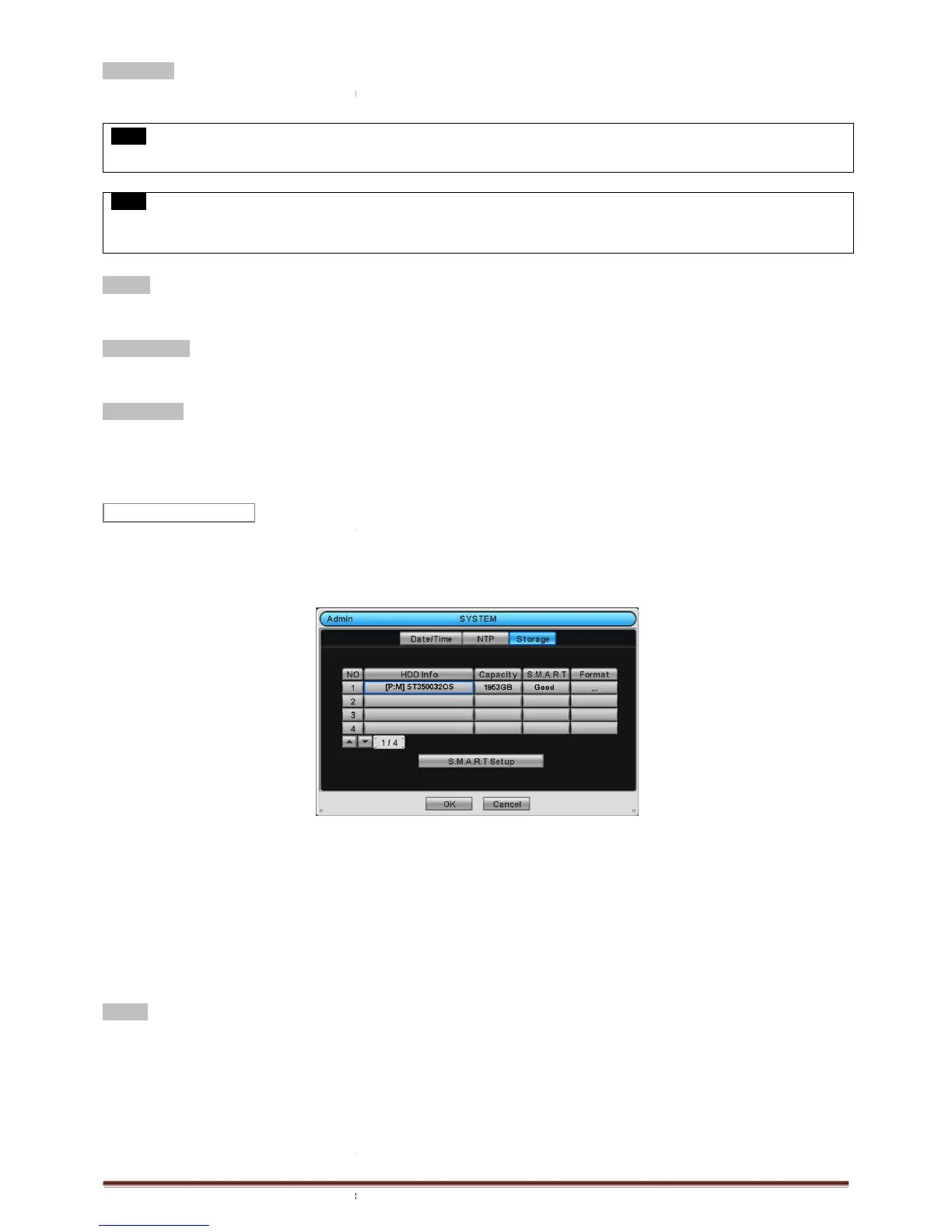
When users click the storage tab,
following screen will appear.
Monitoring Analysis and Reporting Technology) function for HDD format and auto
Clicking Up and Down button for checking up the status of HDD and
SATA port will allow users to connect up to maximum
When user installs full storage device and DVD
as below:
- 1. Internal SATA 1~4 Ports
- 2. External SATA 1
- 3. DVD-RW
Format
User must format when:
- install new HDD
- add another HDD
- replace HDD
- move HDD (change installation port)
- remove HDD
Click (
) Add/Remove frame in Format column and choose ‘OK’ on the dialogue box to start
NTP Server frame and the virtual keyboard will appear. Input IP address of NTP server.
, user should set the Time
zone correctly to operate the NTP function properly.
Currently used NTP is administered by pool.ntp.org and its IP address is 65.23.154.62. However, users are allowed to use IP a
Server. Normally, user can adjust 1 hour up to 24 hours.
Display NTP Server’s clock if Internet is connected to Server Clock. If not displaying, please click (
displayed, please click (
to synchronize NTP Server’s clock with DVR clock.
Choose ‘OK’ to confirm the clock synchronization.
following screen will appear.
Monitoring Analysis and Reporting Technology) function for HDD format and auto
Clicking Up and Down button for checking up the status of HDD and
SATA port will allow users to connect up to maximum
When user installs full storage device and DVD
SATA storage, then following procedures will be listed
) Add/Remove frame in Format column and choose ‘OK’ on the dialogue box to start
NTP Server frame and the virtual keyboard will appear. Input IP address of NTP server.
zone correctly to operate the NTP function properly.
Currently used NTP is administered by pool.ntp.org and its IP address is 65.23.154.62. However, users are allowed to use IP a
Display NTP Server’s clock if Internet is connected to Server Clock. If not displaying, please click (
to synchronize NTP Server’s clock with DVR clock.
Monitoring Analysis and Reporting Technology) function for HDD format and auto
SATA storage, then following procedures will be listed



 To Next Page