Digital Video Recorder for Ness IQ-
Following format, DVR will auto-
reboot. If there are more than 2 HDDs, please formats each of HDDs. DVR will auto
when all the HDDs are formatted.
If the format changes to ‘---
‘after reboot, it means formatting has been properly done.
EXECUTE REMOVE PROCEDURE EVEN WHEN USER REMOVE PREVIOUSLY INSTALLED HDD. THE REMOVE PROCEDURE IS THE
SAME AS THE FORMAT PROCEDURE DESCRIBED ABOVE.
Click the frame on S.M.A.R.T column and temperature and HDD damage will show.
S.M.A.R.T Setup
Please click (
)
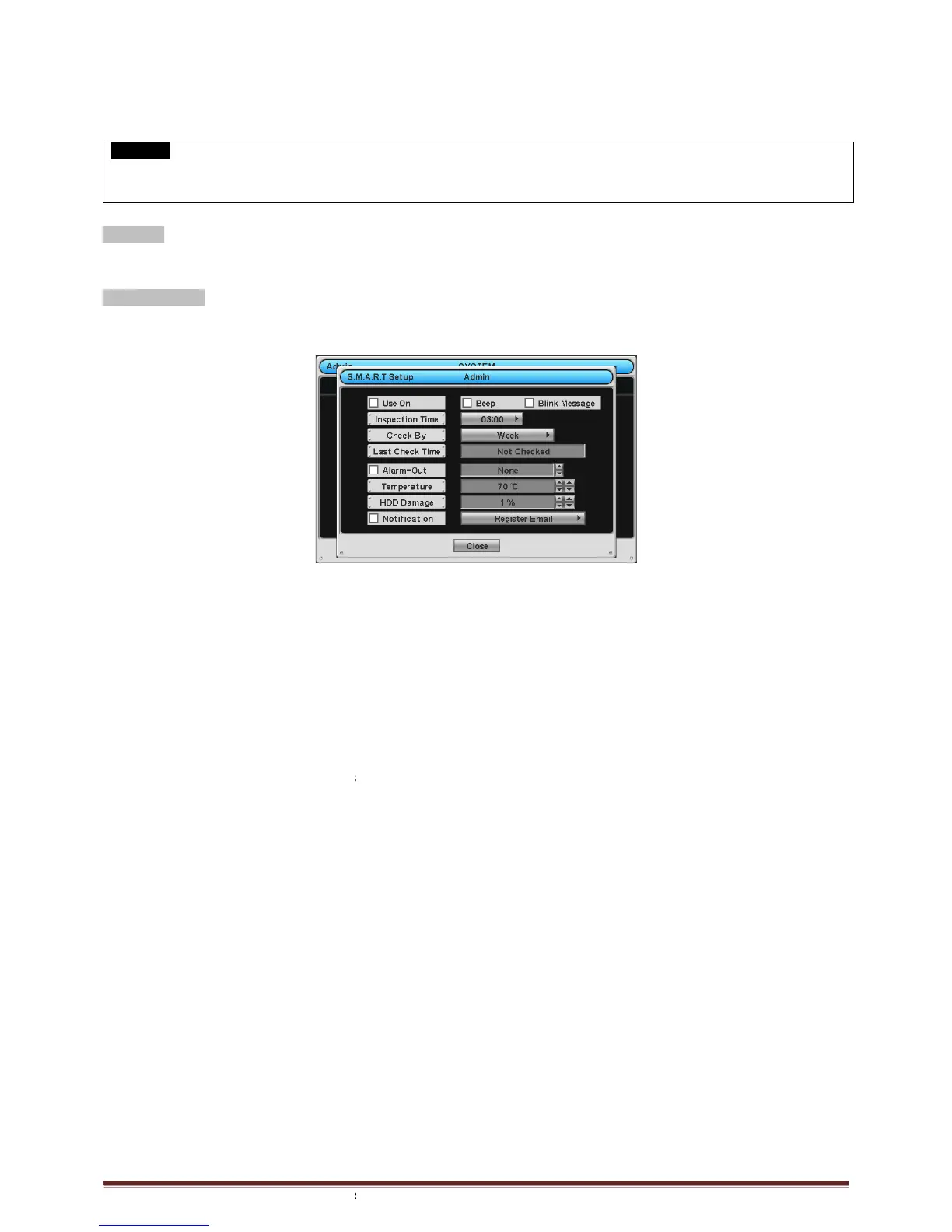
S.M.A.R.T Setup and the following screen will appear.
next to Use On. Through S.M.A.R.T function, make alarm message, indicating HDD damage, will
Beep; it will give the alarm sound, indicating HDD damage, as the SMART setup.
Blink Message, the alarm message will blink on the OSD, as the SMART setup.
If “Use on” box is unchecked, Beep, Blink Message will be unchecked automatically. Only when
can set Beep, Blink Message function.
Click (
) Inspection Time frame to set inspection time.
Click Check by frame to select inspection interval.
Last Check Time: show the time of the last inspection.
user can set the alarm out, when S.M.A.R.T
Duration of alarm out operating time
Clicking (
) ▲, ▼ direction buttons
▲, ▼ direction buttons on the right
HDD used in DVR. In general, it is 55℃
℃℃
℃
Click (
) ▲, ▼ directi
(%). HDD is a very crucial element for DVR recording, so set the permissible level within 1% to 2% to assure maximum
safety.
- While pressing (+) or (-) button
on the rightmost side of Temperature or HDD Damage item, a target value increases or
decreases by 10 units.
Check
Notification : user can send the email notification to registered email address, when S.M.A.R.T function detects
Abnormal symptoms from HDD.
Choose ‘OK’ to confirm the setting.
reboot. If there are more than 2 HDDs, please formats each of HDDs. DVR will auto
‘after reboot, it means formatting has been properly done.
EXECUTE REMOVE PROCEDURE EVEN WHEN USER REMOVE PREVIOUSLY INSTALLED HDD. THE REMOVE PROCEDURE IS THE
SAME AS THE FORMAT PROCEDURE DESCRIBED ABOVE.
Click the frame on S.M.A.R.T column and temperature and HDD damage will show.
S.M.A.R.T Setup and the following screen will appear.
next to Use On. Through S.M.A.R.T function, make alarm message, indicating HDD damage, will
Beep; it will give the alarm sound, indicating HDD damage, as the SMART setup.
Blink Message, the alarm message will blink on the OSD, as the SMART setup.
If “Use on” box is unchecked, Beep, Blink Message will be unchecked automatically. Only when
) Inspection Time frame to set inspection time.
Click Check by frame to select inspection interval.
Last Check Time: show the time of the last inspection.
user can set the alarm out, when S.M.A.R.T
section (please refer 4.4.5).
out frame to select the device for alarm out.
direction buttons on the right
hand side of Temperature frame to adjust to maximum temperature for the
hand side of HDD Damage frame to set the permissible level of HDD damage
(%). HDD is a very crucial element for DVR recording, so set the permissible level within 1% to 2% to assure maximum
on the rightmost side of Temperature or HDD Damage item, a target value increases or
Notification : user can send the email notification to registered email address, when S.M.A.R.T function detects
reboot. If there are more than 2 HDDs, please formats each of HDDs. DVR will auto
EXECUTE REMOVE PROCEDURE EVEN WHEN USER REMOVE PREVIOUSLY INSTALLED HDD. THE REMOVE PROCEDURE IS THE
next to Use On. Through S.M.A.R.T function, make alarm message, indicating HDD damage, will
If “Use on” box is unchecked, Beep, Blink Message will be unchecked automatically. Only when
“Use on” is checked, user
section (please refer 4.4.5).
out frame to select the device for alarm out.
hand side of Temperature frame to adjust to maximum temperature for the
hand side of HDD Damage frame to set the permissible level of HDD damage
(%). HDD is a very crucial element for DVR recording, so set the permissible level within 1% to 2% to assure maximum
on the rightmost side of Temperature or HDD Damage item, a target value increases or
Notification : user can send the email notification to registered email address, when S.M.A.R.T function detects



 To Next Page